
Social Media Calendar Tools: Planning Surfaces Compared

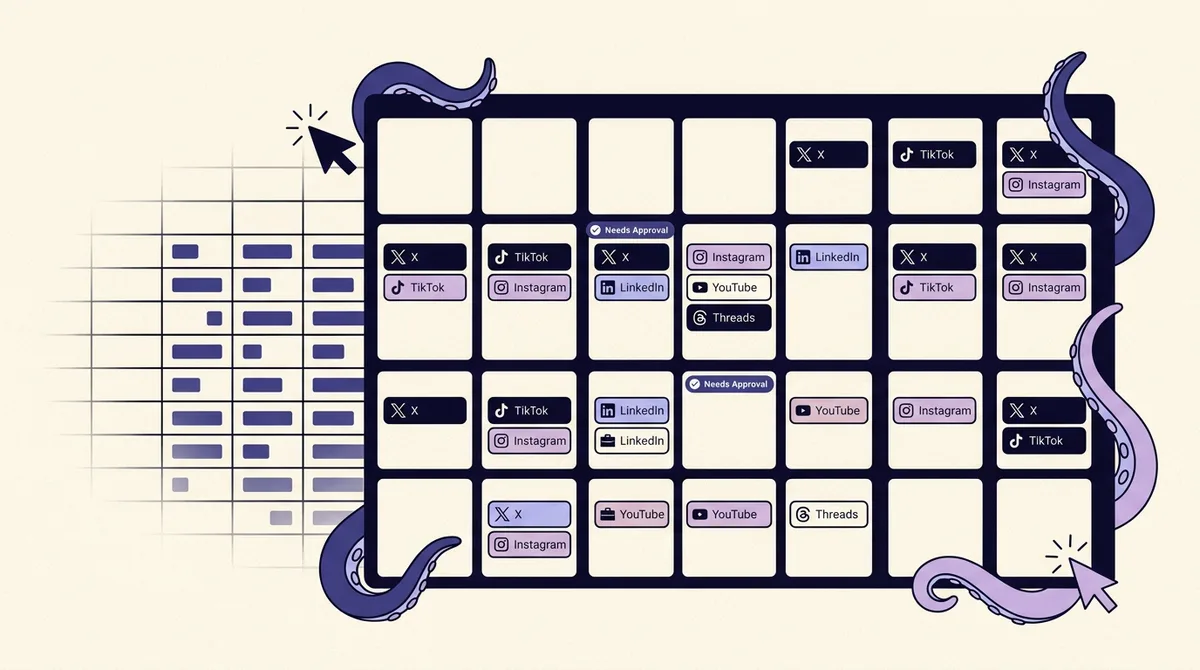
Every article ranking for this query answers the same question: which tool should you buy? That is the second question. The first one is which planning surface your team actually needs, because "social media calendar tool" describes two categories that behave completely differently. One category plans and publishes. The other category plans, and then a human retypes the plan into the thing that publishes.
That distinction is not academic. It decides whether your calendar is a source of truth or a second system you have to keep in sync with the real one. Notion, Airtable, Asana, Trello and Google Sheets are all excellent planning surfaces and none of them can put a post on Instagram. Buffer, Hootsuite, Later, Planable and OctoSpark can publish, and most of them are worse than Airtable at modeling a campaign with twelve dependent assets. Choosing badly in either direction costs you hours a week that never show up on an invoice.
This guide does three things the roundups do not. It names the threshold at which a spreadsheet stops being adequate (it is not volume). It grounds the argument in what the platforms themselves document about scheduling, because a plan written in a generic grid encodes formats and dates that the destination platform will refuse. And it gives you a migration path if you decide to move. If you are below the threshold, the honest recommendation is to keep your sheet and spend the money elsewhere.
What does a social media calendar tool actually do, and why can't half of them publish?
Strip the marketing away and a calendar tool does four jobs: it shows what is going out and when, it holds the asset and the copy, it routes work between people, and it fires the post. Tools that do the first three are planning surfaces. Tools that do all four are publishing calendars.
The fourth job is the expensive one, and it is why the categories exist. Publishing requires holding an OAuth connection to each network, staying current with each API as it changes, handling per-format rules, and retrying failures. A tool like Asana has no reason to build that. So Asana's social media calendar template is genuinely good at custom fields, calendar view and approvals via task dependencies, and it will never post anything. The template pages ranking for this query do not say that out loud.
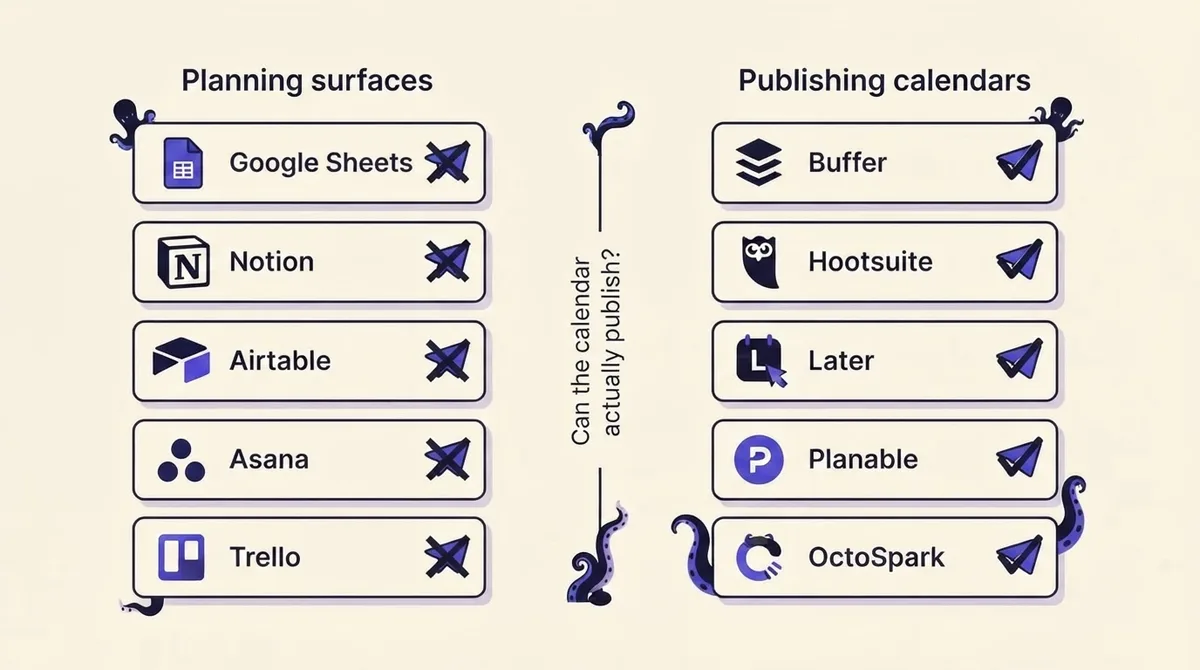
A useful test before you evaluate anything: open the tool's docs and search for the word "connect." If it connects to Zapier but not to Instagram, it is a planning surface. That is not a criticism. It is a category.
When is a spreadsheet genuinely enough?
More often than the vendors selling calendars will admit. A Google Sheet is genuinely sufficient when all three of these are true:
- One person decides. The author is also the approver. Nobody has to say yes before a post ships.
- You publish to three or fewer accounts, and the same asset works on all of them with a caption swap.
- You schedule inside one tool. Whatever fires the post is also where you set the time, so the sheet is a thinking document, not a mirror of live state.
Under those conditions a sheet beats a paid calendar on the axes that matter to a solo operator: it is free, it opens instantly, it has no per-seat cost, and you can restructure it in thirty seconds when your process changes. Creators posting five times a week to X and Instagram, with no client and no approver, are frequently better served by a sheet plus a scheduler than by a $99/month suite whose collaboration features they will never open.
What a sheet cannot do is hold state. The moment a cell says "scheduled Tuesday 9am" and the actual scheduler also says "Tuesday 9am," you own two copies of the same fact, and one of them will be wrong within a month.
The copy-paste field schema for staying on a spreadsheet
If you are staying, build the sheet so it survives the move later. These are the columns that carry over cleanly into any real calendar tool, in this order:
- id - a short unique string like
2026-04-12-a. Everything else can change; this cannot. - status - one of
idea,drafting,needs review,approved,scheduled,published,killed. Free text here is the single most common reason a migration goes badly. - publish_at - full date and time with an explicit timezone, for example
2026-04-12 09:00 America/New_York. - platform - one row per platform, never a comma-separated list. This is the discipline that makes format divergence visible.
- format -
reel,carousel,single image,text,pin,short,story. - copy - the actual caption, not a summary of it.
- asset_url - a link to the file in Drive or Dropbox, not an embedded thumbnail.
- owner and approver - two separate columns, even if they hold the same name today.
- campaign - a tag, so you can filter without building a second sheet.
- link and utm - keep the tracked URL next to the copy that contains it. A UTM generator makes this a paste rather than a construction job.
One row per platform per post is the rule people resist and later thank themselves for. It is what turns "post the launch everywhere" into five rows with five formats and five different sets of rules.
How do Sheets, Notion, Airtable, Asana and Trello hold up as calendars?
Judged on visibility, collaboration, approvals and asset handling, and ignoring publishing for a moment, they separate cleanly.
Google Sheets wins on speed and cost and loses on assets. Images live elsewhere, so approving a post means opening a second tab. Comments work but do not gate anything: a reviewer can comment "not approved" on a row that has already gone out.
Notion is the best of them for a small team that thinks in documents. A database with a calendar view, a status property and page-level comments is a legitimate content calendar, and the per-post page is a natural home for the brief. It degrades when you need the same asset attached to six posts, because Notion has no real concept of a shared asset record.
Airtable is the strongest data model in the group. Linked records let you keep one asset row joined to many post rows, which is exactly the shape of a repurposing workflow. Interfaces give a reviewer a clean view without letting them break the base. The cost is setup: expect a day of build before it is better than the sheet it replaced.
Asana has the best approval mechanics of any non-publisher. Approval-type tasks and dependencies mean a post genuinely cannot move to scheduled until the approver acts, which is more than most publishing tools enforce. It is also the surface where the sync problem is worst, because Asana looks so much like a system of record that people stop checking the scheduler.
Trello is the weakest fit. Kanban models a pipeline, not a date. Calendar view exists as a Power-Up, but a board that shows twelve cards in a column tells you nothing about whether Thursday is empty.
CoSchedule and Canva occupy the middle. CoSchedule sells the marketing calendar as a category, unifying blog, email and social on one grid, which is right if social is one of five channels you run. Canva's Content Planner is design-first: it schedules what you designed in Canva to a handful of networks, which is unbeatable if your bottleneck is making the image and irrelevant if your bottleneck is approvals.
What do publishing-connected calendars add that a planning surface cannot?
One thing, and it is the whole thing: the calendar and the queue are the same object. Change the date on the grid and the scheduled post moves. There is no sync step because there is nothing to sync.
Everything else these tools sell follows from that. Bulk scheduling only means something if the calendar owns the queue. Approval workflows only bind if the approve action is what unlocks the publish action. Per-platform previews only tell the truth if the tool knows what it is about to send. Hootsuite, Buffer, Later, Planable and Sprout Social all deliver this coupling with different emphases; we compare them on use case in our guide to social media scheduling tools. OctoSpark adds the same coupling for teams that also drive their calendar from a terminal or an AI agent, which matters if posts are generated programmatically rather than typed.
The honest trade-off: publishing calendars are usually worse at planning. Few of them model a campaign, hold a brief, or link one asset to many posts as well as Airtable does. Teams that need both often keep a light brief document upstream and let the calendar own everything from drafting onward.
What can native platform scheduling actually do?
This is the part no ranking page covers, and it is the part that turns "a spreadsheet doesn't scale" from a sales line into an engineering fact. Your plan is a promise about what will publish. The platforms document exactly which promises they will keep.
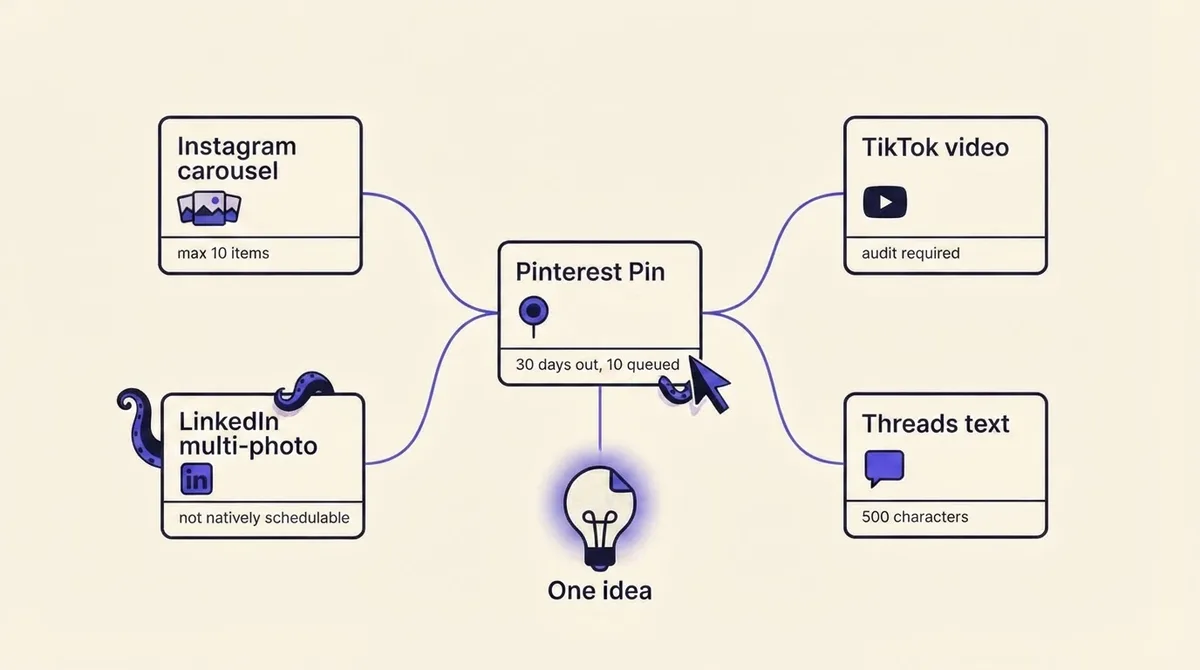
- LinkedIn. A Page post can be scheduled between one hour from now and three months out, and LinkedIn's help center states you cannot schedule events, multiple photos, reshares, polls, jobs or service posts for a Page (LinkedIn Help). A native-only workflow cannot schedule a multi-image LinkedIn post at all. If your calendar has a row saying "LinkedIn photo carousel, Tuesday," somebody is posting that by hand.
- Pinterest. One Pin at a time, a maximum of 10 Pins scheduled ahead, and no more than 30 days out. After scheduling you can edit the date, title, board, description and link, but not the image or video (Pinterest Help). A quarterly Pinterest plan cannot exist natively.
- Instagram. The Content Publishing API allows 100 published posts per rolling 24 hours per account, with remaining quota readable from the
content_publishing_limitendpoint. Carousels cap at 10 items, and every carousel image is cropped based on the first image. The API accepts JPEG only, does not support shopping tags or filters, and does not supportalt_texton Reels or Stories (Meta developer docs). - TikTok. Content posted by an unaudited client through the Content Posting API is restricted to private viewing until the client passes audit, the
video.publishscope must be explicitly approved, and apps must query the Creator Info endpoint before posting. There are two paths: Direct Post, and Upload-to-Inbox, which drops the video into the creator's inbox for review (TikTok developer docs). Direct post is limited to 6 requests per minute per user token, with titles capped at 2,200 UTF-16 runes. - Threads. Meta's Threads posting documentation caps profiles at 250 published posts per 24 hours, text posts at 500 characters, carousels at 20 items (minimum two), videos at 300 seconds, and 5 links per post.
Read those together and the pattern is obvious: the ceilings differ per platform, per format, and per authorization state. A generic grid has no idea. It will happily accept "LinkedIn, 4 photos, June 14" and nobody finds out it is impossible until June 14. If you are building or buying against these APIs directly, our breakdown of choosing a social media posting API goes deeper on the authorization and quota mechanics.
Where exactly is the breaking point?
Not volume. Teams post 40 times a week from a spreadsheet without pain. The break happens when two things arrive at once:
- An approval step. Someone other than the author must say yes before it goes live.
- Multi-platform format divergence. One idea becomes a Reel, a carousel, a text post and a Pin, each with different specs and different scheduling ceilings.
Either alone is survivable. An approver with one platform can work over Slack. Four platforms with no approver can work from a sheet, because the only person who needs the state to be correct is the person holding it.
Together they compound. Approval now has to happen per format, because approving "the launch post" does not mean the 20-item Threads carousel and the 10-item Instagram carousel are both signed off. And the approved version has to travel to the scheduler without a retype, because retyping is where the approved copy and the published copy diverge. That is the failure mode: the sheet says approved, the scheduler holds an earlier draft, and the earlier draft is what publishes.
The cost of a calendar that cannot publish is not the tool. It is the sync: a second system holding a second copy of the truth, reconciled by hand, silently, forever.
Above that line, the question stops being "which calendar" and becomes "does approval gate publishing." A workable answer needs a named approver per post, an approval that is per-platform-version rather than per-idea, and a state the scheduler respects. We cover the mechanics in how to set up a social media approval workflow, and OctoSpark's client approvals implement the version of it where the approve action and the publish permission are the same object.
How do you choose by team size and budget?
Honest framing, because the AI Overview on this query explicitly asks for team size and budget and no ranking page supplies it.
- Solo creator, 1 to 3 accounts, no approver. A free spreadsheet plus a free or entry-tier scheduler. Paying for a calendar suite here is waste. Spend the budget on assets.
- Small team, 2 to 4 people, one approver, 3 to 6 accounts. This is the threshold. A publishing calendar with real approvals at roughly $20 to $60 per month total. The decision is not features, it is whether approval gates publishing.
- Agency, multiple clients, external approvers. Per-client separation and a client-facing review link matter more than any planning feature. Expect per-seat or per-client pricing and check whether reviewers consume a seat, because that line item is where agency plans quietly triple. Our agency operating model guide covers the structure.
- In-house team where social is one of several channels. A marketing calendar (CoSchedule-style) upstream, a publishing calendar downstream, and an explicit rule about which one owns dates. Two calendars is fine. Two calendars with no owner is not.
Compare the total against the hour count you are actually spending on reconciliation. Four hours a month of retyping and chasing is the real price of the free option, and at typical rates that exceeds most paid plans before you count the mistakes.
How do you migrate off a spreadsheet without losing the plan?
Carry over the things that are decisions. Abandon the things that are bookkeeping.
Carry over: your pillars and recurring series, your posting cadence per platform, your evergreen and repurposable rows, anything scheduled more than a week out, and your naming conventions. These encode judgment you spent months building.
Abandon: status columns (the tool owns status now), publish times for anything already live, manual performance columns that the tool will pull automatically, and any "platform" cell containing a comma. Split those into one row per platform first, in the sheet, before you import anything. It is tedious and it is the entire migration.
A sequence that works:
- Freeze the sheet. Announce a date after which no new rows go in it.
- Split multi-platform rows and normalize
statusto the seven values above. - Import only future-dated rows. History belongs in analytics, not in the new calendar.
- Run both systems for exactly one cycle (usually two weeks), with the sheet read-only.
- Delete the sheet's edit access on the agreed date. Not archive. Delete, or people will keep using it.
Step five is the one teams skip, and skipping it recreates the sync problem you paid to remove. If you want the planning side of this rebuilt from scratch rather than ported, our pillar guide on how to build a social media content calendar walks the cadence and pillar decisions, and multi-platform publishing covers how one idea becomes correctly formatted versions per network.
The short version
If one person decides and one asset works everywhere, keep your spreadsheet and stop reading roundups. If an approver and format divergence have both arrived, a calendar that cannot publish is now a liability rather than a saving, because you are maintaining two copies of the same schedule and paying for the difference in retypes and missed posts. The category to buy is not "calendar," it is "calendar tied to publishing." Which vendor wins after that is a much smaller question than the one you just answered.