
Turn one good LinkedIn week into a quarter.
LinkedIn's clock icon schedules one post, once, from inside whichever composer you happen to be standing in. OctoSpark hands you recurring slots, a calendar that covers your profile and every page you administer, and drafts built from work you already published. One LinkedIn sign-in puts all of it behind a queue that keeps running.
- Posts publish through LinkedIn's official posting API
- LinkedIn profile and company page queues share one calendar
- LinkedIn document decks and native video queue like any other post
The honest answer
Does LinkedIn have a built-in scheduler?
Yes. LinkedIn has a free native scheduler built into the post composer: click the clock icon, pick a date and time within the next three months, and the post publishes itself. It works on profiles and Pages, on desktop and mobile, and costs nothing. It schedules one post at a time.
the clock icon in the LinkedIn post composer, lower right on desktop web and upper right in the mobile app
One post, one LinkedIn identity, one at a time
The scheduler is bound to whichever composer you opened it from. There is no bulk upload, no CSV, and no way to queue the same update to your profile and two pages in a single pass.
No "every Tuesday" option
Every scheduled post is a one-off date and time typed in by hand. LinkedIn has no concept of a repeating slot, so a weekly cadence is a weekly chore that stops the first week you are on holiday.
Three months is LinkedIn's hard ceiling
The picker refuses any date more than three months out, and anything less than ten minutes away. A launch calendar that runs past the quarter has to be re-entered in chunks as the window rolls forward.
Events, jobs, and services posts are rejected
LinkedIn returns an error if you try to schedule an event, a job posting, or a services update. The posts with a fixed date already attached are precisely the ones the scheduler will not take.
The LinkedIn schedule dialog takes the post body only
Nothing else rides along with a queued post. The comment where most people park their link has to be typed once the post is already live, which means being at a keyboard at the exact minute it goes out.
Queue view is a list behind the clock icon
Scheduled posts appear as a chronological list, not a week or month grid. There is nothing to drag when a launch date moves, and no view that shows a profile and its pages together.
Schedule for later vs OctoSpark.
| Capability | Schedule for later | OctoSpark |
|---|---|---|
| Recurring LinkedIn posting slots | LinkedIn's Schedule for later dialog takes exactly one date and one time. Expressing a standing 08:00 Tuesday habit is not possible, so the cadence only survives as long as someone keeps reopening the composer. | You define the 08:00 Tuesday slot once and drop LinkedIn drafts into it, so the cadence outlives the weeks nobody has time to plan. |
| Planning past the LinkedIn three-month window | LinkedIn caps the scheduling window at three months from now, so an annual campaign cannot be loaded in one sitting even when the copy is already finished. | LinkedIn dates are not clipped to a rolling ninety-day horizon, so a full-year launch plan is loaded in one sitting and left alone. |
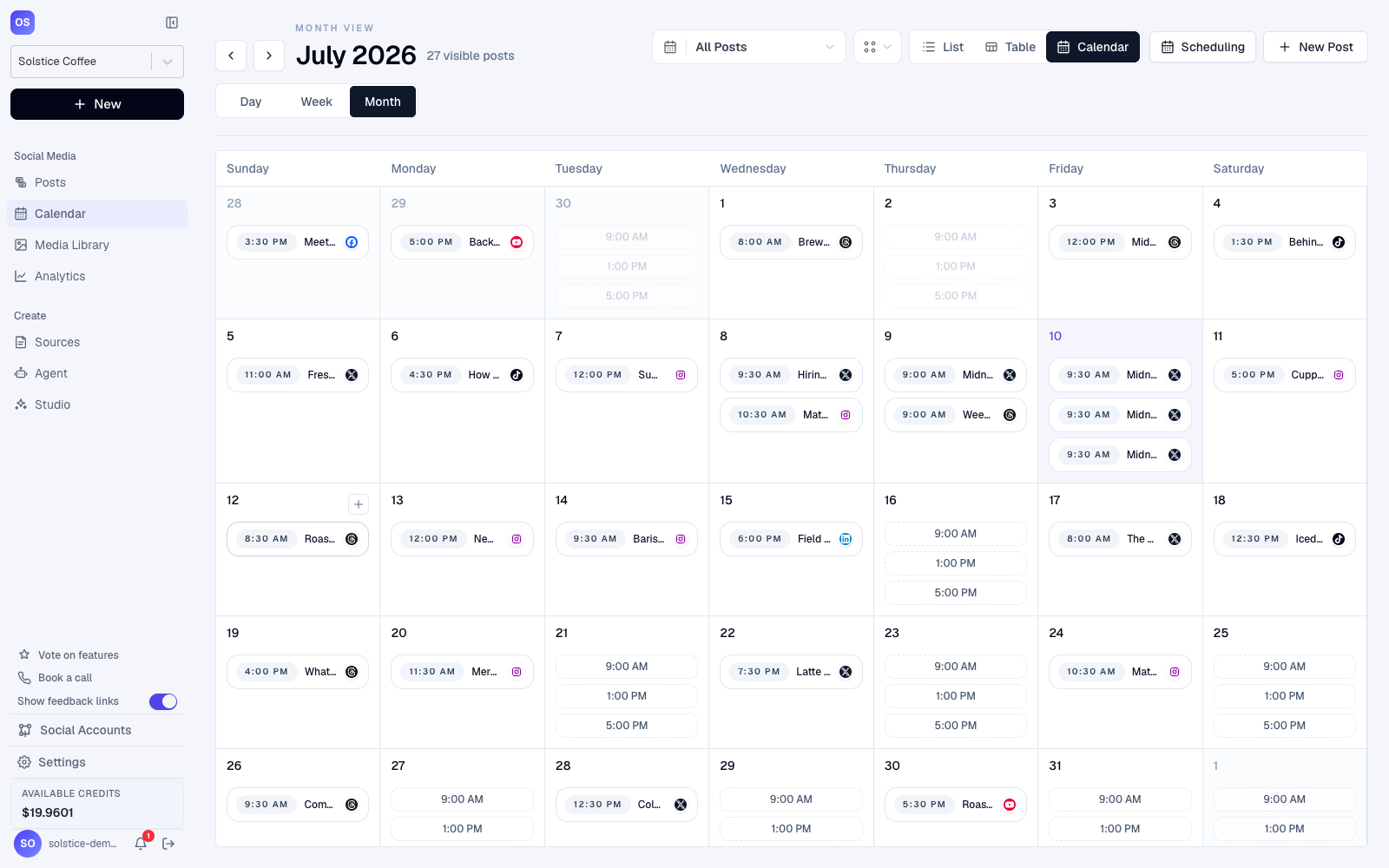
| Seeing the LinkedIn week at a glance | LinkedIn's scheduled posts view behind the clock icon is a flat list ordered by publish time. There is no grid, no colour, and no sense of how thin next Thursday looks. | A month grid holds the LinkedIn queue, so moving a launch by three days is one drag rather than five separate edits. |
| LinkedIn profile and company page in one place | You schedule as whoever the composer is currently acting as. Moving between your own profile and a page means switching identity in the LinkedIn UI and starting the post again from an empty box. | Every LinkedIn profile and page in the workspace sits in one queue, so a post is aimed at the right identity without leaving the editor. |
| Teammates seeing a LinkedIn post before it publishes | LinkedIn shows a queued post only to the account that scheduled it. Copy that goes out under a company name can sit invisible for two weeks and then surprise everyone at once. | Scheduled LinkedIn drafts live in a shared workspace where a colleague reads and edits them well before the slot arrives. |
| Scheduling LinkedIn without opening a browser | Queuing happens inside the LinkedIn composer, on the web or in the app. There is no public endpoint that simply books a post for a future time. | A CLI call or an MCP tool call queues the LinkedIn post, so scheduling happens from a terminal, a build step, or an agent. |
| Turning existing work into LinkedIn posts | The LinkedIn composer starts empty every single time. Pasting a URL gets you a preview card, but the words underneath it are still yours to write at 07:50. | A webinar recording, a PDF report, or a blog URL arrives as a drafted LinkedIn post you edit rather than a blank box you stare at. |
What you can schedule on LinkedIn.
Document carousel
SupportedA multi-page PDF that LinkedIn renders as a swipeable deck in the feed. It holds attention longer than almost anything else on the platform, because every swipe is another dwell signal.
The PDF uploads as a LinkedIn document attachment rather than being flattened into a gallery of images, so the deck keeps its page count and its swipe behaviour.
LinkedIn native video
SupportedVideo uploaded straight to LinkedIn instead of linked from elsewhere. LinkedIn gives it its own vertical viewing surface and will caption it on request.
The file goes up to LinkedIn ahead of the scheduled time rather than at it, so an 08:00 slot is not racing a large upload it might lose.
Single image LinkedIn post
SupportedOne image above the fold with copy underneath. Still the default shape for most B2B pages, and the format where the crop goes wrong most often.
Dimensions are checked against LinkedIn feed sizing while the post is still a draft, so a bad crop is caught in the editor instead of halfway down the feed.
LinkedIn poll
PlannedA question with up to four options that runs for a fixed duration on LinkedIn. Reliably high reach, and reliably the format that breaks automated workflows.
LinkedIn does not expose poll creation to third-party applications, so a poll stays a job for the LinkedIn composer and no tool on the market can queue one today.
LinkedIn newsletter issue
PlannedA recurring long-form piece that pushes a notification to every subscriber. Profiles and pages can each run one, and the subscriber list belongs to LinkedIn.
Issues are authored inside LinkedIn and are not published through its API, so the queue carries the announcement post that points at an issue rather than the issue itself.
Which LinkedIn accounts work.
LinkedIn personal profile
The member signing in grants posting permission for their own profile. Nothing else is required, and the profile keeps the wider set of post types LinkedIn reserves for individuals.
LinkedIn Company Page
You need a content admin role or higher on the page. LinkedIn grants page posting through organization permissions that are separate from personal ones, so connecting a profile never quietly unlocks the pages behind it.
LinkedIn Showcase Page
Showcase Pages are organizations in LinkedIn terms and inherit admin roles from the parent company page, so they appear alongside it once organization permissions are granted.
LinkedIn Group
LinkedIn exposes no third-party endpoint for posting into a group, so group activity stays manual no matter which scheduler you use.
Before you connect
- A LinkedIn member account that completes a real sign-in. Identity comes back through OpenID Connect, so the connected account is a person, not a pasted API key.
- Posting permission for the LinkedIn member profile. This is the grant that lets a queued update appear under your own name rather than a brand one.
- Organization permissions for pages. LinkedIn treats page posting and page admin lookup as two distinct grants, so both are requested when you attach a company page.
- A content admin role or higher on every page you want in the queue. LinkedIn re-checks the role at publish time, so losing admin access mid-campaign stops that page rather than the whole workspace.
- Occasional re-authorisation. LinkedIn access tokens are deliberately short-lived, so a connected account asks to be refreshed instead of failing quietly three weeks into a plan.
LinkedIn publishing rules, in one table.
Read straight from the same capability matrix the product runs on, so this table cannot drift from what actually happens at publish time.
| Character limit | 3,000 | The composer counts down against this as you type, and warns you before a post can be scheduled over the limit. |
|---|---|---|
| Delete a published post | Supported | Remove a live post from OctoSpark and it is deleted on the platform too, not just hidden in your queue. |
| Edit a published post | Not supported | No platform supports editing through the API here, so we surface delete and repost rather than pretending an edit worked. |
| Scheduled first comment | Supported | Queue the first comment with the post and it lands automatically once the post is live, which is where links usually belong. |
| Repost / reshare | Supported | Reshare an existing post on a schedule without duplicating the original. |
| Engagement analytics | Supported | We poll the platform after publish and pull real engagement back onto the post, so reporting is measured rather than estimated. |
| Tracked short links | Supported | Inline text links are rewritten for click tracking. The native article source URL is left exactly as you set it. |
| Native publish settings | 2 available | Set them per post before it goes out, including Visibility, Media title. These are the platform's own options, passed straight through at publish time. |
How to schedule a LinkedIn post.
- 1
Work out which LinkedIn identities the post needs
A LinkedIn update goes out as a member profile, a company page, or a showcase page, and LinkedIn treats each of those as a separate grant rather than as one account. Confirm you hold a content admin role or higher on every page you intend to queue for, because LinkedIn re-checks that role at publish time and drops a destination you have quietly lost access to.
- 2
Attach your LinkedIn profile and pages
One LinkedIn sign-in brings across your own profile plus every company and showcase page you administer, each as its own destination you can aim a post at.
- 3
Fill the calendar, not the LinkedIn composer
Drop drafts into recurring slots instead of choosing a date per post. LinkedIn documents, video, and images all queue through the same flow.
- 4
Let the LinkedIn queue run
Each post goes out at its slot without anyone opening LinkedIn at dawn, and anything that fails surfaces in the queue rather than quietly not happening.
Agent native
Schedule LinkedIn from your terminal, an MCP client, or any agent.
The LinkedIn queue is reachable from a terminal or an MCP client, not only from the web app. Point the CLI at a report and it drafts the copy, attaches the file as a document so LinkedIn renders it as a swipeable deck, and drops it into the next open Tuesday slot on the page you named. Agents schedule this work the same way you would, because they call the same API.
octospark schedule --platform linkedin --page acme-labs --slot "tue 08:00" --source ./state-of-b2b-2026.pdfSchedulers for other platforms.
TikTok post scheduler
Yes. TikTok Studio has a free built-in scheduler on desktop web.
Read morePinterest post scheduler
Yes. Pinterest business accounts get a free built-in scheduler in the Pin creation flow.
Read moreFacebook post scheduler
Yes, and it is the strongest native scheduler of the major networks. Meta Business Suite queues Facebook Page posts, Reels, and Stories free of charge, with a real calendar, editable drafts, and Instagram cross-posting.
Read moreFeatures behind the LinkedIn scheduler
- how document decks and native video are handledLinkedIn reach lives and dies on the document deck, so format handling matters more here than on any other network.
- what you can do to a LinkedIn post once it is liveA LinkedIn post that lands badly needs a decision inside the hour, and the available moves differ sharply by platform.
- turn a report or a webinar into a LinkedIn draftMost LinkedIn cadences stall because nobody wants to write the fifth post that week, not because picking a time was hard.
LinkedIn scheduling, answered.
Yes, and it is free. The clock icon in the post composer, labelled Schedule for later, accepts a date and time between ten minutes and three months from now. It is available on profiles and pages, on desktop web and in the mobile app, with no upgrade required.
It is LinkedIn itself. There is no separate product to install, and nothing to pay for: the scheduler is a clock icon inside the ordinary post box. Third-party tools exist because that icon handles one post for one identity, not because scheduling costs money.
No. LinkedIn ranks a post on what happens after it publishes, not on how it was submitted, and a natively scheduled post is indistinguishable from a manually posted one. What genuinely moves reach is real conversation in the first hour, which is an argument for scheduling into hours you can actually show up for.
Yes. LinkedIn has an official posting API and approved applications can queue posts once you grant permission. That is a different thing from browser automation that logs in as you and clicks the buttons, which LinkedIn treats as a violation and which is worth staying away from.
Three months, and no closer than ten minutes away. Anything outside that window is refused by the LinkedIn picker, so a campaign mapped out for the year has to be entered in quarterly passes as the window rolls forward.
A LinkedIn carousel is a PDF uploaded as a document, not a native gallery type, which is exactly why carousel behaviour differs between tools and between reports. Attach the PDF first, then check whether the clock icon is still offered: if it is not, that deck has to go out manually or through an approved application.
Switch the composer to post as the page, write the update, then use the same clock icon. The friction is identity rather than features: you must already be acting as that page, so running three pages means three context switches and three separate queues to remember.
Open the composer, click the clock icon, and choose the option that lists what is already queued. From there the publish time can be moved or the post removed. It is a chronological list rather than a calendar, so a busy month is a scroll instead of an overview.
Not through any external tool. LinkedIn does not expose poll creation to third-party applications, so every scheduler on the market is in the same position. Plan polls as manual posts and keep the rest of the cadence queued around them.
Yes. Updates go out through LinkedIn's own posting endpoints, authorised as the member or the organization you connected, rather than through a browser session pretending to be you. Documents, native video, and single images each follow LinkedIn's own upload rules, and whatever LinkedIn returns at publish time is what the queue reports back.