
Client sign-off, without the chase.
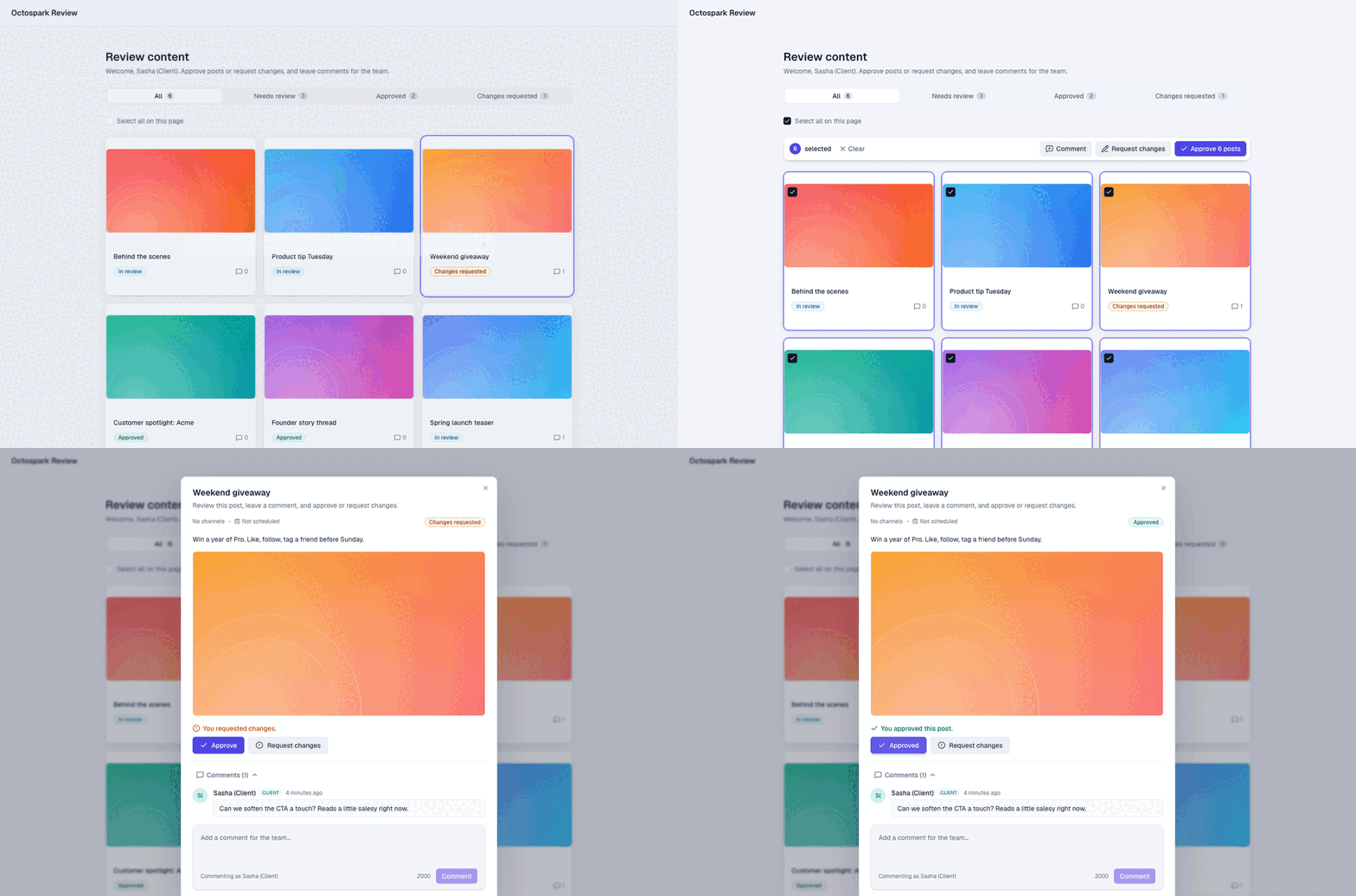
Share one link. Your client reviews every post on a clean board, approves or requests changes, and comments in context. No login, no email threads, no wondering which version they actually saw.
- No-login review links, per client or per post
- Approve, request changes, and comment in context
- A hard gate so nothing publishes until it is approved
What you can do.
No-login review links
Share a board link with a client, or a per-post link. They review in the browser with no account and no password. Reusable contact portals keep the same URL for every future post.
Approve or request changes
Every post gets a clear verdict. Approvals pin to the exact version reviewed, so an edit after sign-off flags the approval as stale instead of shipping silently.
Comments in context
Clients leave notes on the post they are looking at, with the image, caption, and channel right there. Your team sees every thread, internal or client-facing, in one place.
A real publishing gate
Turn on Required approval and nothing goes out until a client signs off. Optional for indie hackers, strict for agencies, set per workspace.
Bulk review
Select many posts and approve, request changes, or comment on the whole batch at once. A week of content, cleared in a click.
Email invites and notifications
Email the review link straight to your client, and your team is notified the moment a decision or comment lands.
How it works.
- 1
Share a link
Send a client a no-login review link, per post or a standing board portal.
- 2
They approve or comment
Your client reviews on a clean board, approves, requests changes, or leaves notes in context.
- 3
It ships once approved
Approved posts publish on schedule, and anything edited after sign-off is flagged before it goes out.
Frequently asked questions.
No. A review link works in any browser with no login, so clients can approve in seconds.
Yes. Turn on Required approval per workspace and nothing publishes until a client signs off. It is optional if you would rather keep it a soft step.
The approval is pinned to the exact version the client saw. Edit it afterwards and the approval is flagged as stale, so an unreviewed change never ships.
Yes. Clients comment in context on each post, and your team sees every thread, internal and client-facing, in one place.
Yes. Select multiple posts and approve, request changes, or comment on the whole selection in one action.
Explore more features.
Get sign-off without the back-and-forth.
Connect your channels, brief the agent, and keep the approval gate. The rest runs itself.
Start creating