
The Best Social Media Scheduling Tools, Compared by Use Case

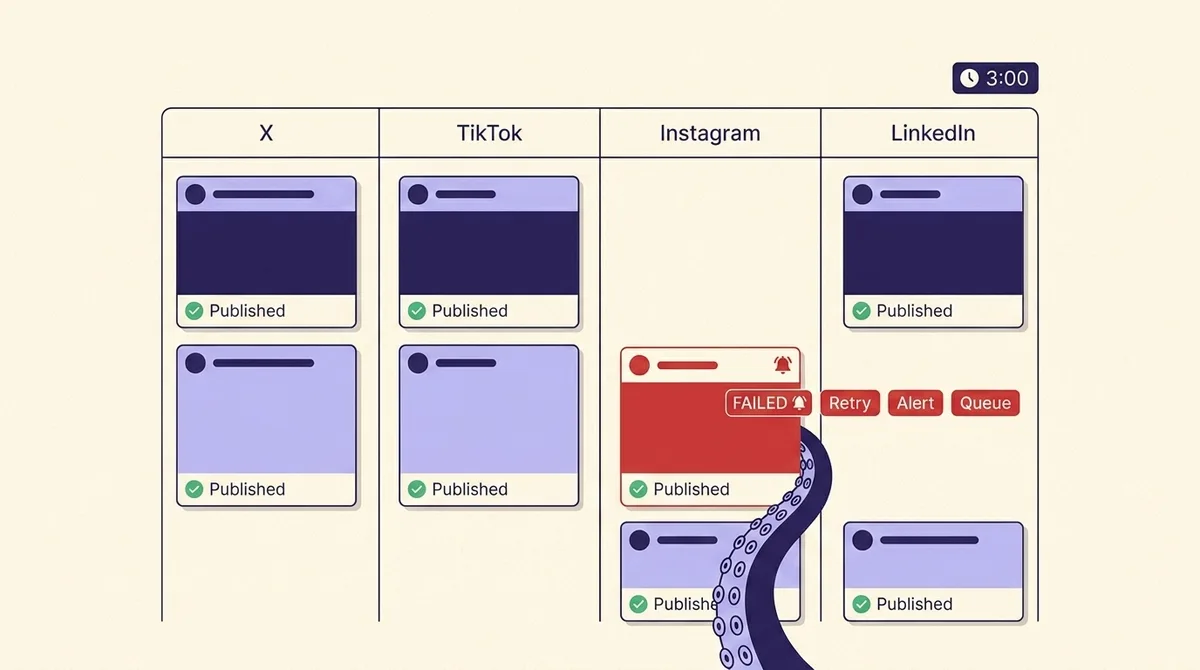
Every comparison of social media scheduling tools reads like a feature inventory. Calendar view: check. Bulk upload: check. Analytics: check. Twenty-five tools, one paragraph each, and not one of them answers the question that actually wakes a social media manager up at 3am: the 9am post did not go out, and nobody noticed until 2pm. Did the tool try again? Did it email anyone? Is the post still in the queue, or is it gone?
That is the most expensive thing a scheduler can do to you, and the whole page-one field is quiet about it. So this guide inverts the usual shape. We start with failure behavior, then explain why posts fail in the first place (usually the platform API, not the tool), then compare tools by the job you are hiring them for, then get specific about bulk scheduling row caps and the formatting rules that quietly eat an afternoon.
If you want the wider category view first, our pillar guide on social media management tools covers inboxes, listening and reporting alongside scheduling. This page is only about getting a post out of a queue and onto a platform, reliably, at the time you asked for.
Myth: the hard part is picking features. Reality: the hard part is what happens when nobody is watching
Feature lists converge. Every tool in this category has a calendar, a queue, an approval step and a chart. What separates them is behavior under failure, and you cannot see that in a demo because demos do not fail.
Here is the test protocol we use, and that you can run yourself in an afternoon on a trial account before you commit a year of budget:
- The dead token test. Connect an account, schedule a post for 20 minutes out, then revoke the app's access from the platform's own settings page. Watch what happens at the scheduled time. This simulates the single most common real-world break: an expired or revoked token.
- The oversized media test. Schedule a video that violates the target platform's duration or format rules. You are testing whether the tool validates at compose time or discovers the problem at publish time, when it is too late to fix.
- The notification test. After either failure, count the channels that told you: in-app badge, email, Slack, mobile push, or nothing. Then check whether the alert went to the person who scheduled the post or only to the account owner.
- The queue survival test. Twelve hours later, open the calendar. Is the failed post still there in a failed state, has it been rescheduled, or has it vanished from the calendar entirely?
The fourth one matters most and is the one nobody publishes. A post that fails loudly and stays in the queue costs you ten minutes. A post that fails silently and disappears costs you the slot, and you find out three weeks later when a client asks why the campaign had a hole in it.
Myth: a failed post just retries. Reality: retry, alert, and queue behavior differ wildly
The cleanest public evidence in this category comes from Buffer, because Buffer actually wrote up an outage instead of hiding it. During a multi-hour AWS incident, scheduled posts did not send. They were not auto-republished when service recovered. They were flagged in red with an email to account owners, and getting them out required a manual retry. Choosing "Retry in Buffer" pushed the post to the end of the queue, which means your carefully chosen 9am slot becomes whenever the queue naturally gets there. Buffer documents this openly in its postmortem, which is more than most vendors offer.
Read that behavior against the four columns that matter:
- Auto-retry a transient failure: no blanket retry. Recovery is manual.
- Alerting: red flag in the app plus email to account owners. Not necessarily to the person who scheduled it.
- Queue survival: the post survives. It is not silently dropped.
- Time to notice: unbounded, but the slot is effectively lost as soon as you miss the window, and retrying re-queues rather than re-times.
That is a good outcome, not a bad one. It survives the queue and it alerts a human. Compare it to the pattern you should actually fear, which is a tool that marks a post as sent because the API returned a 200, when the platform later rejected the content asynchronously.
The honest state of the market: almost no scheduler publishes its retry semantics. Buffer's own Instagram error library lists well over a dozen named failure modes with no blanket auto-retry policy stated anywhere. When a vendor does not document retry behavior, assume there is none, and treat any tool that cannot show you a failed-post state in the UI as a tool that will lose posts. Before you sign, send support one question: "If a scheduled post fails with a transient API error, do you retry it automatically, how many times, and who gets notified?" The quality of that answer is the most predictive signal you will get.
Myth: posts fail because the tool is bad. Reality: they fail against limits every scheduler inherits
This is the section no competitor writes, and it reframes the entire buying decision. Your scheduler does not publish anything. It calls a platform API, and that API has hard limits your vendor cannot negotiate around.
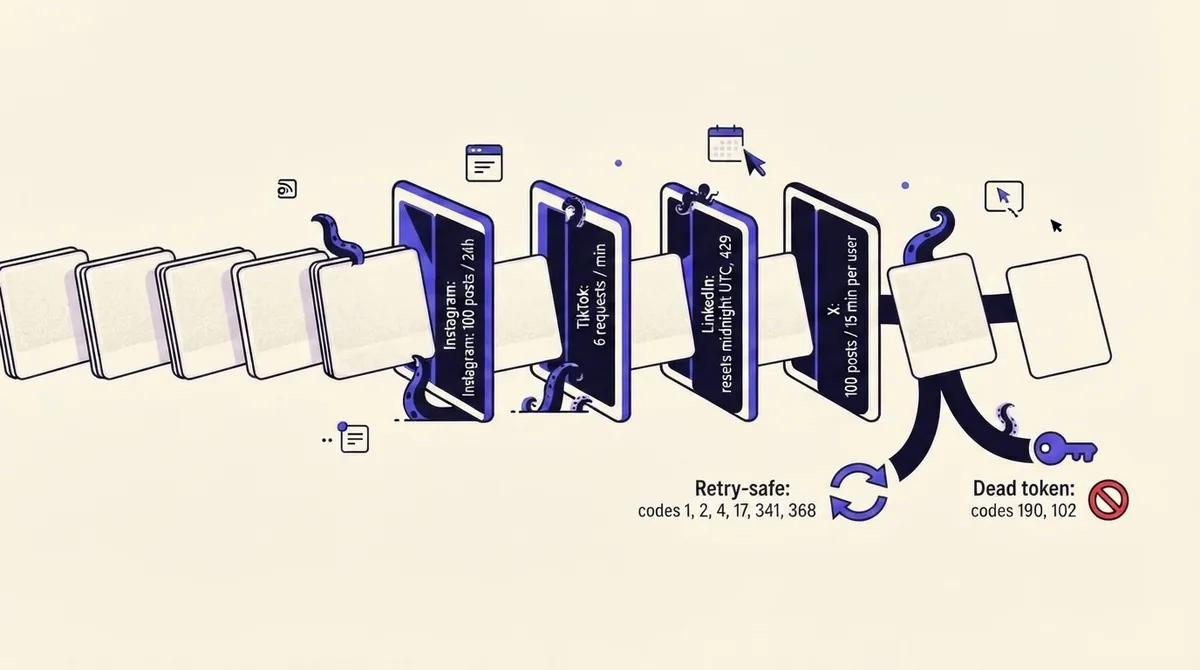
Instagram. Accounts are capped at 100 API-published posts in a rolling 24-hour window, with a carousel counting as a single post, and current usage is readable from the content publishing limit endpoint. Carousels max out at 10 items, all cropped to the first image's aspect ratio. Critically, a media container expires if it is not published within 24 hours and returns an EXPIRED status, so a scheduler that builds the container early and publishes late loses the post outright. API publishing also requires a professional account and may require Page Publishing Authorization first (Meta docs).
Meta error codes. Meta's error reference explicitly splits transient from terminal. Codes 1 and 2 are downtime: "Wait and retry the operation." Codes 4 and 17 are throttling, same instruction. Codes 341 and 368 are app-limit and temporary policy blocks, also retry. But 190 (expired access token) and 102 (OAuthException) need new credentials, and retrying them will never work. So the real question about a scheduler is not "does it support Instagram?" It is "does it distinguish a retryable 429 from a dead token, and does it tell me which one happened?"
TikTok. All content posted by unaudited API clients is restricted to private viewing mode until the client passes an audit. That single line explains most "my scheduled TikTok posted successfully but nobody can see it" complaints. Direct Post is limited to 6 requests per minute per user access token, and the issued upload URL is valid for one hour. TikTok's status endpoint returns PROCESSING_UPLOAD, SEND_TO_USER_INBOX, PUBLISH_COMPLETE or FAILED, with named reasons including spam_risk_too_many_posts, auth_removed, video_pull_failed and file_format_check_failed (TikTok docs). A scheduler that never polls that endpoint cannot tell you which of those happened.
LinkedIn. Limits run per 24 hours and reset at midnight UTC, apply at both application and member level, and return 429 when throttled. LinkedIn states plainly that standard rate limits are not published in documentation and must be looked up per endpoint in the Developer Portal. Quota alert emails fire only at 75% of the application-level quota, are delayed roughly one to two hours, and never fire on member-level breaches (Microsoft Learn). Your scheduler is flying partly blind here, and so are you.
X and YouTube. POST /2/tweets allows 10,000 per 24 hours per App and 100 per 15 minutes per user. YouTube Data API projects get a default allocation of 100 search.list calls, 100 videos.insert calls, and 10,000 units per day across everything else, which is why an agency uploading for many clients through one project hits a ceiling that has nothing to do with the scheduler.
The practical upshot: if you are a solo creator posting three times a day, none of these limits will ever touch you. If you are an agency pushing 40 accounts through one tool, the shared quota is the constraint, and you should ask the vendor how they isolate clients.
The best social media scheduling tools by use case
Route by job, not by ranking. Pricing in this category changes often enough that quoting figures here would mislead you within a quarter, so what matters more is the billing axis, because that is what decides whether a tool costs you $20 or $600 a month at the same volume.
- Buffer, for solo creators and small teams who want a queue that just works. Simple slot-based queue, clean mobile app, generous entry tier. Bills per channel, so cost scales with connected accounts rather than people. Best-documented failure behavior in the category, which is a real point in its favor.
- Later, for visual-first Instagram and TikTok work. Strong grid preview and media library. Bills per social set, which suits one brand across many networks and punishes many brands on few networks.
- Hootsuite, for larger teams that need permissions and a bulk pipeline. Deepest bulk composer of the mainstream tools, plus role-based access. Bills per seat, so it gets expensive the moment more than one person needs to log in.
- Sprout Social, for reporting that goes to executives. Analytics presentation is the product. Bills per user with add-ons, and is the priciest mainstream option per seat.
- Agorapulse, for agencies that live in the inbox. Unified inbox and per-client reporting, with genuine approval routing. Bulk upload tops out around 200 rows.
- Sendible, for agencies with many small clients. Client-centric structure, white-label reporting.
- SocialBee, for evergreen recycling. Category-based queues that recirculate content on a cadence instead of publishing once. If your content has a long shelf life, this is the mechanic you want.
- MeetEdgar, for the same recycling idea with a smaller surface area. Simpler, cheaper, less analytics.
- Planable, for approval-heavy content teams. Comment-on-post review that non-marketers can actually use. Best in class if your bottleneck is a legal or brand sign-off step, which is also where our notes on client approvals apply.
- Metricool, for analytics on a budget. Reporting depth well above its price point, scheduling adequate rather than excellent.
One axis nobody lists: who the failure email goes to. In agency setups, alerts routed only to the account owner mean the person who can fix the post is not the person who hears about it. Ask before you buy.
Free and native options, and where they stop
Meta Business Suite schedules Facebook and Instagram at no cost and, being first-party, is not subject to third-party token expiry in the same way. LinkedIn, X, TikTok, YouTube and Pinterest all ship native scheduling in their own composers. For one brand on one or two networks, native scheduling is genuinely the right answer, and paying for a tool is a mistake. Our walkthrough of how to schedule social media posts covers the native path platform by platform.
Native schedulers break down at exactly three points: cross-platform scheduling in one view, approvals, and any reporting that spans networks. If you are switching between five browser tabs to plan a week, you have outgrown them. If two people need to review before publish, you outgrew them a while ago.
Myth: bulk scheduling means uploading a spreadsheet. Reality: the row caps and formatting rules eat the afternoon
Most comparisons reduce bulk scheduling to a checkmark. The numbers matter enormously.
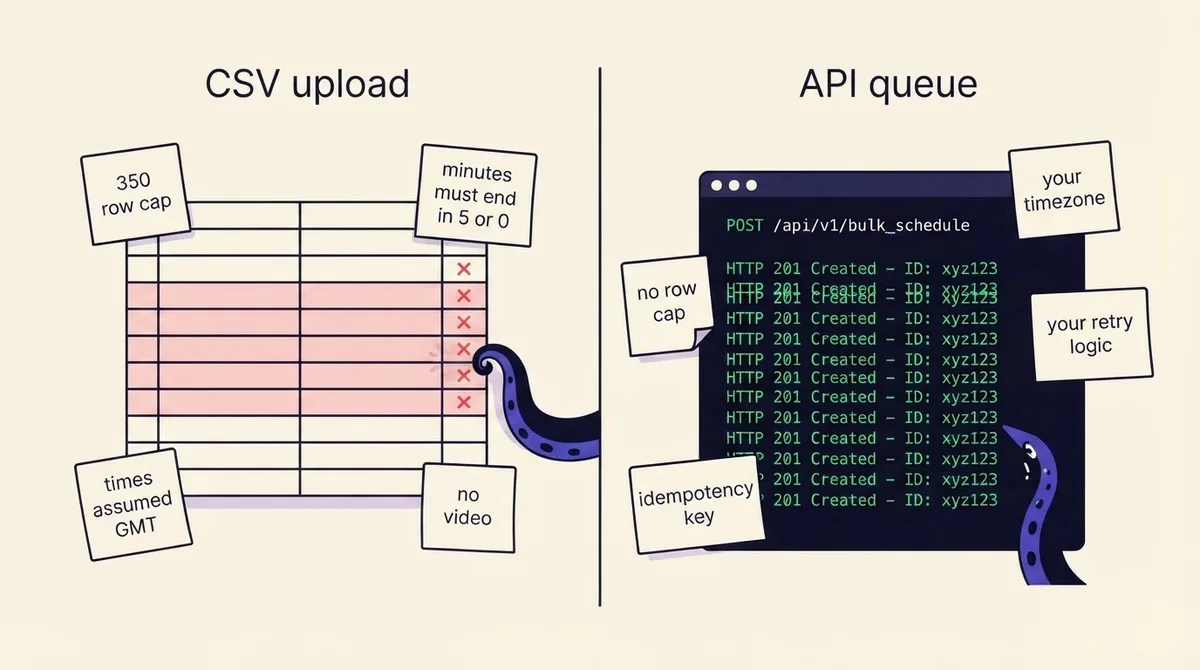
Hootsuite Bulk Composer allows a maximum of 350 posts per upload, and posts already scheduled on those accounts count toward that 350. Schedule 100 by hand and you can only bulk upload 250 more. Times must be at least 20 minutes in the future, in 24-hour format, with minutes ending in a 5 or a 0 (10:45 or 10:50, never 10:47), one post per time slot, and a consistent date format throughout. Problem rows show a red banner and block scheduling until fixed, and anything left unscheduled is discarded when you leave the tool. Supported networks are X, Facebook Pages, LinkedIn Pages and profiles, TikTok, and Instagram Business profiles (Hootsuite help).
Statusbrew allows up to 400 posts per upload, but only one single image per post, no bulk video at all, assumes every date and time is GMT, and requires posts to be at least one hour apart from each other and at least one hour after upload.
Agorapulse tops out around 200 rows.
A worked example of how this bites. You have 120 posts for a quarter, two images each, spread across four accounts, at times your data says work: 8:07am, 12:22pm, 6:41pm. In Hootsuite you must round every time to a 5 or 0, which collapses your timing plan. In Statusbrew you must drop the second image on every post and convert 360 timestamps from your local timezone to GMT by hand, and the one-hour minimum spacing means you cannot post to four accounts at once. Either way you spend an afternoon reformatting, and the discarded-rows rule means a browser crash costs you the lot.
If you are building the underlying plan first, our social media content calendar guide covers the spreadsheet structure that survives this conversion, and best time to post covers why those odd-minute slots exist in the first place.
Scheduling without a CSV: the API and CLI path
Here is the thing worth saying plainly: CSV bulk upload is a workaround for the absence of an API. Every rule above exists because a vendor built a spreadsheet parser instead of an endpoint.
Post a queue programmatically and the constraints move. There is no vendor row cap, because you are making one call per post. There is no GMT guessing, because you send an ISO timestamp with an offset. There is no minutes-ending-in-5 rule. And the three things that actually determine whether posts land are back in your hands:
- Retry logic you define. Retry Meta codes 1, 2, 4, 17, 341 and 368 with exponential backoff. Do not retry 190 or 102, surface those as a reconnect prompt instead. Poll TikTok's status endpoint rather than trusting the initial response.
- Alerting you route. A failure becomes a Slack message in the channel that owns the account, not an email to whoever created the workspace two years ago.
- Idempotency you control. A client-supplied key means a retried request cannot double-post, which is the failure mode that turns a small outage into an apology to a client.
OctoSpark is built for this shape: the same queue is drivable from the dashboard, from a terminal, or by an AI agent over API and MCP, across X, TikTok, Instagram, LinkedIn, YouTube, Facebook and Threads. Drop a quarter of posts in with one script, let an agent draft variants against your sources, and keep failure handling in your own code. See multi-platform publishing for how one payload fans out to seven networks, or the scheduler overview for the calendar-first view.
One cost note if you are going direct instead: X API v2 now uses credit-based pay-per-usage rather than fixed tiers, with standard post creation billed at $0.015 per request and posts containing URLs at $0.200 per request. A link-heavy program at 500 posts a month is a materially different bill from a text-only one.
How to choose, and how to switch without losing posts
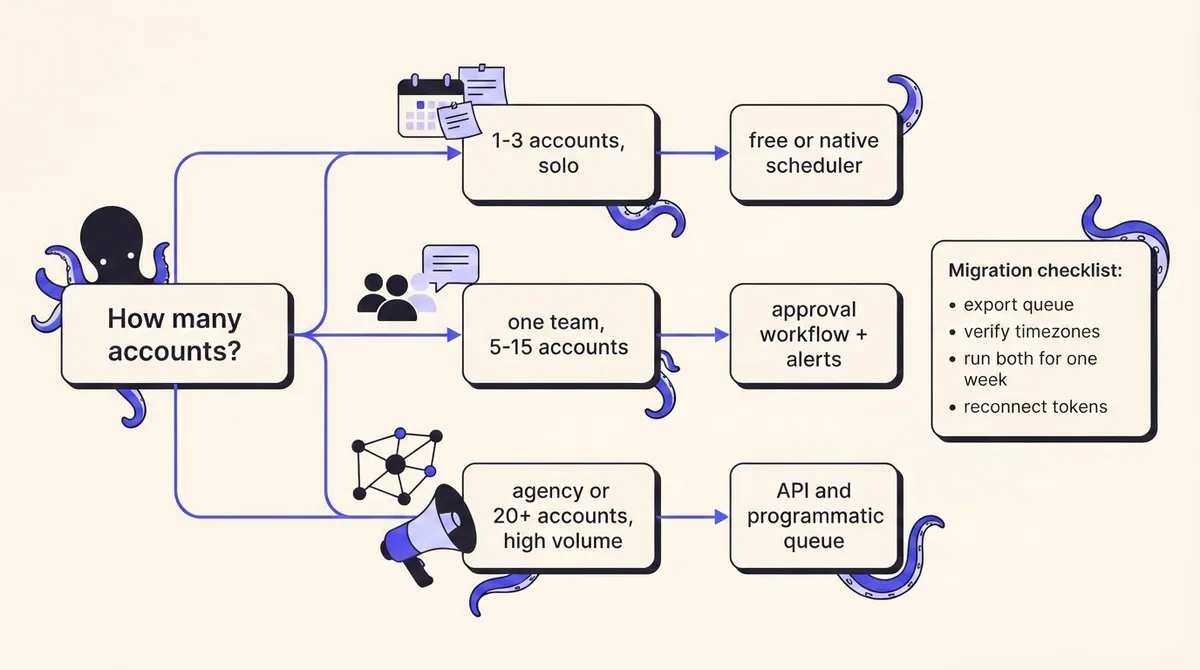
Route by three inputs, in this order: number of people who need access (seats drive cost), number of accounts (channels drive cost on the other billing model), and whether anything must be approved before it publishes.
- One person, one to three accounts: native schedulers, or a free tier.
- One team, five to fifteen accounts, no approval step: a per-channel tool like Buffer or Metricool.
- Approval-gated content: Planable or Agorapulse, because retrofitting approvals onto a tool that lacks them never works.
- Agency or 20-plus accounts, or volume above a few hundred posts a month: programmatic publishing, because CSV caps and per-seat pricing both become the binding constraint at that scale.
The migration checklist, which is the step everyone skips:
- Export the existing queue before you cancel. Most tools lose scheduled posts on downgrade, not on cancellation, and downgrade often happens automatically at renewal.
- Screenshot the calendar for the next 30 days. Exports frequently omit media attachments and per-network variants.
- Check timezone handling on both sides. If the old tool stored local time and the new one assumes UTC, a whole quarter shifts by hours and you will not notice until a post lands at 3am.
- Run both tools in parallel for one week, with the new one publishing and the old one paused. Do not delete anything until you have watched seven days of successful publishes.
- Reconnect every token deliberately and record the expiry. Instagram and LinkedIn tokens are the most common silent breakage after a migration.
- Re-verify TikTok audit status if you are moving to a tool with API publishing, or your posts will land in private viewing mode.
- Delete the old tool's app permissions from each platform once you are done, so a stale integration cannot post.
Social media scheduling FAQs
What is the best scheduling tool for social media? There is no single answer, which is why this page routes by use case. The one universal criterion: pick a tool that shows failed posts in the interface and tells you why they failed. Everything else is preference.
What is the 5:3:2 rule for social media posts? A content-mix heuristic: for every 10 posts, five are curated from other sources, three are your own original content, and two are personal or human posts that show the people behind the brand. It is a planning convention rather than a platform rule, and its value is that it stops a calendar from becoming ten promotional posts in a row. Treat it as a starting ratio to adjust against your own performance data, not a law.
What is a good free tool for scheduling social media content? Meta Business Suite for Facebook and Instagram, plus the native schedulers in LinkedIn, X, TikTok and YouTube, cover most solo creators at zero cost. Free tiers of third-party tools typically cap channels and scheduled posts. If you want to fill the calendar faster, our content idea generator is free and needs no account.
Do scheduled posts get less reach than manual ones? There is no published platform documentation supporting a penalty for API-published posts on any major network. What is documented is that unaudited TikTok API clients have all content restricted to private viewing mode, which looks identical to a reach penalty and is not one.
What is the best social media calendar tool? Different question from scheduling. A calendar tool needs to show cross-network conflicts, per-client filtering and a month view you can hand to a stakeholder. Check whether the calendar renders failed posts, because a calendar that hides them is a calendar that lies to you. Our social media analytics tools comparison covers the reporting side of the same stack.
If what you want is a queue you can drive from a dashboard, a terminal or an agent, with failure handling you can actually inspect, see pricing or start free.