
Social Media Management Tools: How to Choose the Right One for Your Team


Every buyer's guide to social media management tools is a ranked list, and every ranked list has the same flaw: it treats "supports Instagram" as a checkmark. Nobody sources that checkmark. Nobody dates it. So the same folklore gets copied forward year after year, including the still widely repeated claim that Instagram Stories can only be posted by sending a push notification to a phone. Meta's own content publishing documentation contradicts that: you create a Story by setting the media container's media_type to STORIES.
That matters because the ceiling on what any tool can do is set by the platform API, not by the tool's feature page. If TikTok will not let an unaudited client post anything above SELF_ONLY viewership, then no scheduler on earth can make your TikTok posts public until that audit clears. If LinkedIn's Posts API does not support organic carousels, then "LinkedIn carousels" in a vendor's feature list means something narrower than you think. You are not really choosing between dashboards. You are choosing which set of platform constraints you inherit, and which of them your vendor has actually done the work to handle.
So this guide is built as a walkthrough rather than a leaderboard. We start by classifying how your team publishes, then check what each network permits, then run a fourteen day evaluation with concrete milestones and pass or fail gates. Every platform claim below carries a source link and was verified on 23 August 2026. Re-verify before you sign anything, because these documents change.
Milestone one: decide how your team actually publishes
Before you look at a single pricing page, answer one question. When a post goes live, what triggered it?
There are only three honest answers, and they are the real segmentation axis. Company size does not predict tooling fit. Neither does industry. Publishing architecture does.
Mode one, dashboard only. A human opens a composer, writes the post, attaches media, and clicks publish. Nothing is queued, nothing is automated. This is most solo creators and a surprising number of small in-house teams. If this is you, your buying criteria are composer quality, media handling, and how fast you can get from idea to live. Almost every tool on the market serves this mode adequately, which is why the SERP is full of pages arguing about which dashboard is prettiest.
Mode two, dashboard plus scheduled API. A human composes, and a queue publishes later on the team's behalf. This is the mainstream agency and in-house workflow. Your criteria shift: approval routing, calendar visibility, per-network previews, retry behavior when a publish fails, and whether failures are surfaced loudly or swallowed quietly. Most vendors are competent at the happy path here and wildly variable at the failure path.
Mode three, headless. A script, a CI job, a content pipeline, or an AI agent originates the post and publishes it with no human ever touching a composer. This mode is real and growing. Zapier's roundup names Ordinal's MCP server; Buffer markets its own MCP plus what it calls direct AI agent connectors. But both treat it as a single feature bullet rather than a scored buying axis, so nobody on page one of this search result actually answers the question "can my pipeline or my agent post this, to this network, at this viewership?"
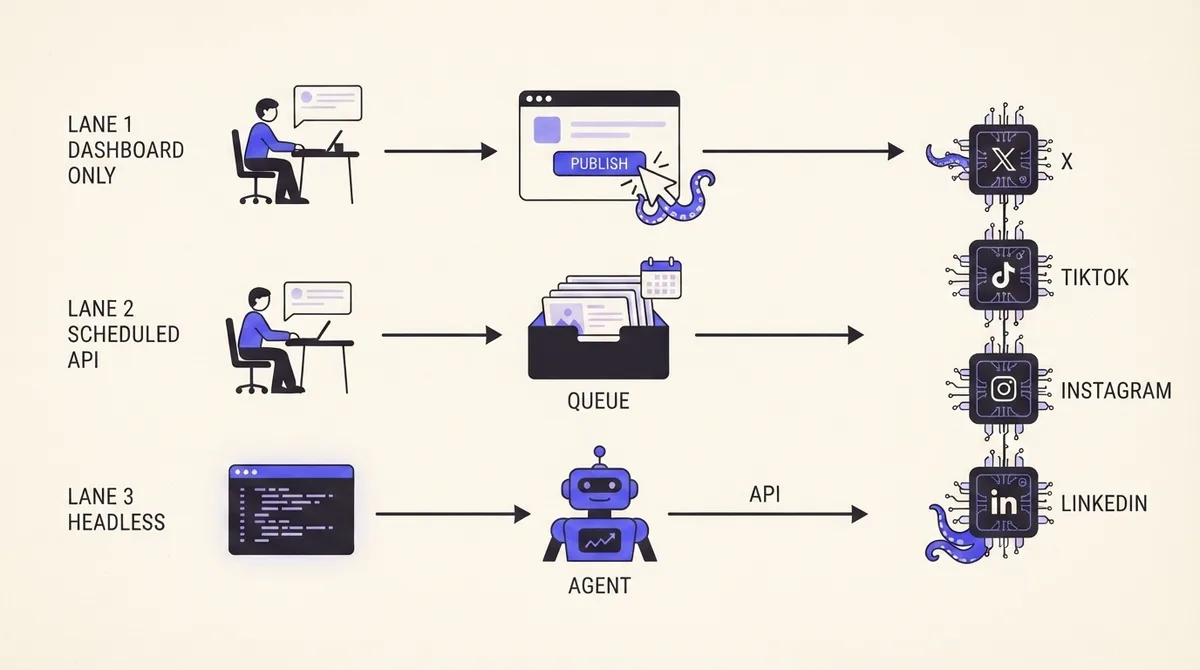
The practical test for mode three is blunt. Can you publish a real post with a single authenticated request, with no browser session, no OAuth popup, and no manual confirmation step? If the answer requires a human clicking anything, you are in mode two with extra steps.
OctoSpark is built for teams that live across all three modes at once: a dashboard for the humans, a scheduler for the queue, and an API plus MCP surface so a terminal session or an agent can draft, schedule, and publish through the same account and the same approval rules. That is the whole product thesis, and you can see the surface on our features page.
Milestone two: check the network ceilings before you check the vendors
This is the step that reorders most shortlists. Read these limits first, because they disqualify more plans than pricing does.
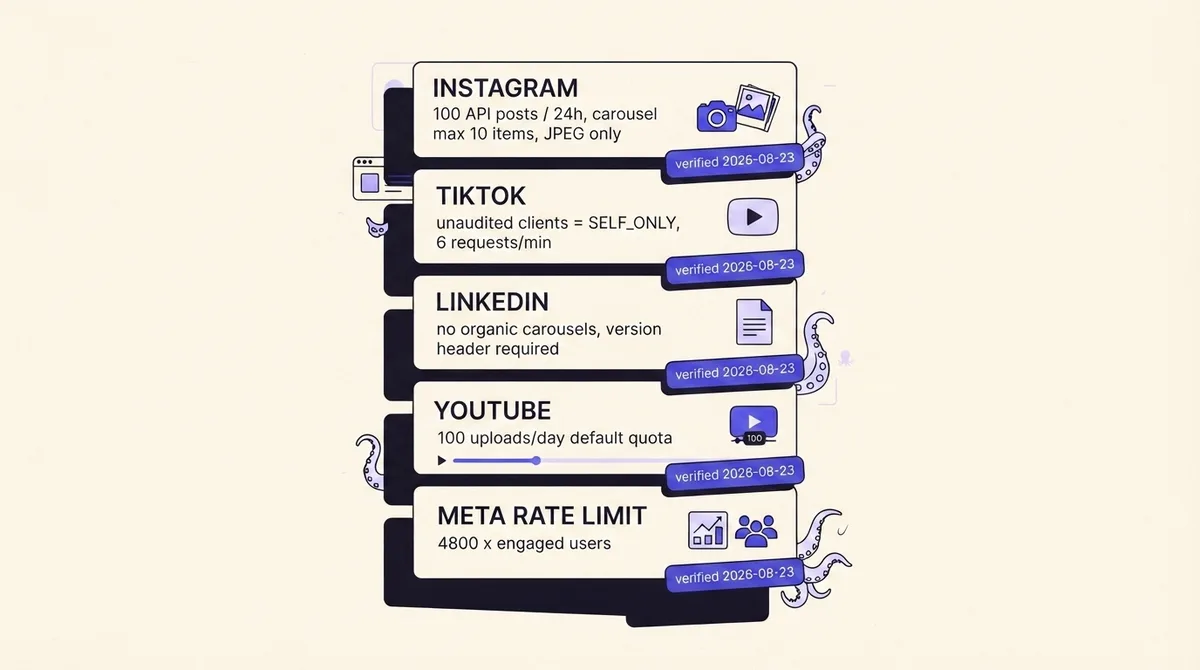
Instagram accounts are limited to 100 API published posts within a rolling 24 hour period, and a carousel counts as one post toward that limit. You can query current usage through the GET /<IG_ID>/content_publishing_limit endpoint. Beyond the volume cap, there are hard content limits: carousels max out at 10 images, videos, or a mix; JPEG is the only supported image format, so extended formats such as MPO and JPS will fail; shopping tags are not supported; and filters are not supported. Stories and Reels are publishable, which kills the reminder-notification myth outright. All of this is in Meta's Instagram content publishing documentation, verified 23 August 2026.
If you are planning heavy carousel output, the 10 item cap shapes your creative format before any tool does. Our Instagram carousel guide covers how to design inside that constraint.
Meta rate limiting
Meta does not enforce a flat call ceiling. For the Pages API the formula is calls within 24 hours equals 4800 multiplied by the number of engaged users. For the Instagram Platform it is 4800 multiplied by impressions. Both are enforced over a rolling 24 hour window, per Meta's rate limiting overview. The consequence nobody writes down: a small or newly launched account hits the ceiling sooner than a large one. If you are onboarding fifteen new client pages with no engagement history, your integration is at its most fragile exactly when you need it most.
TikTok
TikTok's content posting documentation states that all content posted by unaudited clients is restricted to private viewing mode. Lifting that requires passing a TikTok audit for Terms of Service compliance plus approval of the video.publish scope. The content sharing guidelines go further and constrain the interface itself: unaudited clients can only post at SELF_ONLY viewership, the user must manually pick a privacy status from a dropdown that has no default value, interaction options for comments, duets, and stitches must default to unchecked, clients may only send content materials to TikTok after the user has expressly consented to the upload, and commercial content must carry a promotional content or paid partnership label. The Direct Post endpoint caps each user access token at 6 requests per minute, allows captions up to 2200 UTF-16 runes, and returns a spam_risk_too_many_posts error when the daily account cap is hit.
Read that list again with a headless workflow in mind. "The user must manually pick a privacy status with no default" means fully unattended TikTok publishing is constrained by design, not by your vendor's laziness. Any tool promising one-click autonomous TikTok posting is either audited and compliant or is describing something other than what happens.
LinkedIn's Posts API does not support organic carousels. The content type table marks carousels as sponsored only and states plainly that organic carousel is currently not supported. Organic multi-image posts have to use the separate MultiImage API, which is itself unavailable for sponsored posts. Publishing to a company page requires the w_organization_social permission and only works where the authenticated member holds an ADMINISTRATOR, DIRECT_SPONSORED_CONTENT_POSTER, or CONTENT_ADMIN page role. Every request must carry a Linkedin-Version header in YYYYMM format, and versions sunset on a schedule (Marketing Version 202508 sunsets 17 August 2026). See LinkedIn's Posts API reference.
That versioning detail is the buying signal. LinkedIn integrations require ongoing migration work rather than one-time setup, so ask any vendor how they handle version sunsets and how many times their LinkedIn integration has broken in the last year.
YouTube
A new YouTube Data API v3 project gets a default daily quota of 100 search.list calls, 100 videos.insert calls, and 10,000 units per day across everything else. Because a video upload costs one unit, the practical ceiling is 100 uploads per day regardless of how much unit budget you have left. That is documented in YouTube's getting started guide. For most teams 100 is generous. For a bulk repurposing pipeline pushing shorts, it is the actual wall.
X and Pinterest
The X API has moved to pay-per-usage credit pricing rather than fixed monthly tiers. Credits are bought upfront and deducted per request, with post reads at $0.005 per resource and user reads at $0.010 per resource. The same resource requested twice within 24 hours is charged once, and pay-per-usage plans cap at 3 million post reads per monthly billing cycle before Enterprise is required, per X's API pricing docs. If a tool's analytics feature backfills your entire X history nightly, somebody is paying for that.
Pinterest gates publishing behind access tiers. Trial access apps are rate limited per day per app, and all Pins and Boards created with Trial access are only visible to their creator as Sandbox entities. Upgrading to Standard access requires submitting a video recording of the app completing an action through the Pinterest API plus proof of a correct OAuth flow.
Milestone three: score the tools on the row nobody scores
With the ceilings understood, the vendor comparison gets short. Rather than reprint feature grids you can read on any vendor site, score each candidate on five rows, and insist on evidence for each.
- Networks published natively. Not "integrations available." Which networks does the tool publish to through a first-party API connection, and which are routed through a third party or a browser extension?
- Ceiling honesty. Does the product surface the limits above, or does it let you schedule 300 Instagram posts in a day and fail silently at 100? Ask support directly. The answer tells you how mature the publishing layer is.
- Headless publishing. Is there a documented API or MCP surface where a script or an agent can create and publish without a browser? Is it on every plan, or gated behind an enterprise call?
- Failure surface. When a publish fails, do you get a notification, a retry, and the platform's actual error message, or a red dot?
- Real cost at your shape. Cost per additional channel, cost per seat, cost of API access, and cost of client workspaces.
And then the row that keeps a roundup honest: who should not buy this.
- Do not buy a per-channel priced tool if you run more than about ten accounts. Per-channel pricing is excellent at three channels and punishing at thirty.
- Do not buy an enterprise suite if your team is under five people. You will pay for governance modules and a mandatory onboarding you will never use.
- Do not buy a dashboard-only tool if any part of your content originates from a script, a pipeline, or an agent. You will end up copy-pasting out of one system into another, which is worse than either system alone.
- Do not buy a tool whose API is enterprise-gated if headless publishing is your actual reason for buying. That is the most common expensive mistake in this category.
- Do not buy OctoSpark if you only need a single Instagram account scheduled once a week and you have no interest in an API, a CLI, or approvals. A free native scheduler will do that fine.
On cost: the number on the pricing page is rarely the number you pay. Count channels, seats, client workspaces, and API access separately, then recompute. Our own pricing page lists what is included per plan, including the API and MCP surface, because gating programmatic access behind a sales call is the thing we found most annoying while evaluating other tools.
Milestone four: run a two-week evaluation with pass or fail gates
Demos prove nothing. Run this instead, on real content, with a real account.
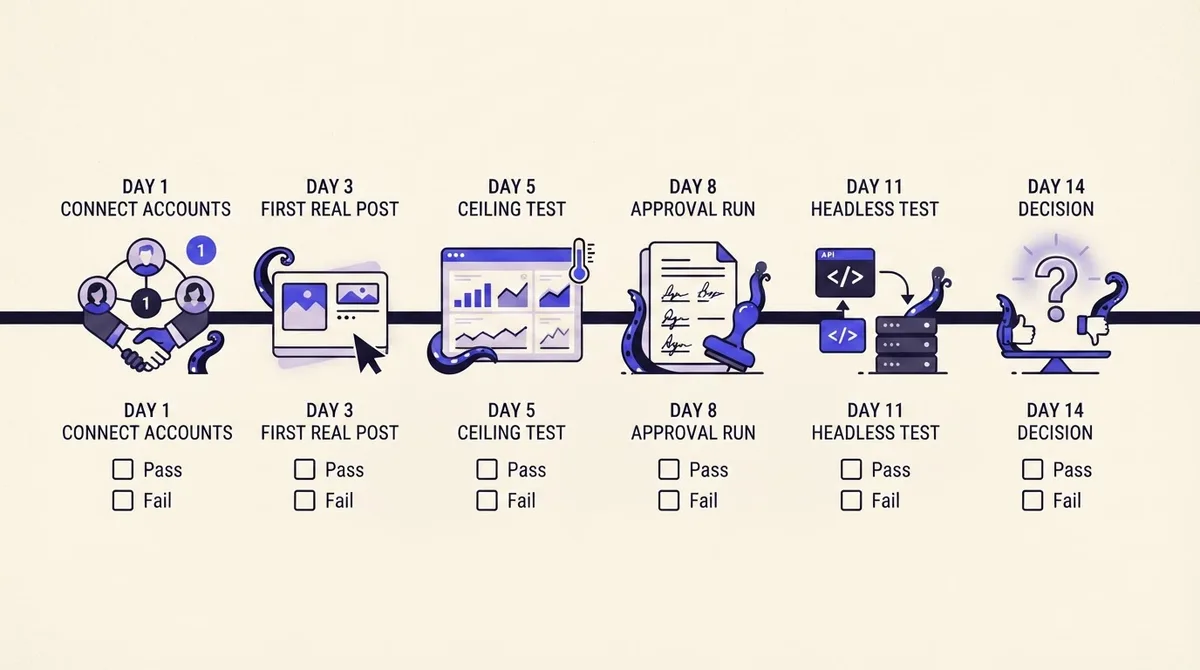
Day 1, connect accounts. Connect every network you actually use. Gate: did any connection require a permission you cannot grant, such as a LinkedIn page role you do not hold? A tool that cannot complete auth on day one will not improve.
Day 3, publish one real post per network. Not a test post to a dummy account. A real post to the real account. Gate: did every network publish, and did the preview match what actually appeared?
Day 5, ceiling test. Deliberately push a limit. Queue an eleven item Instagram carousel. Upload a PNG. Schedule a TikTok post from an unaudited context. Gate: did the tool warn you before scheduling, or fail after? Pre-flight validation is the single best proxy for engineering quality in this category.
Day 8, approval run. Route three posts through your real approval chain, including one rejection and one edit-after-approval. Gate: did the approved version publish, or did an edit silently bypass approval? If you work with clients, our client approvals workflow is designed around exactly this failure.
Day 11, headless test. Publish one post from outside the dashboard: a curl request, a CLI command, or an agent. Gate: did it work without a browser, and did it respect the same approval rules as the dashboard? If a tool has two different permission models for humans and machines, you have two different security postures.
Day 14, decision. Review the failure log, not the feature list. Count silent failures. Count support response times. Then decide.
Do schedulers hurt your reach?
This question drives a lot of traffic and deserves a direct answer: there is no documented penalty in any platform's developer or publisher documentation for content posted through an official API. The APIs cited throughout this guide are the platforms' own sanctioned publishing paths, and the platforms impose rate limits and audit requirements rather than reach penalties on them.
What does change outcomes is behavior that scheduling makes easy: posting identical copy to every network at once, ignoring per-network format norms, and never being present to reply. Cross-posting without adaptation is a real problem, and it is a content problem, not an API problem. Our cross-platform distribution guide covers adapting one asset per network instead of mirroring it, and Instagram posting time data is more useful than any theory about scheduler penalties.
What a social media manager's stack actually contains
Asked as a PAA question, answered vaguely everywhere. In practice it is five layers: a source layer for ideas and inbound content, a drafting layer, a scheduling and approval layer, a publishing layer that talks to the APIs, and an analytics layer. Most teams buy one tool for the middle three and improvise the outer two. If you want to see what consolidating looks like, multi-platform publishing and agentic drafting are the two halves of that, and the caption generator is free if you just want to test the drafting layer without signing up.
How we verified this
Every platform capability claim above was read directly from the network's own developer documentation on 23 August 2026 and linked inline, so you can re-check it yourself. We did not take capability claims from vendor marketing pages, because the vendor is not the authority on what the API permits. Nothing here is derived from a press release or a competitor roundup. We re-verify these pages as platforms ship changes, and the update date at the top of this article reflects the last check.
The short version: pick your publishing mode first, read the network ceilings second, and treat the vendor comparison as the last step rather than the first. If mode three is where you are heading, start with a free account and run the day 11 test before you run anything else.