
Social Media Management for Agencies: Tools and Operating Model

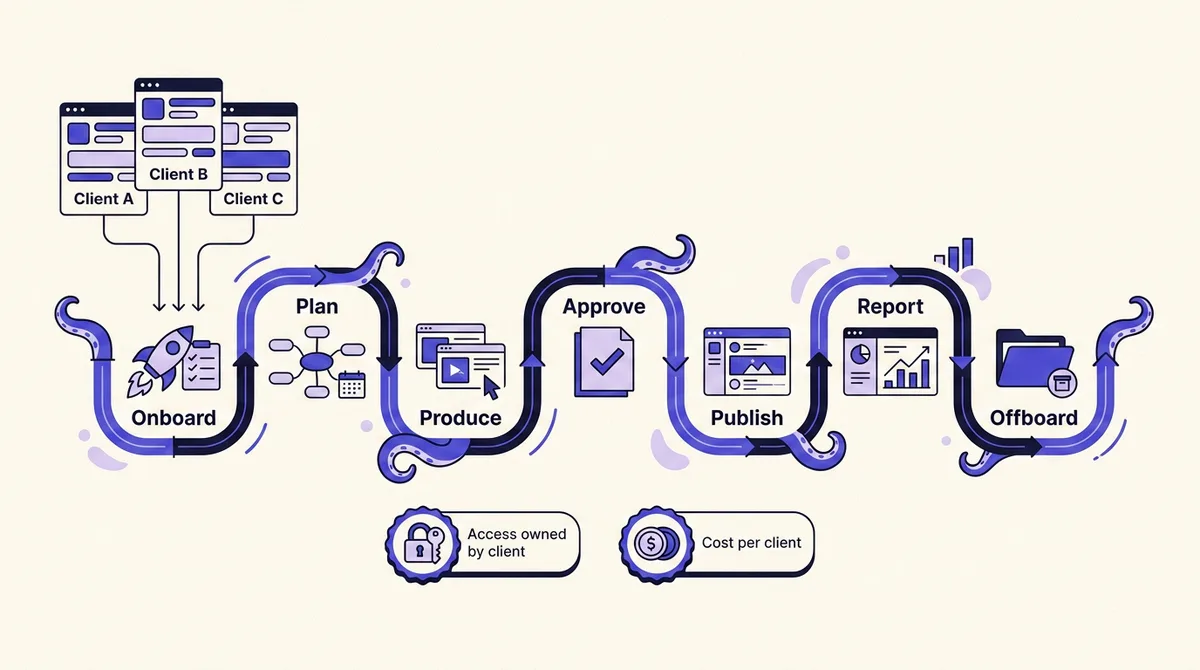
Search for social media management for agencies and you get twelve versions of the same page: a ranked list of tools, a pricing grid, a verdict. Useful if you have already decided that your problem is software. Less useful if your actual problem is that client three approves posts on Thursday night for a Monday campaign, client five still sends assets over WhatsApp, and nobody can say what any single client costs you to deliver.
The tool matters, but it is the last decision, not the first. What determines whether an agency can hold twenty clients is the operating model: who owns the access, how approval is gated, what the platform will actually let you publish, and what happens on the day a client leaves. So this guide is structured as the client lifecycle: onboard, plan, produce, approve, publish, report, offboard. Each stage produces a tool requirement. Along the way we cover the three things no roundup mentions: the formal agency-access models Meta, TikTok and LinkedIn actually ship, the hard API limits that cap every tool equally, and the per-client unit cost you should be pricing retainers against.
The short version
- Never collect client passwords. Meta, TikTok and LinkedIn all ship a partner or role-based access model. The client owns the assets, your agency is added as a partner, and access is revoked with a settings change.
- The approval gate is your biggest cost lever, not your posting tool. Rework is usually the largest variable line in delivery cost.
- Every tool rents the same platform APIs. Instagram caps API publishing at 100 posts per rolling 24 hours; TikTok forces unaudited apps to private-only visibility. Feature lists differ; the ceiling does not.
- Know your cost per client before you quote a retainer. Pricing models break at different client counts.
- Design offboarding on day one. Week one decides whether the exit is four clicks or a hostage negotiation.
Why agency delivery breaks at the fifth client
One to four clients runs on memory. Around the fifth, memory stops scaling and three failures show up at once.
First, access sprawl: each client was connected differently, one via a personal Facebook account, one through a shared spreadsheet password, one properly, and nobody can produce an inventory. Second, approval drift: with four clients you chase approvals by text; with ten you have forty open threads and no shared state, so posts publish unapproved or miss their slot. Third, invisible margin: blended revenue looks fine while one client quietly consumes triple the hours.
The rest of this guide fixes these in the order they occur.
Onboarding: getting access without collecting passwords
This is the stage every competing article compresses into "connect client accounts in minutes." It causes the most damage, because the platforms already solved it and most agencies never use the solution.
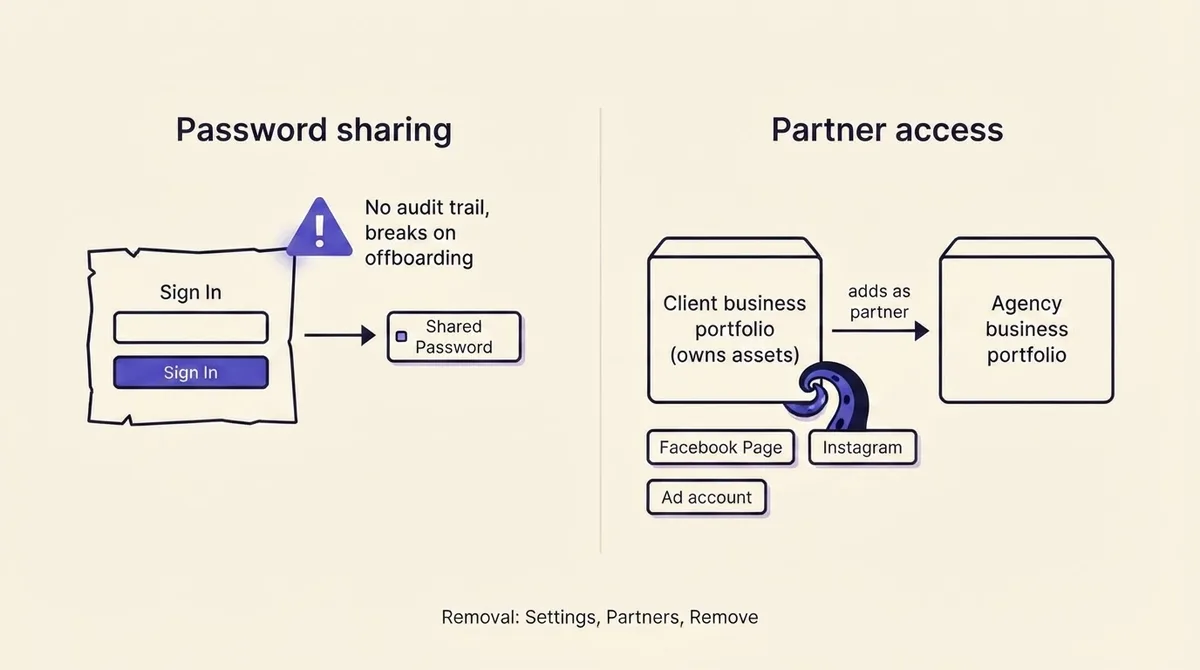
Meta: the client owns the business portfolio, you are a partner
The rule that should govern every Meta onboarding: the client owns the business portfolio and the assets inside it; your agency is added as a partner. A partner granted full control of a shared asset "can manage everything but they cannot share the business asset with another business - only the organization that owns the asset can share it with another business portfolio." Partial access instead grants specific tasks such as creating content, managing ads and responding to messages (Meta Business Help Center).
Three preconditions have to be true before the kickoff call: the client must have full control of their business portfolio, your agency must already have its own, and the client needs your business portfolio ID. Meta also lists two-factor authentication as a prerequisite and notes another person with full control may need to approve the addition. Put all four on the onboarding checklist and a two-week access chase becomes one meeting.
One more line for your onboarding doc: anyone with full control of a business portfolio can request access to a Page by entering its URL, and Facebook itself never requests access to a Page, so any such request should be declined and reported. Meta also notes third parties cannot get a business verified, which kills a common upsell scam, and recommends more than one Page admin so access can be restored if lost.
TikTok: Business Center roles and the partnership label
TikTok Business Center has two basic member roles. Admin has full access to all system functions including managing members, partners, accounts and assets. Standard works only on the accounts and assets specifically assigned to them. Finance roles are separate advanced roles that an Admin must be assigned before viewing or managing finances (TikTok Business Center roles).
Agency access mirrors Meta: the client adds your Business Center by ID, then selects which assets you may reach and at what level. When a Direct Business Center adds an Agency Business Center, both sides confirm the partnership and a "Media agency partnership" label appears. Default your own staff to Standard; Admin should be two people, not everyone.
LinkedIn: three admin tiers, and most people need the middle one
Super admin holds every Page permission including adding admins and deactivating the Page. Content admin can create and manage Page content, posts including boosting, and events. Analyst can only monitor analytics. Paid-media roles are separate.
The practical mapping: your community manager is a Content admin, your strategist and analyst are Analysts, and the client keeps Super admin. Asking for Super admin because it is simpler makes procurement nervous and gives you nothing you need.
The onboarding requirement this produces
Your tooling must support per-client separation of assets, people and permissions, so a contractor added for client B cannot see client A's queue, drafts or analytics. If your tool models everything as one flat workspace, you compensate with process, and process is what fails at 2am.
Planning and production: a calendar the client can actually review
The planning artifact for an agency is a client-readable calendar, which is a different object from an internal one. An internal calendar optimizes for capacity; a client calendar optimizes for a non-marketer scanning it in eight minutes and saying yes.
- Fix a monthly cadence. Strategy call in the last week, calendar delivered by the 25th, approval by the 28th, scheduling by the 31st. Everything in-month becomes reactive-only.
- Group by theme, not by date. Clients approve a theme once, then approve variations quickly. A date-sorted list makes them re-litigate every post.
- Show the post as it will appear. Per-platform previews kill the "that caption looks wrong on LinkedIn" round trip.
- Carry a reactive reserve. Leave roughly 20 percent of slots open. Fully booked calendars generate emergency approvals, which is where quality drops.
If your calendar keeps collapsing in week three, the problem is usually upstream of the tool; our guide on building a content calendar that survives a busy month covers the batching mechanics. Briefs and source material should live with the content, not in a separate drive, because pulling client-supplied material and past top performers into drafting is what makes AI output on-brand rather than generic, which is the idea behind grounding drafts in your own sources.
Requirement produced: a shareable client-facing calendar with per-platform previews, and a home for briefs and source material next to the drafts.
Approval: designing a gate clients clear on time
Late approvals are a design failure, and the design has four parameters.
Who approves. Exactly one named approver per client with one named backup. Two approvers means each waits for the other. Write the names in the SOW.
What they approve. Calendar approval (themes and slots) and asset approval (copy and creative) are separate gates. Merging them means every copy tweak reopens strategy.
By when. A dated deadline with a stated default: unapproved posts move to the next cycle rather than publishing. This clause moves the cost of delay onto the delayer.
Through what. Approval must happen where the post lives, with threaded comments and a recorded decision. Email has no state: you cannot tell which of forty posts is cleared.
What a weak gate costs, illustratively: twelve clients at 20 posts each is 240 posts a month. At 15 percent rework, 25 minutes each across writer, designer and account manager, that is 15 hours, or 900 dollars at a 60 dollar loaded rate. Tightening to 5 percent saves roughly 600 dollars a month, more than most agencies pay for their entire stack. That is the number to hold when you evaluate client approval workflows.
Requirement produced: role-separated approval with per-client approvers, comment threads on the post, an audit trail, and a default behavior for unapproved content.
Publishing: what the platform APIs will not let any tool do
Every scheduling tool, including ours, publishes through the same official platform APIs, and those APIs impose limits no vendor can engineer around.
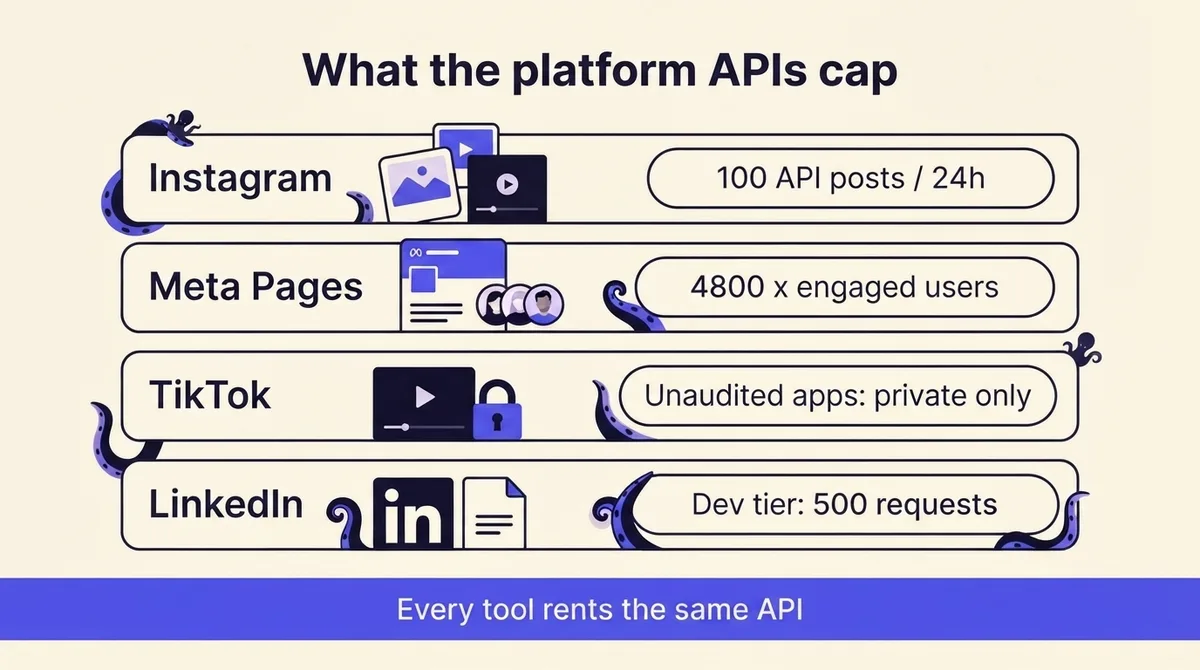
- Instagram: 100 API-published posts per rolling 24 hours per professional account. Carousels are capped at 10 items and count as one post. An account subject to Page Publishing Authorization cannot be published to until PPA is completed (Instagram content publishing docs).
- Meta rate limits scale with audience, not with your plan. Business Use Case limits use published formulas: for the Pages API, 4800 multiplied by engaged users per 24 hours; for Instagram Platform endpoints, 4800 multiplied by impressions. A brand new client Page has a small allowance by design.
- TikTok restricts unaudited apps. All content posted by unaudited clients is restricted to private viewing mode (SELF_ONLY). Direct posting also needs an approved video.publish scope and Direct Post enabled (TikTok Content Posting API).
- LinkedIn gates and versions its API. The Community Management API runs a Development Tier with limited volume (defaults of 500 requests per app, 100 per member) and a Standard Tier requiring a screencast per declared use case. Versions carry hard sunsets; 202508 sunsets on 17 August 2026 (LinkedIn Community Management overview).
- Meta access levels gate everything else. Advanced Access, needed to serve real clients, has required Business Verification since 1 February 2023, may require App Review per permission, and requires an annual Data Use Checkup.
Three consequences. Any vendor promising unlimited Instagram automation is describing something the API does not permit. Any TikTok tool that does not state its audit status may be publishing your client's content to nobody. And any tool on an unmaintained LinkedIn version will break on a published date, which is why a changelog beats a feature grid. For what each platform allows natively versus through an API, see our breakdown of scheduling on every major platform.
Requirement produced: official API integrations, transparent failure handling and retries, visible publish status per post, and evidence the vendor tracks API deprecations.
Reporting and renewals: reports that hold up in the room
Most agency reports fail because they report platform metrics instead of answering the client's question, which is always some version of "did this do anything."
A report that survives the renewal meeting has four parts. What we shipped (volume by platform, versus committed). What performed (top three and bottom three posts, one line each). What it produced downstream (clicks, sign-ups, or whatever the client counts, tracked with consistent UTM conventions). What we are changing next month (two specific decisions).
Metric definitions drift between platforms, so a blended "engagement rate" across seven networks is not a real number. Fix a definition per platform, state it in a footer, and never change it mid-retainer; our guide to what each analytics tool actually measures covers where definitions diverge. White-labeling matters for a narrow reason: a competitor's logo on your report invites the client to buy the tool directly. Scheduled delivery matters more than aesthetics: a report that arrives automatically on the second of the month is worth roughly two hours per client.
Requirement produced: per-client reporting with consistent metric definitions, UTM support, white-label output, and scheduled delivery.
Offboarding: what actually happens when a client leaves
Every agency loses clients. The difference between a clean exit and a bad one was decided at onboarding.
If you used partner access, offboarding is administrative: only someone with full control of the client's business portfolio removes a partner, through Business Suite Settings, Partners, Options, Remove from business portfolio. TikTok partnerships end at Business Center level, and LinkedIn Super admins remove admins directly.
If you did not, offboarding is a negotiation: passwords to rotate, personal accounts still holding admin, a Page whose only admin is a former employee, and a client convinced you are holding their audience hostage.
A 30-day runbook: export published content and performance history in week one; hand over source files and the calendar in week two; walk the client or incoming agency through remaining scheduled posts in week three; remove partner access and delete credentials on the final day, then send written confirmation of exactly what was removed. That last email converts a departure into a reference.
Requirement produced: full export of posts, assets and analytics; the ability to archive a client workspace without deleting its history; clean per-client access removal.
Per-client cost of delivery, and how to price against it
Sticker prices are the wrong unit. What you need is cost to deliver one client for one month, because that is what a retainer has to clear.
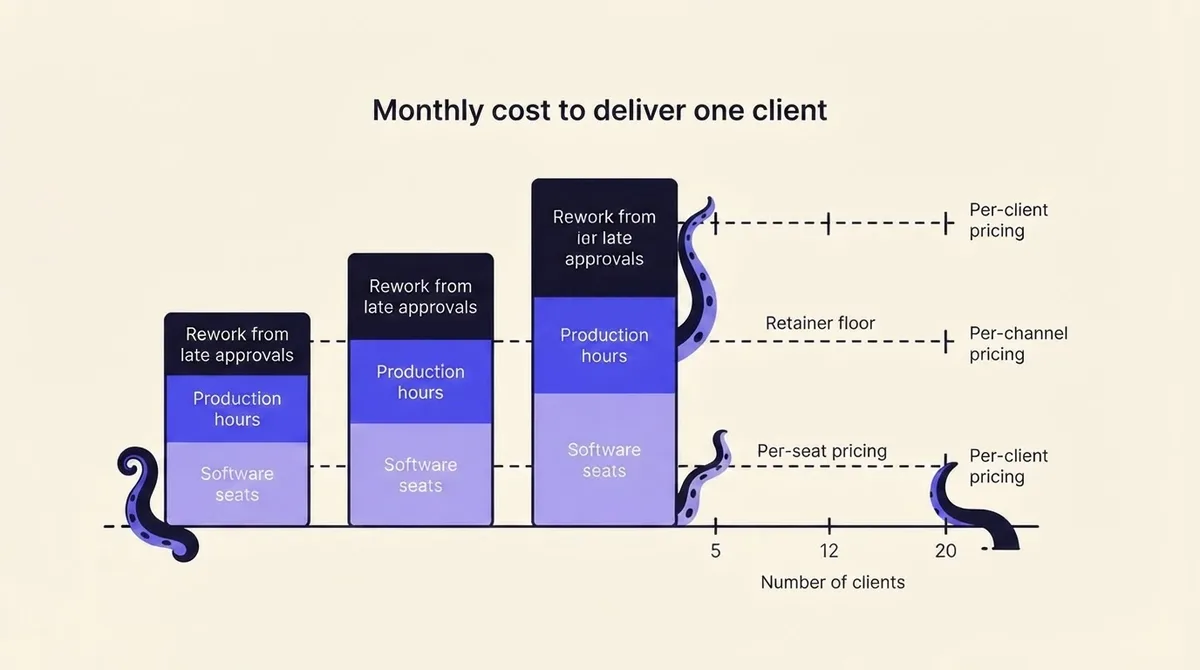
Software per client = total monthly tool spend divided by clients. Hours per client = strategy, production, community and reporting hours multiplied by loaded rate. Rework = posts per month × rework rate × minutes per rework × loaded rate.
Illustratively, for a ten-client agency at 60 dollars loaded: 400 dollars of tool spend is 40 dollars per client; 20 posts takes about 9 hours (2 strategy, 4 production, 2 community, 1 reporting), so 540 dollars; rework at 12 percent, 25 minutes each, adds 60 dollars. Total 640 dollars per client per month. At a 2,000 dollar retainer that is a 68 percent gross margin before overhead. At 900 dollars it is not a business.
Notice which lever moves. Software is 6 percent of cost; halving your tool bill saves 20 dollars. Cutting rework from 12 percent to 4 percent saves 40 dollars and buys back time. This is why the approval gate outranks the feature grid.
Now the part roundups skip: the three pricing models break at different client counts.
- Per-seat. Cost per client falls as you add clients, which is best for a small team serving many accounts. It breaks when headcount grows faster than clients, such as hiring specialists per channel.
- Per-channel. Cost scales with clients multiplied by platforms, so a client on seven networks costs seven times a client on one. This punishes exactly the full-service work that carries the best margin.
- Per-client workspace. Predictable and easy to pass through as a retainer line item. It breaks when you carry many small or dormant accounts, since a 500 dollar and a 5,000 dollar retainer cost the same to host.
Model your bill at your current client count and at double it. That comparison, not the headline price, is the real answer; you can run the same arithmetic against OctoSpark's pricing.
Quoted average retainers are close to meaningless across markets and scopes. The defensible approach is bottom-up: compute cost to deliver, pick a target gross margin (60 to 70 percent is a common planning range), and set the floor from there.
Choosing tools: the requirements the lifecycle produced
Score any candidate out of these seven, treating the first three as pass or fail:
- Per-client separation. Distinct workspaces with per-client roles.
- Approval as a real gate. Named approvers, threaded comments, audit trail, defined default behavior.
- Official API publishing with visible status. Per-post state, retries, and a changelog showing the vendor tracks deprecations.
- Client-facing calendar with per-platform previews.
- White-label scheduled reporting with consistent definitions and UTM support.
- Clean export and archive for offboarding.
- A pricing model that survives doubling your client count.
Against that scorecard the shortlist splits into three groups rather than a ranking. Generalist schedulers (Buffer, Hootsuite, Later) score well on publishing and calendar, weaker on per-client separation and white-label reporting; fine under about five clients. Agency-first platforms (Cloud Campaign, Sendible, Agorapulse, Planable) are built around client workspaces, approvals and white-label reporting; the differentiator is usually pricing model, so run the doubling test. API-first platforms, including OctoSpark, add programmatic control: the same multi-platform publishing from a dashboard, a CLI or an agent via API and MCP. For a feature-level comparison, see our guide to choosing a social media management tool.
When to build instead
Building your own publishing integrations means becoming a platform developer: Meta Business Verification, App Review per permission, an annual Data Use Checkup, TikTok's audit, and LinkedIn's Standard Tier application, then maintaining all of it against dated version sunsets, forever. That is a permanent engineering commitment, not a project.
The middle path is what most agencies actually want: buy the publishing layer, build the surface. With a full API and MCP access you can build a branded client portal, wire approvals into your project management system, or auto-create a workspace when a deal closes, while the vendor absorbs API maintenance. Build when the client-facing experience is your differentiator; buy when publishing reliability is.
The first 30 days
Week one: inventory every client account and how you access it, then convert the worst offender to proper partner access. Week two: pick a tool against the seven-point scorecard and migrate one client, not all of them. Week three: write the approval clause into your next SOW, with named approver, deadline and default. Week four: compute cost per client and rank clients by margin.
At the end of that month you will know which retainers to reprice, which access is fragile, and whether your tool bill survives doubling, a materially better position than knowing which platform won a roundup. To test the workflow side, start with a free account and run one client through onboarding, approval and reporting before you migrate the rest.