
How to Build a Social Media Content Calendar That Survives a Busy Month

You already have a social media content calendar. You downloaded the template, or you built the Notion board, and for eight or nine days it looked beautiful. Then a client escalation ate a Tuesday, a video came back from review with three rounds of notes, and by the eighteenth of the month you were writing captions on a Friday afternoon for slots that were supposed to be approved a week earlier. The grid did not break. The grid never breaks. It just quietly stopped describing anything real.
Almost every guide on this topic teaches the same artifact: dates down one axis, platforms across the other, a Status column bolted on the side. That artifact is the easy part. You can build it in twenty minutes. What nobody publishes is the operating loop around it: where ideas come from, who is allowed to say yes, when a slot stops accepting new work, and how you find out that a post marked Published actually went live as a private draft. Those four things are what fail, and they all live outside the grid.
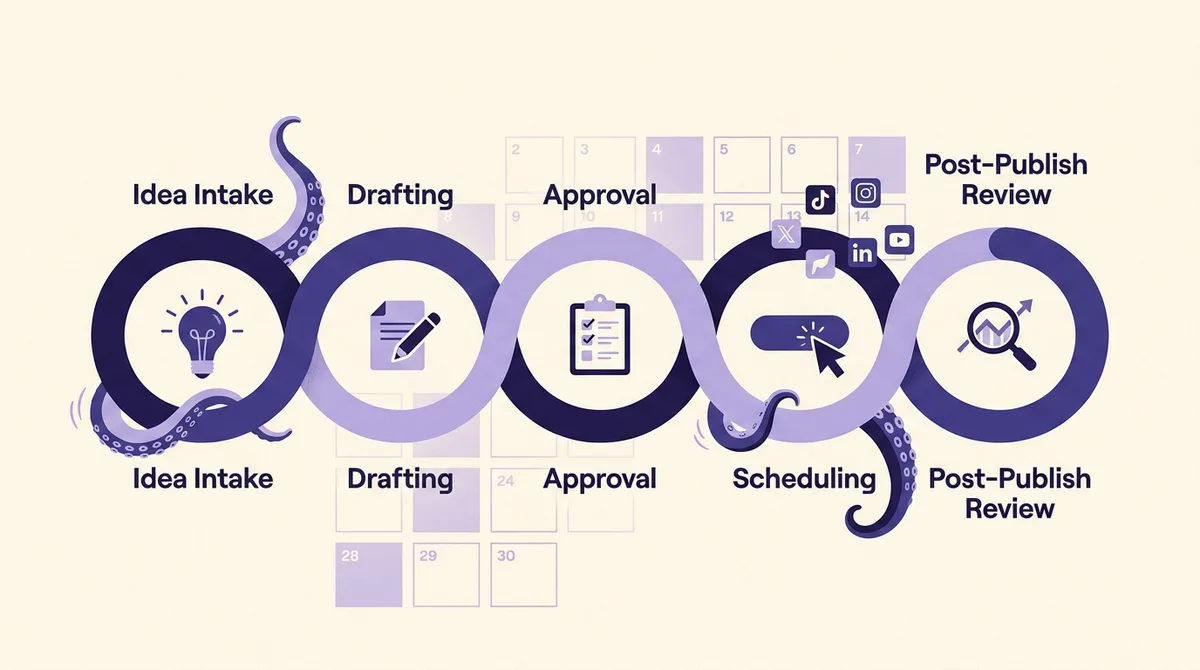
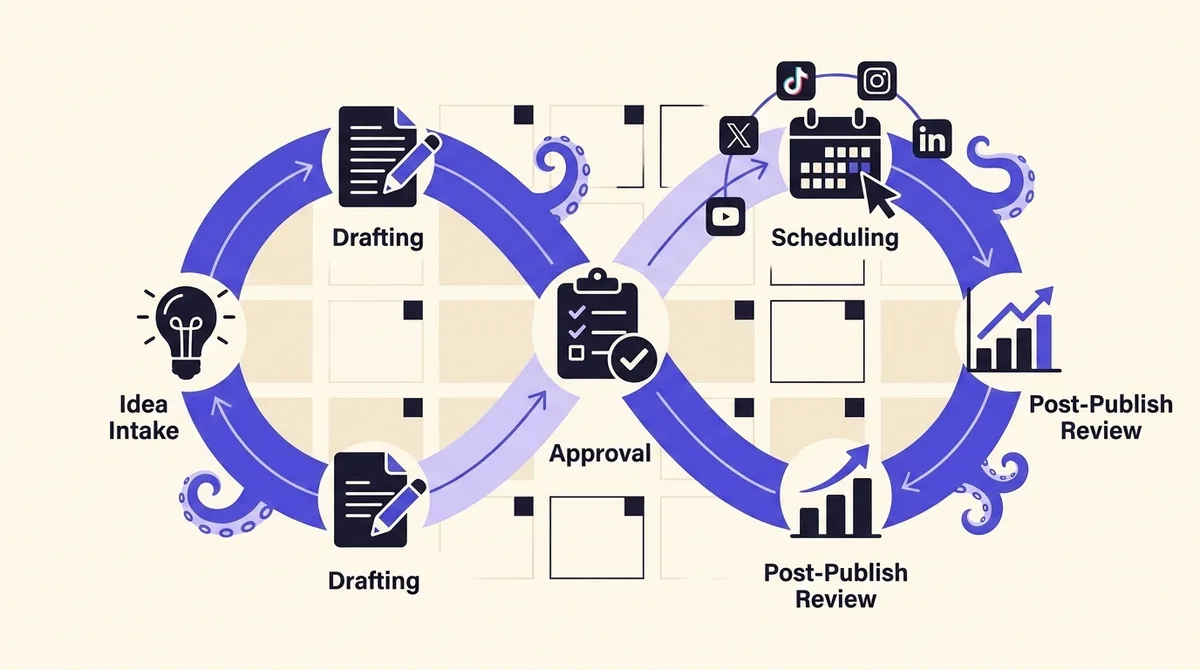
This guide treats the calendar as the visible surface of a five stage production loop: idea intake, drafting, approval, scheduling, and post-publish review. You get a capacity model that tells you how many slots a team of your size can genuinely fill, a field-by-field calendar structure whose primary key is state rather than date, the documented platform limits that silently desynchronise calendars from reality, and the weekly rhythm that holds it together when the month goes sideways.
What is a social media content calendar, and why is the grid the easy part?
A social media content calendar is a shared record of what your team intends to publish, on which channel, at what time, in what state of readiness, and who owns the next action on it. Most definitions stop after the first three. The last two are the ones that do the work.
Think about what you actually use the calendar for. You do not open it to remember that Tuesday exists. You open it to answer questions like: is anything going out tomorrow that has not been approved, who is blocking the carousel, and did last week's LinkedIn post ever publish. Those are all questions about state and ownership. The dates are just how the answers get arranged on screen.
So the useful mental model is inverted from the template you downloaded. The source of truth is a list of posts, each sitting in exactly one state, each with an owner and a due-by for its next transition. The calendar view is a projection of that list onto a set of dates. When you build it the other way around, with dates as the primary key and status as an optional column, the status column becomes the first thing to rot, because nothing depends on it being right.
Why does the calendar go stale by week three of every month?
Four failure points, in roughly the order they bite.
The intake runs dry. Week one is filled from the ideas you had while building the calendar. There is no mechanism that adds new ideas after that, so by week three you are inventing content at the moment you need to publish it. A calendar with no standing backlog is a countdown timer.
Approval has no owner and no deadline. "Send it to Dana" is not a workflow. Dana has a day job. A post sits in review for six days, the slot arrives, and you either publish it unapproved or leave a hole. Canva's own guidance concedes that the review cycle is often the longest part of the creative process, then moves on without designing around it. That gap is where most calendars actually die.
The plan exceeded capacity from day one. You planned twenty slots a week because a blog post said five per platform. Nobody counted the hours. This is not a discipline problem, it is an arithmetic problem, and it is widespread: in the Content Marketing Institute and MarketingProfs 16th annual B2B content marketing survey, fielded June 24 to August 14 2025 and reporting on 1,015 B2B marketers, 39% named resource constraints of time, people and budget as a top challenge and 28% said they struggle to create enough quality content. Only 9% plan to increase investment in human resources in 2026, last among budget priorities. The constraint is known, and almost nobody plans around it.
Scheduled quietly stops meaning published. Containers expire, tokens lapse, rate limits hit, and a row that reads Published while the post is private is worse than no calendar, because it stops you from looking.
How many slots can your team actually fill each week?
Here is the arithmetic. Do it once, write the number down, and defend it.
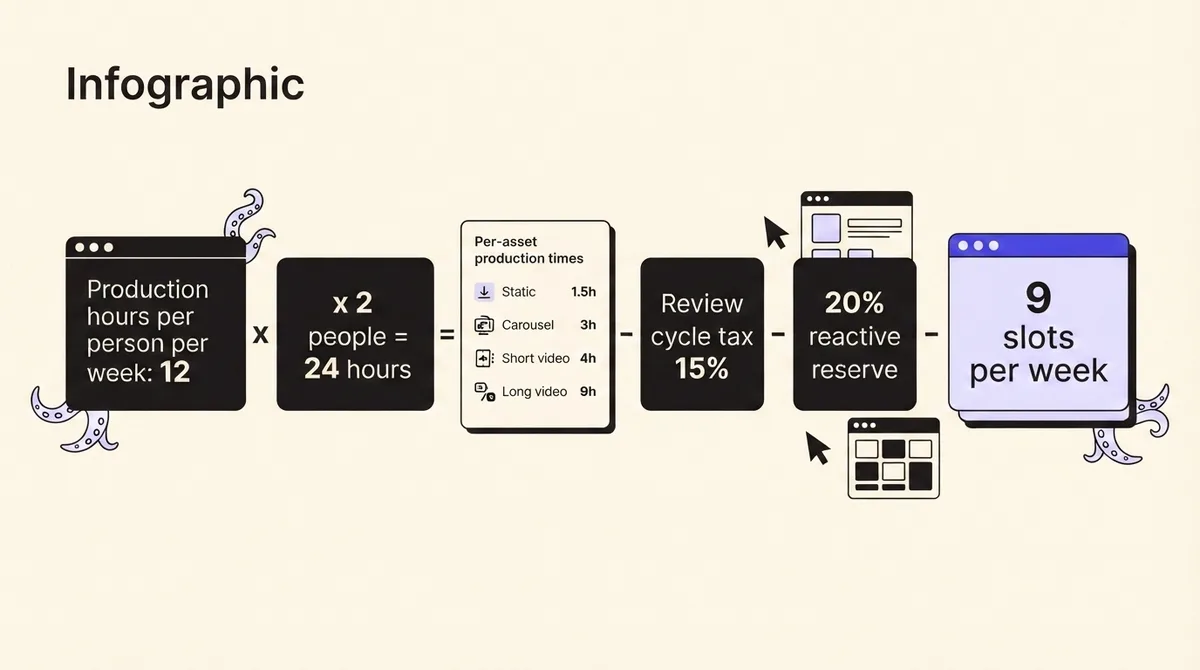
Start with production hours, not headcount. A full-time social media manager does not get 40 hours of production. Between meetings, community management, reporting, inbox, and the ambient chaos of the job, budget 12 to 15 hands-on production hours per person per week. A part-time contributor at 0.5 FTE gets 6.
Now apply realistic per-asset times, end to end, including sourcing the visual and writing the caption:
- Static image post with an original graphic: 1.5 hours
- Carousel of 5 to 8 slides: 3 hours
- Short vertical video, 15 to 60 seconds, filmed and edited: 4 hours
- Long-form video over 3 minutes: 8 to 10 hours
- Text-only post or repurposed variant from an existing asset: 0.5 hours
Worked example. A team of two: one full-timer at 13 production hours, one contributor at 6. That is 19 hours a week.
Subtract the review-cycle tax. Every asset that goes through approval costs the producer additional time in revisions and re-uploads. On a two-round-maximum policy, budget 15% of gross production hours. 19 hours becomes 16.2.
Subtract the reactive reserve. Something will always land: a launch moved, a comment thread needs a response post, a competitor did something. Hold back 20% of the remaining hours, unassigned, every single week. 16.2 becomes about 13 hours of committed production capacity.
Now spend it. A mix of one short video (4h), one carousel (3h), two statics (3h), and four repurposed text variants (2h) costs 12 hours and produces 8 assets. If several of those assets are cross-posted with platform-native edits, at roughly 15 minutes per adaptation, 8 assets can fill 12 to 14 published slots across channels. That is your number: roughly 9 original assets and no more than 14 published slots per week for a two-person team.
If that feels low, it is because you have been comparing it to a plan you have never once hit. Nine assets you actually ship beats twenty you plan and abandon in week three.
Does your cadence survive the platforms' own ceilings?
Before you commit that number, check it against limits that are documented rather than guessed. Most teams never come close, which is genuinely useful information: it means your ceiling is your own capacity, not the API. But if you run an agency posting for many clients through one tool, or you batch-publish at hour boundaries, these matter.
- Instagram: professional accounts are limited to 100 API-published posts in a rolling 24 hour window, and a carousel counts as one post toward that limit. You can query current usage via the content publishing limit endpoint. (Instagram content publishing docs)
- X: the post endpoint allows 100 requests per 15 minutes per user, and 10,000 per 24 hours at the app level. (X rate limits)
- YouTube: projects get a default quota of 100 videos.insert calls per day, a hard ceiling on programmatic uploads. (YouTube Data API quotas)
- TikTok: the Content Posting API limits each user access token to 6 requests per minute for direct posts, and returns a reached active user cap error when the daily cap is hit.
- LinkedIn: limits are enforced per 24 hours at both app and member level, reset at midnight UTC, and return 429 when exceeded. LinkedIn does not publish standard limits in its documentation at all. (LinkedIn rate limits)
On cadence itself, LinkedIn's own Pages best practices say companies that post weekly see a 2x lift in engagement, images typically get a 2x higher comment rate, and video gets 5x more engagement. Note the floor in that claim: weekly. Not five times a day. If you want to tune when those slots land rather than how many there are, our analysis of the best time to post on social media works from post-level data rather than generic charts.
What actually feeds every slot: how do you run intake and drafting?
Stage one is intake, and it needs to be a standing habit with a named owner, not a burst of inspiration during planning week.
Run one 30 minute idea session per week, same slot, whole team, output measured in rows added to a backlog. The target is simple: end every week with at least three weeks of slots' worth of ideas in the backlog. For our two-person example at 9 assets per week, that is a standing backlog of 27 or more. If the backlog dips below two weeks, planning stops and intake becomes the priority.
Feed intake from sources that renew themselves: customer support tickets and sales call objections, comments and DMs from the last 14 days, your own top three performing posts from the previous month for repurposing, and one recurring industry input such as a newsletter or subreddit. Every idea enters with a one-line premise, a target format, and a proposed channel. Ideas without a format are wishes.
Drafting is where the format tax gets paid, so batch it. Group by format rather than by publish date: film all short video on one block, build all carousels on another. Context switching between a video edit and a text post is the single most expensive habit in a small team's week. And when a long asset exists, mine it properly before making something new. Our guide to turning one video into ten formats is essentially a backlog multiplier. If drafting is your bottleneck rather than ideas, agentic drafting can produce first drafts against your brief so the human hours go into judgment and editing rather than blank pages.
Every draft carries a due-by. Not "before it publishes": a date. The default rule is that a draft is due to review no later than the lock window described below.
What does an approval gate look like when it has teeth?
An approval gate is three commitments: a named approver, a service level, and a defined failure behavior.
Named approver. One person per post, chosen when the post enters Drafting, not when it enters review. "The team" cannot approve anything.
Service level. 24 business hours to first response for standard posts, 4 hours for reactive ones. Put the SLA in the row so it is visible to everyone.
Failure behavior. This is the part that gets skipped. Decide in advance what happens when the SLA is missed. The only two defensible answers are auto-approve, which suits a founder posting on their own brand, or slot-forfeit, which suits agencies and regulated clients. Silence must resolve to one of them automatically. If silence resolves to "chase Dana again," you have not built a gate.
Round cap. Two rounds of revisions maximum. A third round means the brief was wrong, so the post goes back to Idea rather than looping in review. Unlimited rounds are how one post eats a week.
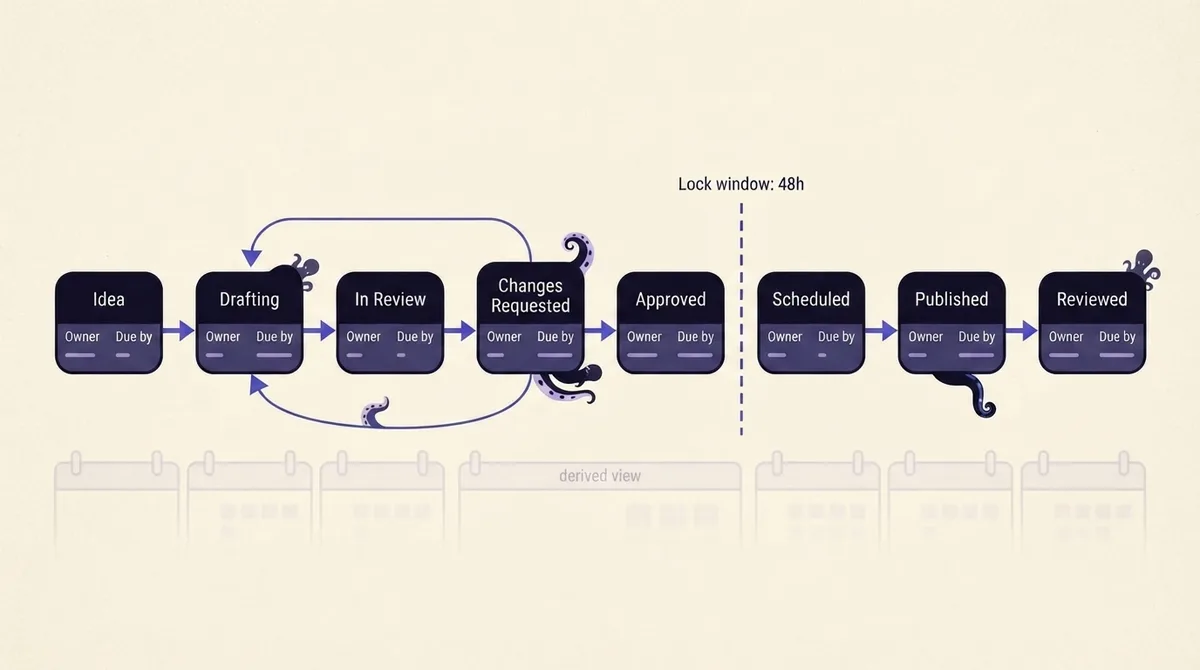
Then the rule that saves your Fridays: the lock window. A published slot stops accepting new drafts 48 hours before its scheduled time. After the lock, a slot can only be filled from the approved queue, or it goes empty. That is the whole rule, and it is the difference between a calendar and a permanent emergency. The reserve capacity you set aside is what makes it survivable, because you will always have approved evergreen posts sitting ready.
For agencies, the same rule needs to be visible to the client, not just internal. Explicit client approval gates with a shared queue and a timestamp on every decision remove the "I never saw that" conversation entirely.
Why does "Scheduled" not mean "published"?
Every competing guide assumes those two words are synonyms. They are not, and the mechanisms are documented.
Instagram media containers expire if they are not published within 24 hours of creation, returning an EXPIRED status. A post queued from a container built too far ahead simply does not go out (Instagram content publishing docs).
For Facebook Pages, a scheduled post's publish time must be between 10 minutes and 30 days from the time of the API request. A quarter-ahead calendar is therefore something you can plan but physically cannot schedule on Pages; those rows are intentions, and should be labeled as such (Pages API posts).
TikTok is the sharpest edge. An unaudited API client can only post in SELF_ONLY viewership and can allow up to 5 users to post in a 24 hour window. Content scheduled through an unaudited tool goes live private. TikTok also requires publishing clients to make the creator manually select a privacy status with no default value, check duration against the max video post duration limit, and show a Music Usage Confirmation before publishing (TikTok content sharing guidelines). If your workflow does not surface those, something will fail quietly.
And LinkedIn's admin alerts fire only at 75% of an application-level quota, with an expected delay of roughly 1 to 2 hours. You find out you were throttled well after the slot passed.
So stage five exists: a weekly reconciliation of calendar state against what actually went live. Twenty minutes, same slot each week. Open the last seven days of rows marked Published, confirm each post exists publicly on the platform, check its privacy state on TikTok and its container status on Instagram, and mark the row Reviewed only after you have seen the live post. Anything that failed goes back to Approved with a new slot. That single habit is what stops a calendar drifting into fiction.
What fields does a state-first calendar actually need?
Copy this structure into a spreadsheet, Airtable base, or Notion database. One row per post per channel. State is the primary key; the calendar view is a filter on it.
- Post ID - stable identifier, never reused.
- State - one of: Idea, Drafting, In Review, Changes Requested, Approved, Scheduled, Published, Reviewed. Exactly one value, never blank.
- Owner - the single person responsible for the next transition. Changes as state changes.
- Due by - a date and time for the next transition, not the publish date.
- Channel - one row per channel, even for cross-posted content, because limits and formats differ.
- Format - static, carousel, short video, long video, text. Drives the capacity math.
- Premise - one sentence on what this post argues or shows.
- Copy - the final caption text, with a separate variant field per channel.
- Asset link - the actual file, not "in Dropbox somewhere."
- Approver - named person, plus an SLA due timestamp.
- Revision round - 0, 1, or 2. Hitting 3 sends it back to Idea.
- Scheduled at - timezone-explicit. Blank until Approved.
- Locked - yes or no, derived from 48 hours before Scheduled at.
- Published URL - filled after verification, not after scheduling.
- Verified at - the timestamp a human or system confirmed the live post.
- Outcome note - one line at review time: what to repeat, what to drop.
Build three saved views on top of it: This Week filtered to Scheduled and Approved, Blocked filtered to In Review or Changes Requested with a due-by in the past, and Backlog Depth counting Idea rows against your weekly slot number. The Blocked view is the one you check daily. It is the calendar's smoke alarm.
What is the weekly rhythm, and what do you do when a month goes sideways?
Daily, 5 minutes. Check the Blocked view. Nudge or escalate anything past its SLA. Nothing else.
Weekly, 90 minutes total. 30 minutes of idea intake into the backlog. 20 minutes of reconciliation for last week's Published rows. 40 minutes to fill the coming week's slots from Approved content and confirm that everything inside the lock window is genuinely locked.
Monthly, 60 minutes. Compare planned slots to published slots and calculate your fill rate. Below 80% means your capacity number is too high, so lower it. Above 95% for two consecutive months means you can add one slot per week, and only one. Review outcome notes for patterns, and reset the reserve.
When a month goes sideways, the recovery playbook is deliberately blunt. First, cut the weekly slot count in half for two weeks. Do not try to catch up: a backlog of missed posts has no value, and chasing it guarantees the next two weeks fail too. Second, publish only from the Approved queue and repurposed variants, since neither needs new production hours. Third, protect intake. It is the first thing teams cancel and the reason week three collapsed in the first place. Fourth, at the end of the two weeks, recalculate capacity with the real hours you had, not the hours you wished for, and rebuild from that number.
Spreadsheet, database, or a calendar backed by real post status?
A spreadsheet is fine for one person on two channels. It is free, it is fast, and its weakness is that every state change is manual, so the state column is only as accurate as your discipline on a bad week.
A database like Airtable or Notion is the right upgrade for a team of two to five. You get real views, automations that nag approvers on the SLA, and a lock field you can compute rather than remember. Its ceiling is that it still knows nothing about the platforms. Nothing in your base can tell you the Instagram container expired or the TikTok post went live as SELF_ONLY, so the reconciliation stage stays fully manual.
The third option closes that gap: a calendar whose states are backed by real publishing status from the platforms themselves, with approval gates as first-class objects rather than a column someone remembers to update. That is what OctoSpark is built around. Posts move through explicit states with owners and due-bys, approvals are gates rather than reminders, and Published means the platform confirmed it, across X, TikTok, Instagram, LinkedIn, YouTube, Facebook and Threads from a dashboard, a terminal, or any AI agent through the API and MCP. If you want the mechanics of the scheduling layer specifically, we cover them in how to schedule social media posts on every major platform, and the wider tool landscape in our guide to choosing social media management tools.
Whichever you choose, the decision that matters is not the software. It is committing to a slot number you can actually hit, an approver with a deadline, a lock window you refuse to breach, and twenty minutes a week spent confirming that the calendar still matches the internet. Do those four things in a spreadsheet and you will beat a team with better tooling and no loop. When you are ready to stop maintaining the state column by hand, see how the plans compare.