
Social Media Automation Tools and Where Automation Backfires

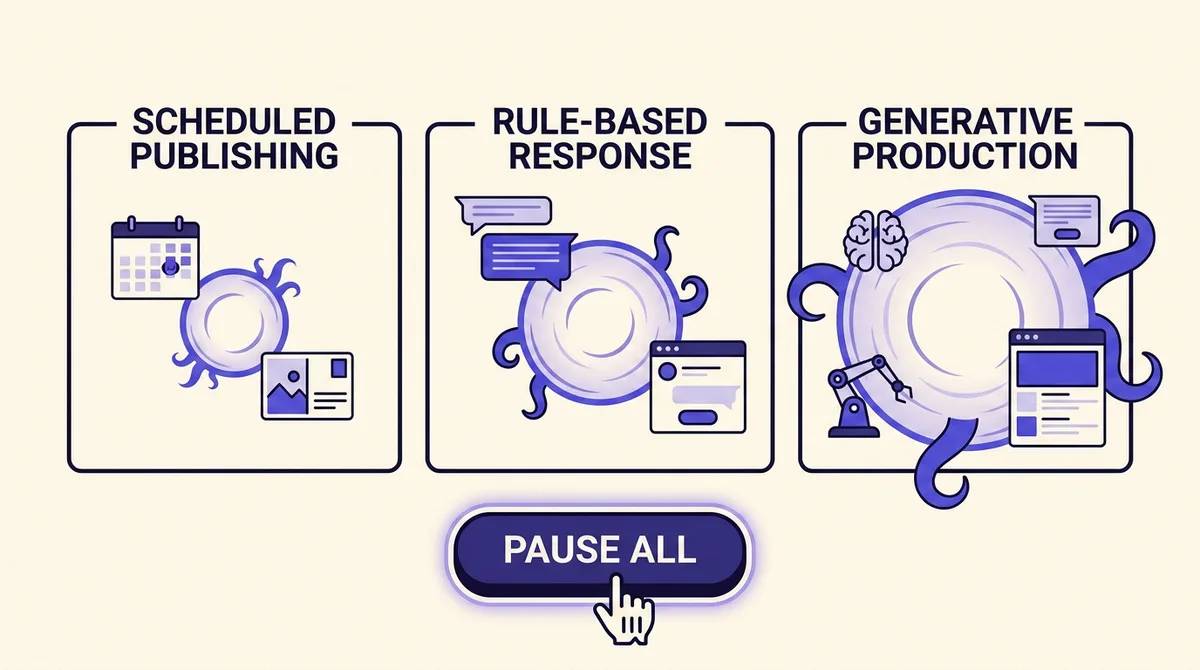
Every guide to social media automation tools answers the same question: which product should I buy? That question is premature. Before you pick a tool you have to know which of three completely different activities you are automating, because they share a word and share nothing else. One of them fails quietly, at 2am, in a way no dashboard will ever alert you to.
The three are scheduled publishing, rule-based response, and generative production. A scheduler that dispatches a post at 09:00 has a blast radius of one post. An auto-reply rule has a blast radius of every conversation that matches its trigger, with no ceiling on volume. An AI content pipeline has a blast radius of your account's standing with the recommendation system itself, and that damage arrives with no incident, no error code, and no email.
This guide is organised by that risk profile rather than by product. We start with the three categories and what each one actually breaks, then the platform constraint layer that almost nobody documents (real numbers from Meta, X, Google, TikTok and LinkedIn developer docs), then the kill switch: what "pause the queue" has to genuinely do to be worth anything. The tool comparison comes at the end, mapped to the three automations, so that a team who needs rule-based response is not sold a scheduler.
The three automations that share a word
Sort your intended automation into one of these before you evaluate a single vendor.
Scheduled publishing is deterministic. You wrote the post, a human approved it, a job dispatches it at a time. The failure mode is not content, it is timing: a cheerful product joke landing four minutes after a news event. Its constraints are technical, namely API caps and format coercion.
Rule-based response is reactive. Auto-replies, DM flows, comment triggers, keyword routing. You do not know the input in advance, which is the whole problem. Its failure mode is a bot replying warmly to a bereavement message or to a customer whose payment just failed during an outage. It also runs inside hard platform windows that bound how long you have to answer.
Generative production is compositional. An AI writes, renders and queues at volume. The failure mode is not a bad post, it is a slow decline in distribution when the platform decides your account primarily posts unoriginal content. Sprout Social's Q2 2026 Pulse Survey of more than 2,000 social media users across the US, UK and Australia found 44% are uncomfortable with brand partnerships involving AI creators, against 25% who accept it universally, and 27% do not know whether the influencers they follow are AI-generated (Sprout Social). The audience discomfort is real and the audience awareness is low, which is exactly the combination that produces a delayed, disproportionate backlash.
Most listicles treat generative production as the exciting frontier and scheduling as the boring commodity. By blast radius that is backwards.
Automation 1: scheduled publishing, and its two real constraints
Scheduling is the safest category and the one worth automating first. Two things break it.
The first is format coercion. When one piece of content fans out to seven networks, each network reshapes it. Instagram carousels cap at 10 items and crop every item to the first image's aspect ratio, defaulting to 1:1, and JPEG is the only supported image format (MPO and JPS are explicitly unsupported). An alt_text field exists for image posts as of 24 March 2025 but is not supported for reels or stories (Meta). LinkedIn's Posts API does not support organic carousel posts at all, and performs no URL scraping for article posts, so an integration must explicitly set thumbnail, title and description or the link renders bare (Microsoft Learn).
Worked example. You design a 5-slide carousel at 4:5 with the hero image at 16:9 by mistake. Instagram crops all five to 16:9 and the text on slides 2 to 5 loses its bottom third. LinkedIn silently drops the carousel and posts the first image. Nothing errors. You find out from a comment. The fix is a design-time rule (all carousel slides authored at 4:5, hero first) rather than a publish-time check, and a preview per channel before approval. Our walkthrough of how to schedule social media posts on every major platform covers the per-network format rules in more detail.
The second constraint is timing risk, and the mitigation is boring: no evergreen promotional content in the queue during a known-volatile week, and a documented pause. More on that below.
Automation 2: rule-based response, and the windows it runs inside
Auto-replies are where volume gets away from you. One rule matching a common word can send thousands of identical messages before anyone notices, and each one lands in a private conversation with a real person.
The platform rules here are strict and specific. Messenger Platform gives a business up to 24 hours to respond to a user, and messages inside that window may contain promotional content. Outside it you need approved message tags, and the Human Agent tag allows a manual response within a 7-day period. Critically for bot design, Meta's policy states that automated bots must respond to user input within 30 seconds, and failure can restrict message sending within 7 days of a violation notice. The Instagram Messaging API applies the same 24-hour response window (Meta).
Read those two numbers together and the design falls out. You have 30 seconds to say something and 24 hours to say something useful. So the bot's job is acknowledgement and triage, not resolution. A first reply that confirms receipt and asks one clarifying question satisfies the 30-second rule; a human answers inside the remaining window.
The governance that matters is a stop-word list and a sentiment gate. Any inbound message containing terms tied to grief, harm, legal threat, refunds or an active outage should route straight to a human queue with no automated reply at all. That gate has to be maintained: the day you ship a status page incident, the words in your inbox change.
Speed is why teams accept this risk. Sprout's Q2 2026 survey found 84% of users say how quickly a brand responds affects how they subsequently perceive it. Fast is worth a lot. Fast and wrong, in a DM, is worth less than slow.
Automation 3: generative production, and the reach you never see leave
This is the only category that can cost you distribution with no visible incident.
Instagram's original content guidelines set a plain "material edits" test: "if someone could remove your contribution to your post or reel, and the content would virtually be the same, it probably needs more of you in it." Borders, watermarks, speed changes and crediting the original creator do not qualify. Accounts that primarily post unoriginal reels, photos or carousels "may not be seen in recommendations to new audiences," and recovery requires most recently posted content to be considered original within a 30-day period (Instagram).
That recovery clause is the operationally important part. The penalty is not a strike you can appeal; it is a rolling 30-day assessment of what you most recently posted. So the recovery plan is to change what you ship and wait out a month, which is a long time to lose new-audience reach.
A practical threshold: if an AI-produced asset would be indistinguishable from the same asset produced by a competitor prompting the same model, it fails the material-edits test in spirit even where it passes in letter. Generative tools earn their place upstream of the post, not at the post. Use them to expand a real asset into formats (a recorded customer call becomes a quote card, a thread, a reel script) rather than to manufacture the asset. Our content repurposer and agentic drafting are built for that direction of travel, and the pillar guide on using AI to run social media covers where the human still has to sit.
The platform constraint layer nobody publishes
Here are the caps that decide whether your automation plan is even physically possible. Not one of the tool roundups currently ranking for this query contains a single one of these numbers.
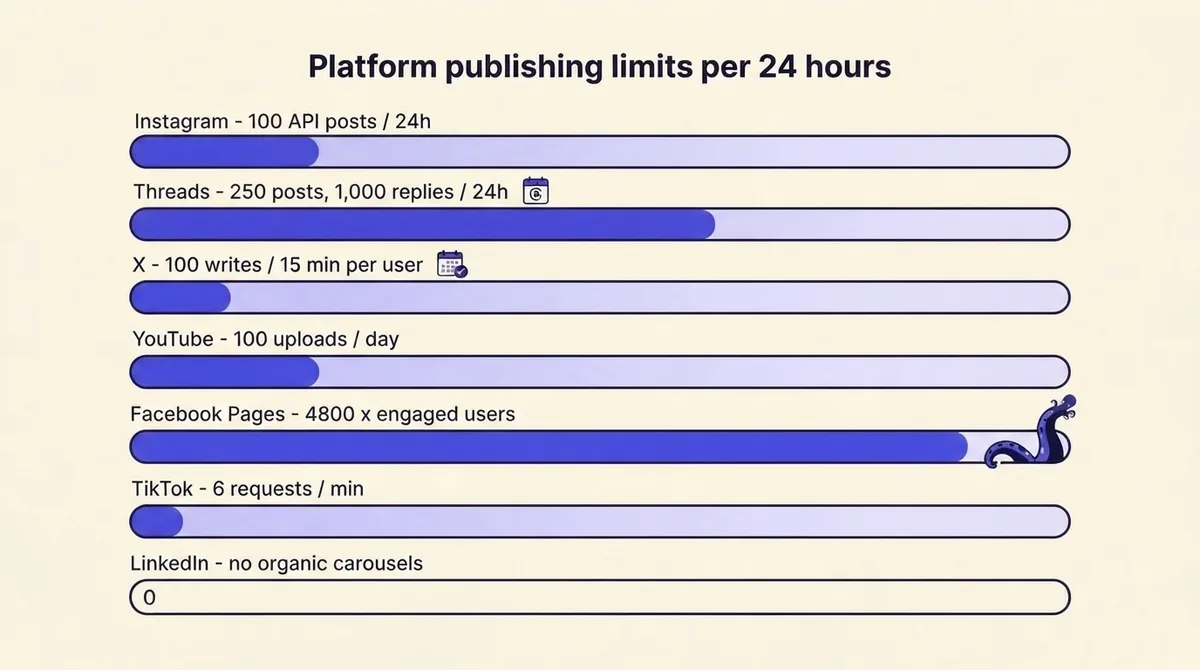
- Instagram: 100 API-published posts within a 24-hour moving period, with a carousel counting as a single post. A publishing container expires if it is not published within 24 hours, and the status endpoint returns "EXPIRED - The container was not published within 24 hours and has expired." (Meta)
- Threads: 250 posts and 1,000 replies per 24 hours, on an 86,400-second quota window.
- X: POST /2/tweets is limited to 10,000 requests per 24 hours per app and 100 requests per 15 minutes per user. X's docs note explicitly that rate limits and billing are separate, so you can stay inside the limit and still incur usage costs.
- YouTube: a default 10,000 quota units per day across endpoints, plus a separate bucket of 100
videos.insertcalls per day. Uploads cap at 100 per day regardless of unit quota remaining. - Facebook Pages: calls within 24 hours = 4800 x number of engaged users. A Page with a small engaged audience gets a proportionally small API budget. Exceeding it returns error code 32, "(#32) Page request limit reached," and the
estimated_time_to_regain_accessheader reports minutes until calls resume. - TikTok: 6 requests per minute per user access token on the video init endpoint.
The Pages formula is the one that bites new accounts hardest: a brand-new Page with a handful of engaged users has almost no API budget, so a bulk backfill of six months of content fails on a Page that has not earned the headroom. Plan backfills against the smallest account you own, not the largest.
You cannot fully automate TikTok, and the tutorials are wrong
This is a correction rather than an addition. TikTok's Content Sharing Guidelines prohibit a hands-off publish. Apps must display a preview of the to-be-posted content and may only send it after express user consent. Privacy Status must be selected by the creator with no default value. Comment, Duet and Stitch interaction settings must be unchecked by default. Preset title text and hashtags must be editable before posting. Apps must not add promotional watermarks or logos to a creator's content (TikTok).
Separately, unaudited API clients are restricted: all content posted by an unaudited client is limited to private viewing mode, and removing that restriction requires an audit verifying compliance with TikTok's Terms of Service.
So every "post to TikTok on autopilot" tutorial is describing something the platform's own developer guidelines do not permit. What you can legitimately automate is everything up to the preview: asset selection, caption drafting, hashtag suggestion, scheduling the moment the preview is presented. A human taps privacy status and confirms. Build that human tap into your workflow deliberately, rather than discovering it when your posts are all private.
The kill switch: what "pause the queue" has to actually do
"Pause your queue during a crisis" is the industry's one-sentence answer to a question that has at least six parts.
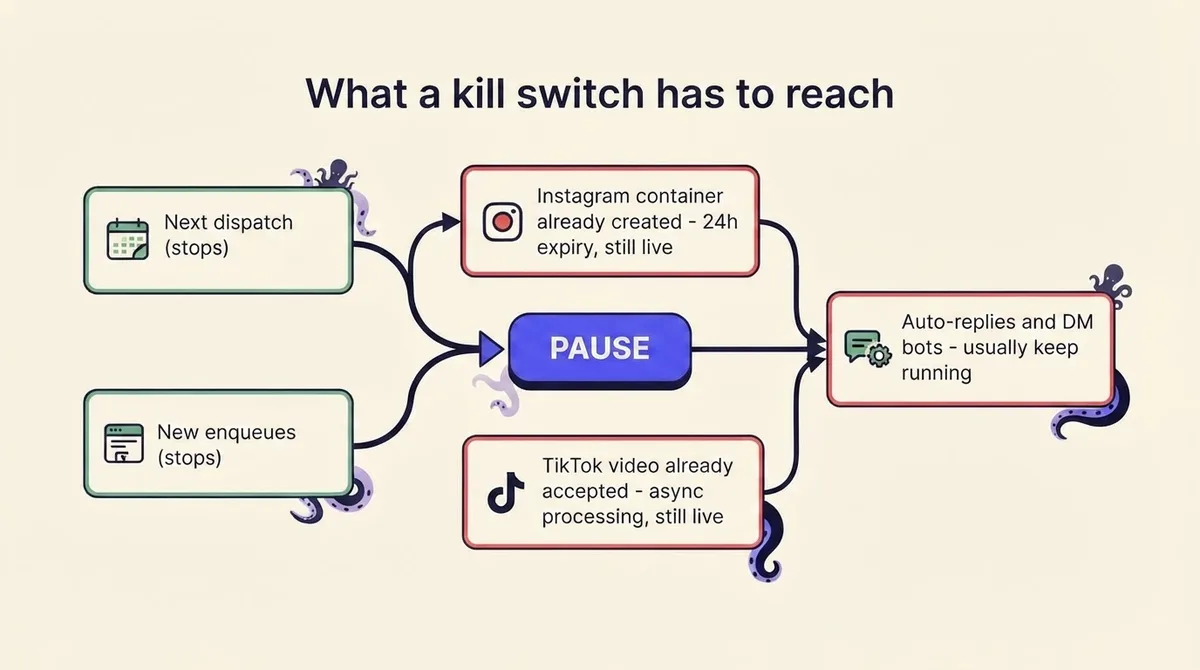
Interrogate your stack against these:
- Does pause stop the next dispatch, or only new enqueues? Many tools stop you adding work and let the already-scheduled jobs fire. That is not a pause.
- What about an Instagram container already created? The container lives for 24 hours. If your integration created it and the publish step is separate, you have to know whether pausing blocks the publish call or leaves it queued.
- What about a video TikTok has already accepted? Publishing is asynchronous. Once accepted for processing, you are recalling from the platform, not from your tool.
- Does pausing publishing also pause auto-replies? Usually it does not, and this is the real crisis risk. Your queue is frozen and your DM bot is still cheerfully offering a discount code to people complaining about the outage. Publishing and response are separate systems and need separate halts.
- Who holds the credential at 2am? If one person's session is the only path to the pause button, you do not have a kill switch, you have a phone number.
- How do you rehearse it? Quarterly, on a real account, timed. Target: full halt of both publishing and response inside five minutes by any on-call person.
That is 64% of users saying it matters that brands communicate on social when a crisis occurs, per Sprout's Q2 2026 survey, colliding with a stack that is still auto-posting about a webinar.
The capability you need, independent of vendor: programmatic pause (callable without a browser), queue inspection (what is scheduled, per channel, right now), per-channel and per-category halting (kill X only, or kill replies only), and recall of unsent legs of a multi-platform post. OctoSpark exposes those as API and MCP calls, so an on-call engineer or an agent can halt a category from a terminal, and multi-platform posts can have individual legs recalled while the rest stand. Buffer, Hootsuite and Later all let you pause a queue from the UI; none of them give you a documented single call that stops publishing and response together, so if you use them, write down the manual sequence and rehearse it.
The automation ledger: what you actually save
"Automation saves you time" is asserted everywhere on this topic and quantified nowhere. It is not a saving, it is a transfer.
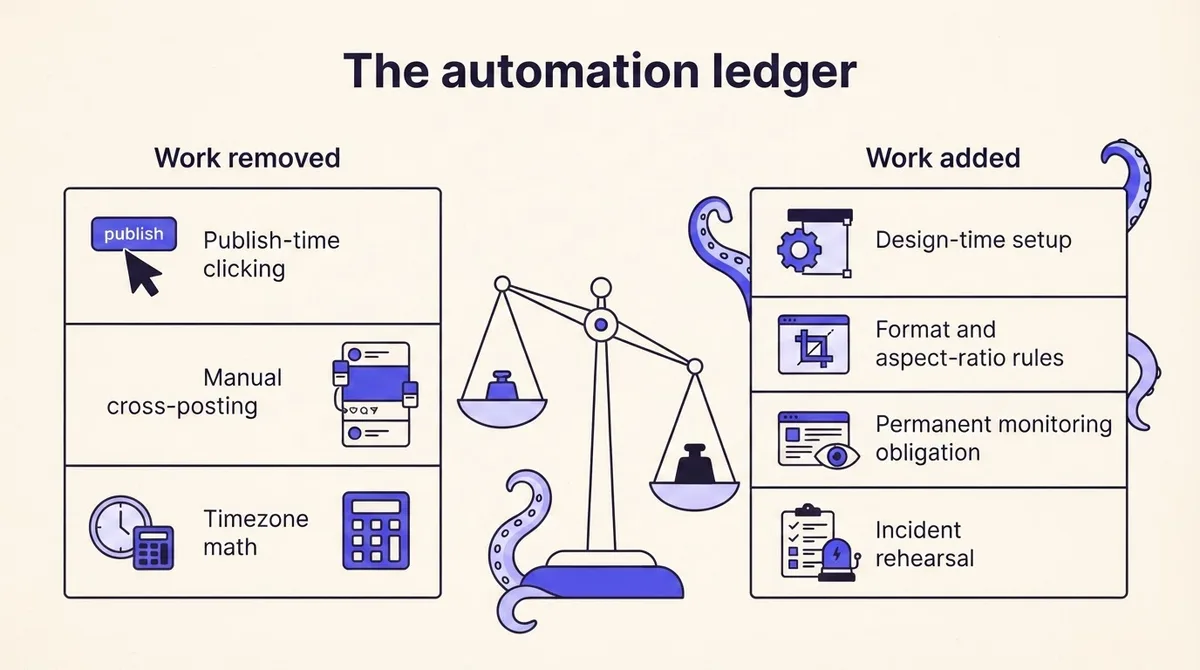
Automation removes publish-time work: clicking, cross-posting, timezone math, the 09:00 scramble. It adds design-time work: format rules per channel, approval gates, stop-word lists, credential rotation. And it adds a line item that never goes away, which is monitoring. Someone has to notice when a container expires, when error code 32 appears, when a bot starts answering the wrong thing.
A useful test before you automate anything: if the automation ran unattended for a week and produced a wrong result on day one, when would you find out? If the answer is "day seven," build the alert before you build the automation. Agencies running this across many client accounts should read our agency operating model guide for how the monitoring duty gets assigned.
Approval gates by category: scheduled publishing gets one approver and a per-channel preview. Rule-based response gets a stop-word gate plus a weekly transcript sample, not per-message approval, which is impossible at volume. Generative production gets a human editor who is accountable for originality, before anything enters the queue. Client-facing teams can formalise the first of these with client approvals.
The tools, mapped to the three automations
Organised by which automation they actually serve, since most listicles rank them as if they were interchangeable.
Scheduled publishing. Buffer (free tier for 3 channels, paid from around $6 per channel per month) is the cleanest small-team scheduler. Hootsuite and Sprout Social sit at the enterprise end, roughly $99 and $249 per seat per month respectively, and buy you approval workflows and reporting more than they buy you scheduling. Metricool and Publer fill the middle. OctoSpark covers this layer through the social media scheduler with API and MCP access, which matters if an agent rather than a person is doing the queuing. Detailed side-by-side comparisons live in our scheduling tools breakdown.
Rule-based response. This is a different product category and schedulers are weak at it. ManyChat and Chatfuel handle Messenger and Instagram DM flows natively and understand the 24-hour window. Sprinklr and Sprout have inbox routing at enterprise price points. Do not buy a scheduler expecting competent DM automation.
Workflow glue. Make, n8n and Zapier are what practitioners actually reach for, usually glued to a scheduler. They are powerful and they are also where kill switches go to die, because a paused scheduler does not pause a running Make scenario. If you use glue, the pause has to be implemented at the glue layer too. n8n self-hosted is free; Make and Zapier start around $9 to $30 per month and scale with operation count, which is the pricing model that surprises people at volume.
Never hand over: crisis communications, anything referencing a named individual, refund or legal replies, and the final confirm on TikTok. See pricing for where OctoSpark sits.
Frequently asked questions
How can I automate my social media posts? Connect each account through a scheduler's official API integration, author content once, set per-channel format variants, get one human approval, and schedule. Keep volume under the caps above. Verify TikTok separately, because it requires a human confirm.
Can ChatGPT automate social media posts? It can draft them, and via tool use or MCP it can call a publishing API. It cannot legitimately complete a TikTok publish unattended, and it should not be the last reviewer before anything goes live on an account you care about.
What is the 5 5 5 rule? A commonly cited content-mix heuristic: five posts about your industry, five about your own content or offers, and five engagements with other accounts, per period. It is folklore rather than platform guidance, useful only as a rough check that you are not posting exclusively about yourself.
What are the top automation tools? By category: Buffer or OctoSpark for scheduling, ManyChat for DM response, n8n or Make for glue. Ranking them on one list assumes they do the same job, which they do not.
Will automation get my account banned? Rarely from scheduling through official APIs. The realistic risks are messaging restrictions from bot policy violations and reduced recommendation reach from unoriginal content, neither of which arrives as a ban notice.
Start with scheduling, gate response behind a stop-word list, keep generative output downstream of something real, and rehearse the pause before you need it. Try it on your own accounts.