
How to Set Up a Social Media Approval Workflow

Most advice about social media approval workflows stops at the point where the interesting problems start. You will read that you should have one, that it protects the brand, and that your tool supports multi-step sign-off. None of that helps at 4:40pm on a Friday when a product launch post is sitting in review, the one person who can approve it is on a plane, and the slot is in twenty minutes.
An approval workflow is not a feature you switch on. It is a small operating system with rules that must hold under pressure: how many stages a post passes through, who can block it, who can go around a block, how long each reviewer has, and what happens when the clock beats the process. Get those five decisions right and the workflow disappears into the background. Get them wrong and your team quietly routes around it, which is the same as not having one, except now you also have a false sense of control.
This is a design guide, not a tour: a copyable approval matrix, three worked patterns (solo creator, in-house team, agency with client sign-off), and the platform and regulatory constraints that decide what your policies can actually be. Every platform claim below comes from official documentation, because the details matter. A post approved nine minutes before its slot cannot be scheduled through Meta's API at all.
What an approval workflow actually is, and what platform roles are not
An approval workflow is a state machine for a piece of content. A post occupies exactly one state at a time (drafted, in review, changes requested, approved, scheduled, published, killed), and each transition has a named owner, a deadline, and a record.
The critical distinction: platform-native admin roles are access control, not approval. They govern who can press publish, not whether anyone read the thing first. LinkedIn Pages offer Super admin (every permission, including adding and removing admins and deactivating the Page), Content admin (create and manage Page content including posts, boosting, and events), and Analyst (analytics only, cannot create or publish), per LinkedIn's admin roles documentation. Nowhere in that list is a review step. Same on Meta, same on X. If you want approval, it lives in your tooling and your written policy, not in the platform.
So the failure mode is not "someone published without permission." It is "someone published with permission, and nobody read it first."
The five ways approval processes actually break
Before choosing a structure, know what you are defending against. Stalled approvals trace back to five causes:
- Ambiguous veto. Three people comment, none says approved, and the drafter cannot tell whether the notes are blocking or advisory.
- No deputy. The single named approver is unreachable and no one else is provisioned to act.
- Silent approval transfer. A post is approved, then edited, and the sign-off carries over to text nobody reviewed.
- Deadlines with no consequence. An SLA nothing enforces is a suggestion, and reviewers correctly treat it as one.
- Scattered feedback. Notes in Slack, a DM, and a spreadsheet, none attached to the draft they describe.
Choose your approval depth: single-stage, multi-stage, or parallel
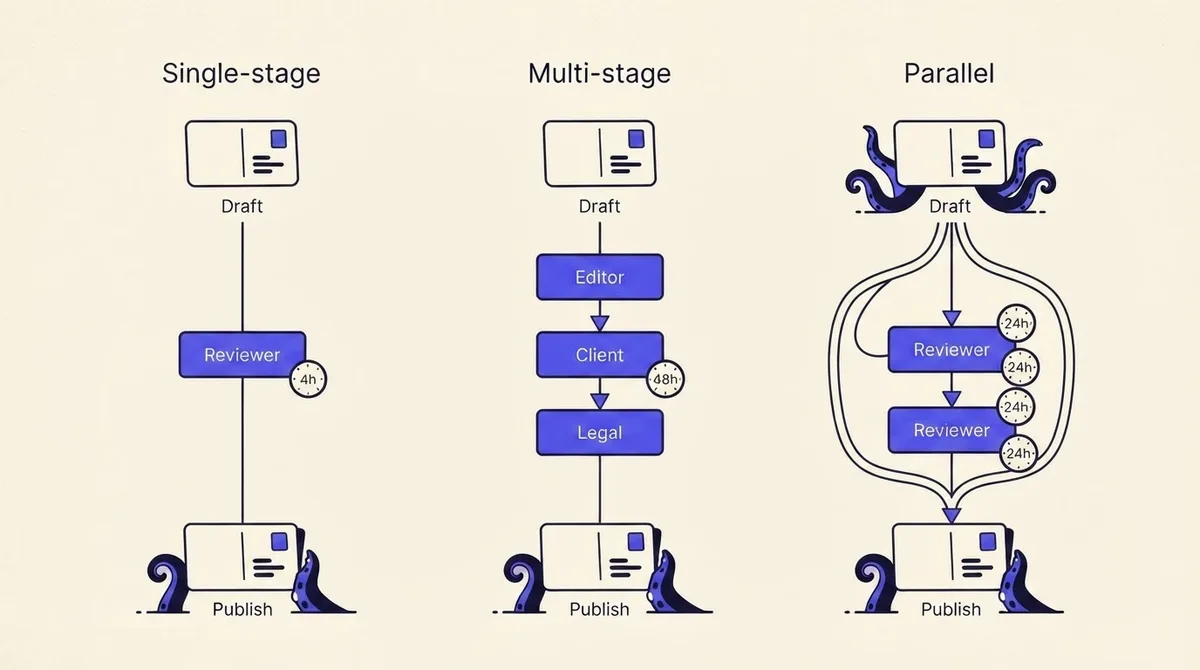
Stages are expensive. Each adds a queue, a notification, and a chance for the post to sit. Add one only where a distinct risk is being checked.
- Single-stage. Draft, one reviewer, publish. Correct for solo operators, evergreen content, and low-risk channels. Fastest loop, but it rests entirely on one person's judgment.
- Multi-stage sequential. Two to four reviewers in order: internal QA, then client or executive, then legal. Each sees a cleaner draft than the last, which is the point. Cost: latency compounds. Three 24-hour stages is a three-day lead time even when nobody is slow.
- Parallel. Multiple reviewers see the same draft simultaneously and all must clear it. Cuts wall-clock time to the slowest single reviewer instead of the sum. Cost: reviewers give conflicting notes against the same version, so you need a named tiebreaker before you use it.
A practical rule: go parallel when reviewers check different things (brand voice versus factual accuracy versus legal risk), sequential when a later reviewer's judgment depends on the earlier one's changes. Never run more than one stage per distinct risk. If your client and your account director both check "does this sound right," delete one of them.
Map the stages and assign the roles: a copyable approval matrix
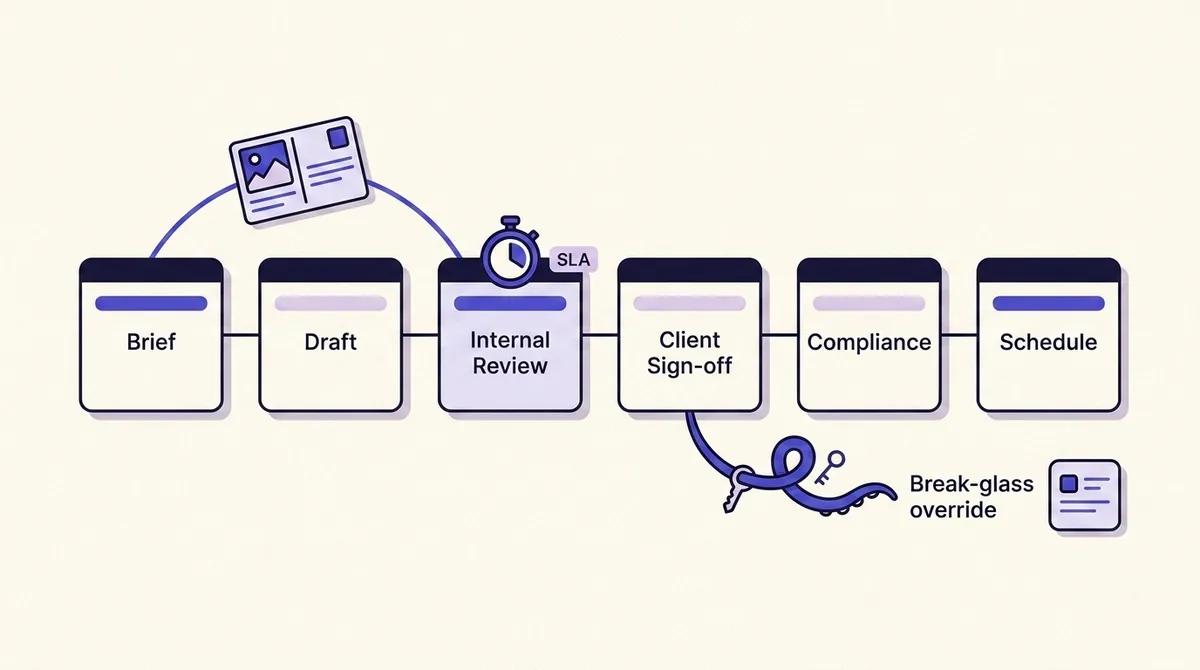
Six stages cover almost every real workflow. Copy this matrix and fill in one row per stage with a named person, never a team.
- Stage 0, Brief. Owner: strategist or account lead. Output: topic, angle, channel, target slot. No approval needed, but an unsigned brief causes most late-stage rewrites.
- Stage 1, Draft. Owner: writer or AI-assisted drafter. Output: copy plus assets, attached to the brief.
- Stage 2, Internal QA. Owner: senior editor or content lead. Checks: brand voice, factual claims, platform fit, disclosure. Veto: yes, on brand and claims.
- Stage 3, Stakeholder or client review. Owner: one named client contact plus one named deputy. Veto: yes, on message and positioning. Not on comma placement.
- Stage 4, Compliance or legal. Owner: qualified reviewer. Conditional, triggered by a flag (regulated claim, endorsement, customer data, competitor mention), not applied to every post.
- Stage 5, Schedule and publish. Owner: account manager or the automation itself. Checks platform-specific constraints and locks the version.
Two rules make this matrix work. First, every row names a human and a standing deputy. Second, each veto has a documented scope. "Client can veto message, agency can veto platform mechanics and disclosure compliance" ends 90 percent of approval arguments before they happen, because it tells each side which objections are theirs to make.
Download the printable approval workflow diagrams and client SLA template (PDF) to fill this in per client.
Who holds veto, and who can override it: designing break-glass before you need it
This is the question no competing guide answers, and it is the first thing that breaks. The implicit advice everywhere else is "never bypass approval," which nobody follows, because reality produces situations where the cost of waiting exceeds the cost of a lightly reviewed post.
Design the bypass instead. Three components:
1. A standing deputy for every approver. Not an emergency contact, an already-provisioned second person with equal rights who is active by default. This is where platform permissions bite. On LinkedIn, only a Super admin can add or remove admins; a Content admin can publish but cannot grant access, per LinkedIn's admin roles documentation. If your single Super admin is unreachable, you cannot provision your way out of the problem. The deputy has to exist before the outage, and you should be able to name your second Super admin on every Page you manage right now, from memory.
2. A narrow break-glass path. One named role can approve and publish outside the normal chain, under written conditions. Good conditions are specific: correcting a factual error in a live post, a crisis-comms response, or a commitment already announced elsewhere. "Urgent" is not a condition; it means whatever the person in a hurry says it means.
3. A bypass that is logged, not forbidden. The override writes a record: who overrode, which stage was skipped, which version shipped, why, and who reviews it afterward. That converts an unauditable shrug into a reviewable event. A team overriding twice a month has an SLA problem worth fixing; a team that has never overridden and never missed a slot probably has a shadow process you cannot see.
One more distinction most workflows miss: veto without a deadline is not veto, it is a veto by silence. Decide explicitly whether an approver who goes past SLA is deemed to have approved or deemed to have blocked. For client work, do not invent this: if silence means approval, that clause belongs in the contract, in writing, agreed before the first post.
Set an SLA per stage, and decide what a missed slot does
Every stage gets a clock: 4 or 8 business hours for internal QA, 24 to 48 for client review, up to 72 for compliance. The number matters less than the fact that something happens when it expires.
Try the numbers
Will this post clear approval before its slot?
Review order
Publish slot
Each dashed line is the end of a working day. Weekends do not count.
Approved
Thu 13:00
28 business hours
Slot
Thu 12:00
3d 4h on the clock
Missed by
1h
What a missed slot does
Approved Thu 13:00, after the Thu 12:00 slot. Meta will not schedule anything less than 10 minutes out, so the policy decides: Evergreen content: the post moves to the next open slot and the cadence holds.
SLA clocks pause outside 09:00-17:00 Monday to Friday. Each revision round adds 4 hours of producer changes plus a fresh client review.
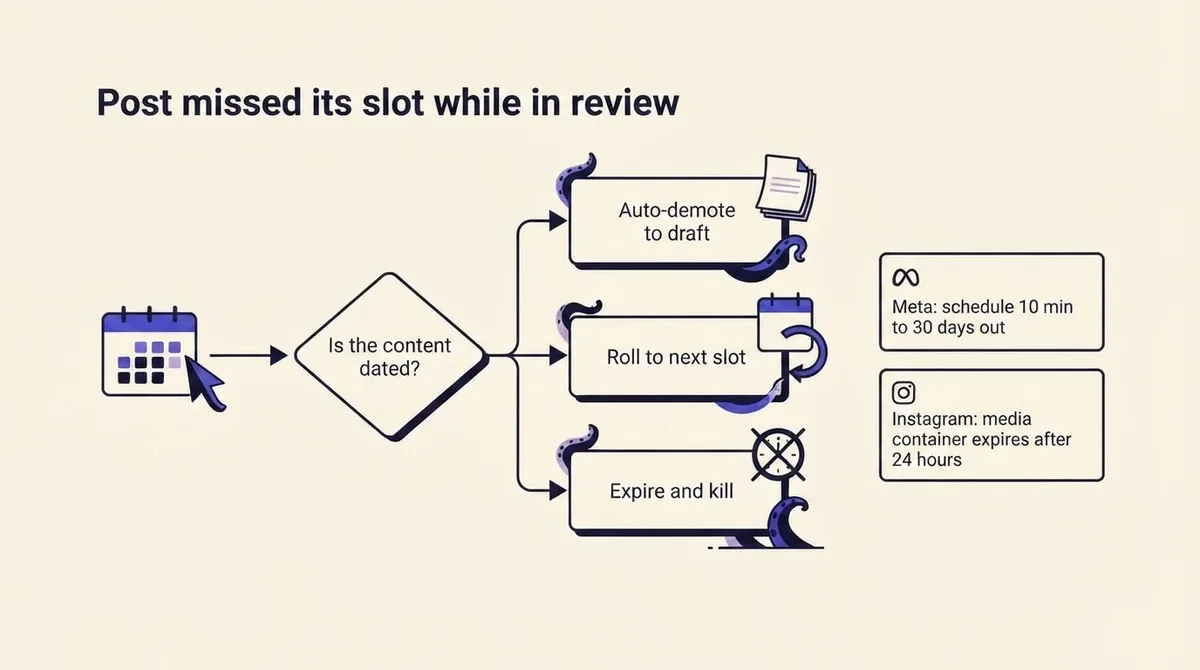
Then answer the question nobody else answers: what happens to a post whose slot passes while it is in review? This is not a soft "posts get delayed" complaint. It hits hard platform limits.
- Meta's Pages API requires a scheduled post's publish time to be between 10 minutes and 30 days from the time of the API request (Meta). Two consequences: a post approved nine minutes before its slot cannot be scheduled at all, only published immediately or moved; and a calendar built more than 30 days ahead cannot be pre-loaded into the queue while it waits on legal.
- Meta's Instagram content publishing documentation states that an unpublished media container expires after 24 hours, and that accounts are limited to 100 API-published posts in a rolling 24-hour window. So a week of held-up content that all clears on Friday is a queue that can technically fail, and any container built before the delay is already dead and must be rebuilt, not merely rescheduled.
- TikTok's Content Posting API documentation restricts content posted by unaudited clients to private viewing mode until the client passes an audit, and requires an approved video.publish scope authorized by the target user. An approved post can still reach nobody.
Given that, pick one of three policies per content type, not per post:
- Auto-demote to draft. The post leaves the calendar, the slot frees up, the owner is notified. Correct for launch-tied and campaign content where publishing late is worse than not publishing.
- Roll to the next open slot. Default for evergreen. Preserves the cadence and costs nothing.
- Expire and kill. For dated or reactive content whose value is gone. Kills the post and logs why, so it does not resurface three weeks later.
Write the policy into the content type in your calendar so it executes without a human decision. If you are still building the calendar those slots live in, our guide to building a social media content calendar covers the slot structure this assumes.
Version your feedback: sign-off binds to a draft, not to "the post"
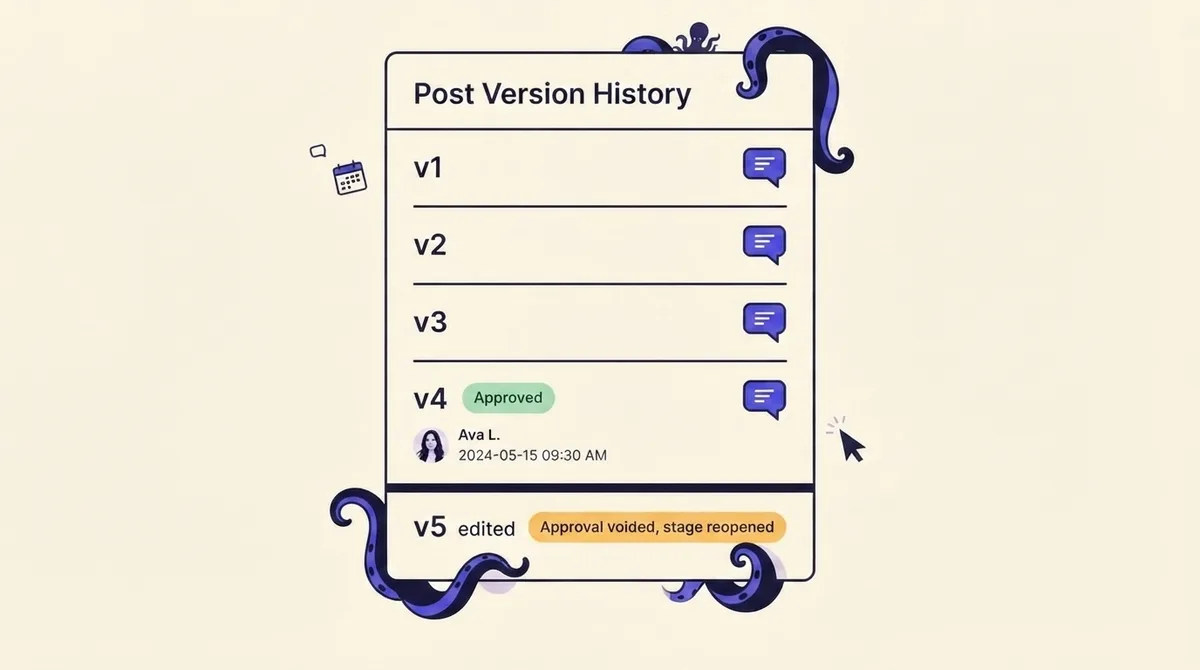
This is the most under-discussed defect in social approvals. Your client approves "the post." Someone then tightens the hook, swaps the image, or adds a link. The approval flag stays green, and now applies to content no approver has ever read.
The fix is three rules:
- Approval binds to a version. The record is "Priya approved v4 on Tuesday at 10:12," not "the post is approved."
- Any post-approval edit re-opens the stage. Automatically. Not by convention, not by an honor system. The green badge flips to amber the moment v5 exists.
- Feedback anchors to the version it was written against. "The second line is too aggressive" is meaningless once the second line has changed twice. Anchored comments make superseded notes obvious.
The predictable objection: "a typo fix should not need re-approval." Handle it with a narrow, named exception rather than by weakening the rule. Let a defined class of edit (punctuation, a hashtag, a UTM parameter) preserve approval, and log it. Everything else, including anything touching a claim, a price, an image, or a call to action, re-opens the stage. If you cannot express the exception as a rule you would show a client, it should not be an exception.
This is one of the few workflow rules that cannot be enforced socially, so it has to live in tooling. OctoSpark's client approvals bind sign-off to a specific version and reopen review when content changes, which is the difference between an audit trail and a decoration.
Compliance sign-off: what regulators actually require you to capture
Competing guides say "loop in legal if you are regulated." Here is what that means specifically, because the obligations are named and the field list is explicit.
For broker-dealers, FINRA Rule 2210(b)(1)(A) requires that an appropriately qualified registered principal approve each retail communication before the earlier of its use or filing with FINRA's Advertising Regulation Department (FINRA). Pre-publication approval is a rule, not a workflow preference.
Rule 2210(b)(4) then dictates what your audit trail must contain: communications must be retained for the period required by SEC Rule 17a-4(b), and the record must include the dates of first and last use, the name of the approving principal, and the date approval was given. That is a field list; any tool you evaluate should capture all four. And FINRA Regulatory Notice 17-18 states that the content of a communication, not the technology used to send it, determines what must be retained, so a sign-off given over Slack is still a business record.
Two routing rules follow, and both are commonly missed:
- Real-time replies can be routed differently. Rule 2210 exempts certain communications from prior principal approval, including posts in online interactive forums, which may instead be supervised like correspondence. So it is legitimate to run planned campaign posts through full pre-approval while supervising community replies under a lighter, post-hoc regime.
- Engagement needs a review path, not just publishing. Under Notice 17-18's entanglement and adoption doctrine, a firm that shares or links to third-party content has adopted it and must ensure it is fair, balanced, and not misleading, and a representative who likes or shares a third-party comment on a business account has adopted that comment. Customer comments on a firm's page generally do not require pre-approval unless the firm is entangled with or has adopted them. Most workflows govern posts and ignore reshares and likes entirely.
On the consumer side, put disclosure inside the review checklist rather than delegating it to the creator. The FTC advises brands to instruct their influencer network on clearly and conspicuously disclosing the connection and to make a reasonable effort to know what participants are saying, and indicates a single rogue influencer is unlikely to trigger enforcement where the company has a reasonable training, monitoring, and compliance program in place. A disclosure must use unambiguous language and stand out so consumers notice it without looking; a hyperlinked disclosure is not clear and conspicuous because it is easily avoidable. The 2023 revised Endorsement Guides also state that a platform's built-in disclosure tool might not by itself be an adequate disclosure (FTC). So "we used the paid partnership label" is not a sufficient answer on a checklist. Your reviewer checks the disclosure in the copy itself.
Three worked workflows you can copy
Solo freelancer or founder, one stage. Draft in a weekly batch. The stage is a cold read by you, minimum twelve hours later, against a written checklist (claim accurate, link works, hook lands, disclosure present). Veto: you. Override: reactive replies skip the cold read but get tagged for a weekly sweep. Missed slot: always roll, because evergreen content is never urgent. Added latency: under a day.
In-house team, two stages, parallel. Social manager drafts. Content lead checks brand and claims; the product owner checks factual accuracy, in parallel, both with an 8-business-hour SLA. Veto scopes are split: the content lead owns voice and claims, the product reviewer may flag factual errors only, not taste. Every approver has a standing deputy. Break-glass: the head of marketing may publish unilaterally, logged, reviewed at Monday stand-up. Missed slot: evergreen rolls, launch-tied content auto-demotes to draft and pages the owner. Typical lead time: one business day.
Agency with client sign-off, four stages. Senior strategist does internal QA (8 hours), then one named client approver plus a named deputy review (48 hours), then compliance only if flagged (72 hours), then the account manager schedules. Veto: client on message, agency on platform mechanics and disclosure. Override: none past compliance; client silence past SLA counts as approval only if the contract says so. Provision two client-side approvers with publish-capable roles on day one. Missed slot: dated campaign posts expire and are killed, evergreen rolls. Agencies running several of these at once should read our pillar on social media management for agencies for the surrounding operating model, and our comparison of social media management tools for how approval features differ between platforms.
Roll it out, then measure it
Pick a tool that enforces the three rules social convention cannot: version-bound approval, per-stage SLAs with an automatic consequence, and an exportable log containing approver name, approval timestamp, and version. Notification quality matters more than feature count: the reviewer who has to log in to discover they are blocking something is the one who blocks things for two days.
Measure four things monthly: median time in each stage (your bottleneck), percentage of posts that miss their slot, override count with reasons, and post-approval edit rate (a high rate means weak briefs, not weak reviewers). If a stage never rejects anything, delete it; it is a notification with extra steps.
Roll out on one channel or client for a month before expanding, and watch for the tell that the process is failing: work moving back into DMs. That is not indiscipline. It is your team telling you the SLA is too slow or a stage is redundant. Fix the design, not the people. If you want a system that plans, drafts, routes, and schedules across every platform you publish to from a dashboard, a CLI, or an AI agent, you can see how OctoSpark handles it.