
How to Schedule Social Media Posts on Every Major Platform

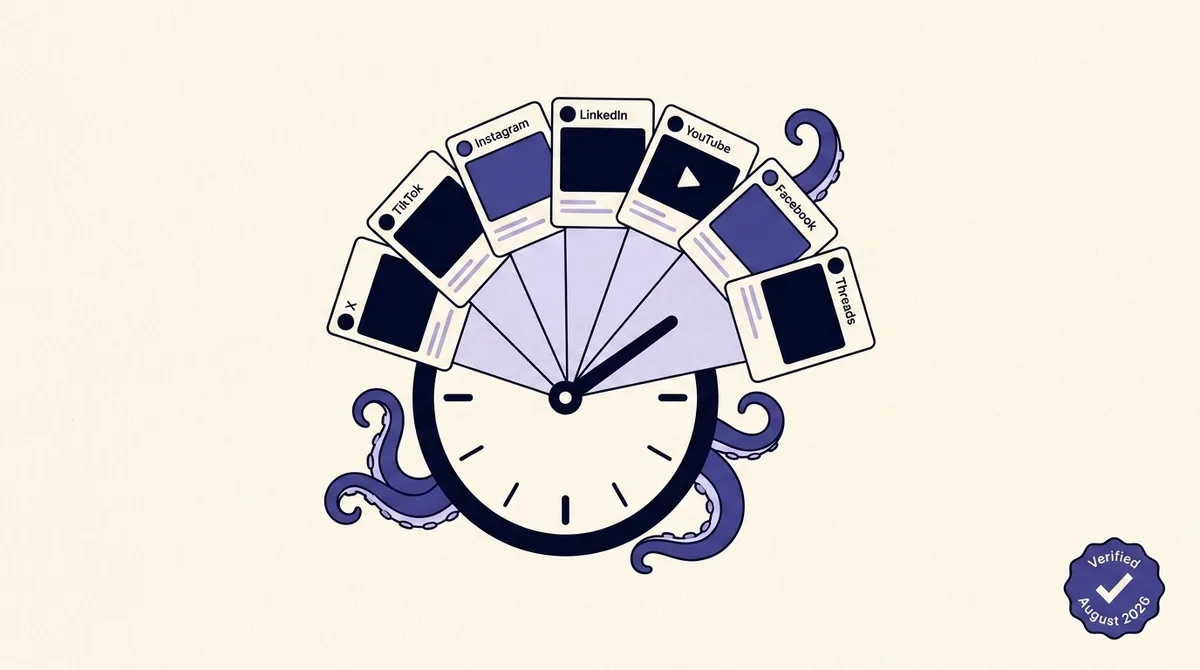
Search for how to schedule social media posts and you get fifteen pages selling you a scheduler. Almost none of them tell you what the platforms themselves permit: how far ahead you can actually queue a post, what the minimum lead time is, and whether the platform's own API will even accept a future timestamp. Those constraints decide whether your Tuesday 6am post goes out while you sleep or quietly does nothing.
This page is the artifact nobody maintains. Below is a per-platform breakdown of native scheduling support, the real window limits, and what the public API does and does not allow, each one sourced to the platform's own documentation. Where a number could not be confirmed on a first-party page, it is marked as unconfirmed rather than laundered from a vendor blog.
The most useful thing here is not any single number. It is the realization that "scheduling" is three different mechanisms wearing one word, and which one you get determines whether your post can fail silently at 6am. Start there.
Limits verified: August 2026. Changelog: August 2026, first publication. Facebook Pages API window corrected from the widely repeated "6 months" to the documented 10 minutes to 30 days. Instagram API publishing ceiling corrected to 100 posts per rolling 24 hours.
What scheduling a post actually means, and why the word hides three mechanisms
When you set a time on a post, one of three completely different things happens. Nobody labels which one you are getting.
True server-side scheduling. You hand the platform a timestamp and the platform owns delivery from that moment. Your tool can go offline, your laptop can die, your access token can lapse, and the post still goes out because it is already sitting in the platform's own queue. Only two of the seven platforms offer this through their public API: Facebook Pages via scheduled_publish_time, and YouTube via status.publishAt.
Deferred push. The tool holds your post in its own database and calls the ordinary publish-now endpoint at the target minute. The platform has no idea a schedule ever existed. This is what happens on Instagram, Threads, TikTok and LinkedIn when you schedule through any third-party product. It works fine most of the time, and its failure modes are real, silent, and entirely on the tool's side.
No programmatic path. The API offers no scheduling of any kind and no workaround short of a different product tier. This is X organic posting.
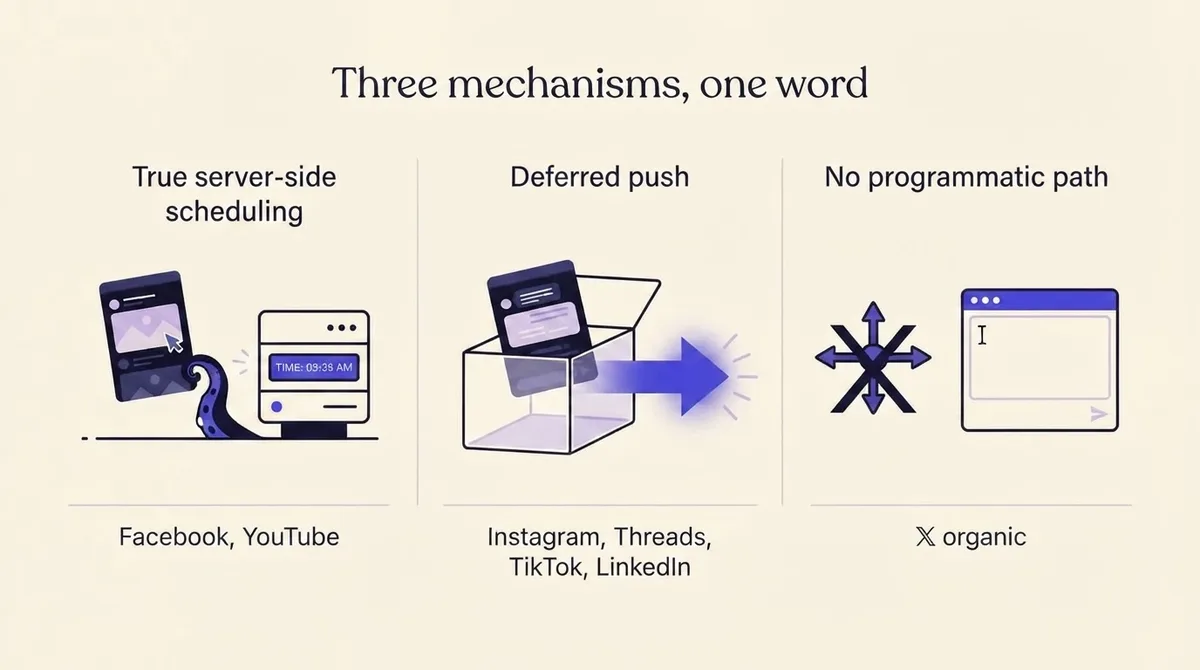
That taxonomy reframes the whole question. You are not asking "which scheduler is best." You are asking: which of my platforms can be trusted to fire unattended, and which need a monitored queue with alerting on failure? Four of seven need the monitored queue.
The 2026 scheduling matrix for all seven platforms
Read each entry as three facts: native support and where it lives, the native window, and whether the public API permits scheduled publishing.
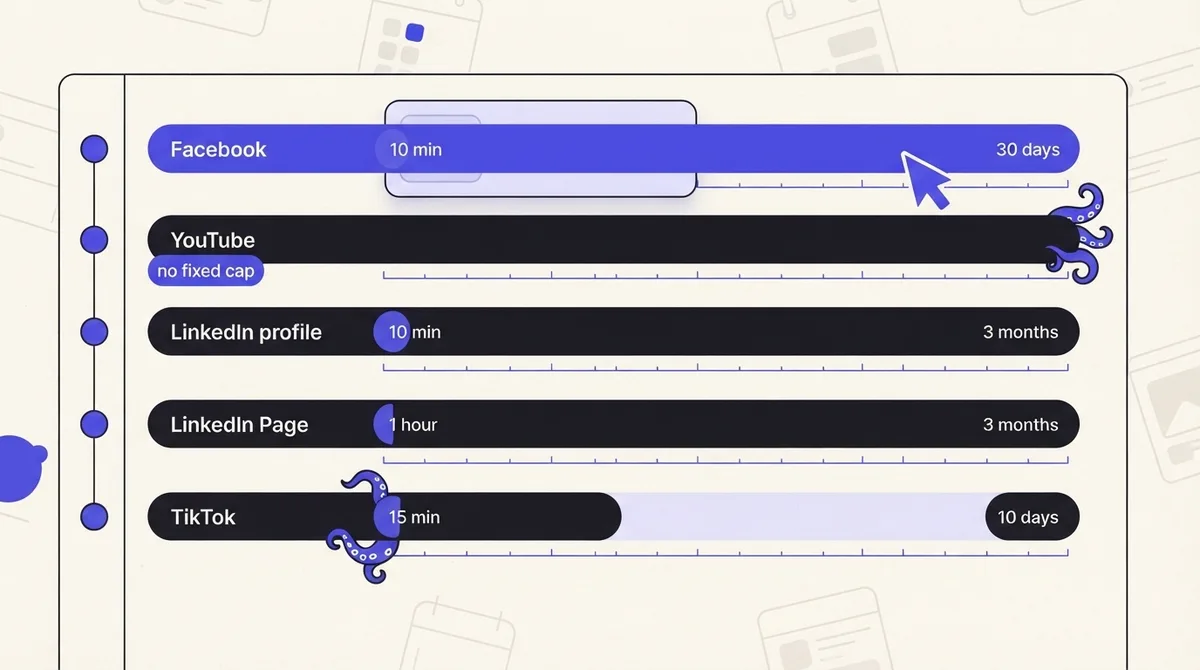
Facebook Pages. Native scheduling in Meta Business Suite. API scheduling: yes, true server-side. Window via API is 10 minutes to 30 days.
YouTube. Native scheduling in YouTube Studio on the Visibility step. API scheduling: yes, true server-side, via status.publishAt. No documented maximum horizon.
Instagram. Native scheduling in the app and in Business Suite. API scheduling: none. Third-party scheduling is deferred push, capped at 100 API-published posts per rolling 24 hours.
Threads. Native scheduling shipped web-first. API scheduling: none. Two-step container flow only, 250 published posts per 24 hours.
LinkedIn. Native scheduling in the composer. Profile window 10 minutes to 3 months; Page window 1 hour to 3 months, super admins and content admins only. API scheduling: none, at all.
TikTok. Native scheduling on the web upload page, Business Account only, 15 minutes to 10 days. API scheduling: none, and unaudited clients post privately.
X. No native scheduling parameter in the v2 create-post API. Native scheduling exists in the web composer and X Pro. The only documented programmatic path is the Ads API scheduled posts endpoint.
Facebook and YouTube: the only two that truly schedule server-side
If a post absolutely has to go out at a fixed moment, these are the two platforms where you can genuinely fire and forget.
On Facebook Pages, you create the post with published set to false and include scheduled_publish_time. The documentation is explicit about the boundary: "The publish date must be between 10 minutes and 30 days from the time of the API request." It accepts a UNIX timestamp in seconds, an ISO 8601 string, or anything PHP's strtotime() can parse (Pages API posts reference).
That 30 day ceiling matters, because scheduling blogs have been repeating "6 months" for years. If you are building a quarterly campaign calendar and assuming everything can be loaded into Facebook in one sitting, only the next 30 days will take.
Worked example. A bakery plans twelve weeks of Facebook posts in one Friday session. Weeks one through four can be handed to Facebook directly and forgotten. Weeks five through twelve exceed the 30 day API window, so they have to sit in a queue somewhere and get pushed into Facebook later. The practical fix is a rolling handoff: every Monday, promote the posts that have entered the 30 day window into true Facebook scheduling, and leave the rest queued.
YouTube works the same way but with a different shape. You set status.publishAt on an uploaded video, and per the docs it "can be set only if the privacy status of the video is private." The value is ISO 8601, the video must never have been published before, and you must explicitly set status.privacyStatus to private even when the video already is private. Setting a date in the past publishes immediately (YouTube Data API videos resource).
In YouTube Studio, the equivalent is choosing Schedule on the Visibility page. One first-party caveat worth knowing: if the channel has an active Community Guidelines strike, a scheduled video will not publish during the penalty period and has to be rescheduled after it ends. That is a delivery failure that looks exactly like nothing happening.
Route: for the full upload-plus-publishAt walkthrough including premiere handling, see our dedicated YouTube scheduling guide in the platform scheduling cluster.
Instagram and Threads: native scheduling in the app, no scheduler in the API
Instagram's Content Publishing API has no scheduling parameter. Not a hidden one, not a partner-only one. What it has instead is a rate limit that tells you exactly how Meta expects scheduling to work: an Instagram account is limited to 100 API-published posts within a rolling 24 hour period, with a carousel counting as a single post. Meta then says the quiet part out loud: "We recommend that your app also enforce the publishing rate limit, especially if your app allows app users to schedule posts to be published in the future" (Instagram content publishing docs).
That sentence is the confirmation that every third-party Instagram scheduler is deferred push. The tool holds your post and calls publish-now at the target minute. If you have seen an older guide claiming 25 or 50 posts per day, it is out of date.
The failure mode is specific and worth memorizing. Instagram publishing is two steps: create a media container, then publish it. The container status endpoint can return EXPIRED, defined as "The container was not published within 24 hours and has expired." A tool that creates containers early and publishes late has built itself a 24 hour fuse.
Threads has the same architecture. It is a create-container then publish flow, Meta recommends waiting about 30 seconds after container creation before publishing, and there is no scheduled-publish field. Threads profiles are capped at 250 published posts per 24 hours (Threads posts docs).
On the native side, both platforms let you schedule in-product: Instagram from the composer's advanced settings, Threads from the three-dot menu on the composer, which shipped web-first. The commonly cited 75 day horizon for both, and the roughly 25 scheduled posts per day figure for Instagram, could not be confirmed on a first-party page, because the relevant help center articles are JavaScript-gated and return no readable body. Treat those as unverified and check the picker in-product before you plan a quarter around them.
One thing nobody can schedule on Instagram: Stories. There is no native scheduling for them and no API path. The honest workflow is a reminder: build the Story asset in advance, attach it to a calendar entry with the caption and link sticker text, and set a push notification for the publish minute. If your posting cadence depends on Stories, plan staffing for it rather than tooling.
If you are choosing publish times as well as mechanisms, our Instagram peak posting times guide covers the timing half of the decision.
Route: container lifecycles, carousel counting and reminder workflows are covered in depth in the Instagram scheduling guide in the platform scheduling cluster.
LinkedIn: a generous native scheduler and an API that accepts nothing but PUBLISHED
LinkedIn is the sharpest contradiction between native capability and API capability of any platform here.
Natively, LinkedIn's scheduler is one of the best. On a member profile, the help documentation states "The time selected must be within 10 minutes to 3 months from the current time (rounded to the nearest interval)." The picker offers 30 minute increments, but you can type an exact time instead (LinkedIn profile scheduling help).
Pages behave differently, and this asymmetry is almost never documented anywhere else: "You can schedule a post anywhere between an hour from the current time to three months in advance," and only a super admin or content admin of the Page can schedule a post or newsletter article. So the floor is 10 minutes on a profile and a full hour on a Page. If your workflow assumes you can slot in a Page post 20 minutes from now, it will not take.
The API is the opposite story. The Posts API cannot schedule anything. For the lifecycleState field the documentation says "PUBLISHED is the only accepted field during creation." DRAFT, PUBLISH_REQUESTED and PUBLISH_FAILED exist only as values that can come back in responses; you cannot set them (LinkedIn Posts API reference). There is no scheduled-publish field anywhere in the Posts API. You cannot even create a draft.
So any product claiming to "schedule LinkedIn via the API" is running its own queue and calling create-post in the moment. That is fine, as long as you know it and monitor it.
TikTok: web upload only, 15 minutes to 10 days, and the audit that keeps API posts private
TikTok's native Video Scheduler is straightforward and tightly bounded: "You can schedule videos anywhere from 15 minutes to 10 days in advance of publishing." It lives on the web upload page, and TikTok states "You'll need a Business Account in order to access desktop scheduling," though scheduled posts show up on both web and app (TikTok Video Scheduler announcement).
Ten days is the tightest horizon of any platform here. A monthly content calendar simply cannot be loaded into TikTok natively in one pass.
The Content Posting API offers Direct Post with either FILE_UPLOAD or PULL_FROM_URL as the source, but documents no future-timestamp scheduling. It requires approval for the video.publish scope, and there is a constraint that catches teams off guard during integration testing: "All content posted by unaudited clients will be restricted to private viewing mode" until the client passes TikTok's audit. If you built an integration and your posts are going out but nobody can see them, that is usually the reason, not a bug.
Route: audit requirements and the pull-from-URL flow are covered in the TikTok scheduling guide in the platform scheduling cluster.
X: no scheduling parameter in the v2 API, and the Ads-API-only workaround
The X API v2 create-post endpoint has no scheduling parameter. The full request field set is card_uri, community_id, direct_message_deep_link, edit_options, for_super_followers_only, geo, made_with_ai, media, nullcast, paid_partnership, poll, quote_tweet_id, reply, reply_settings, share_with_followers and text. No timestamp, no future publish, nothing (X API create post reference).
The only documented programmatic scheduling path on X is the Ads API scheduled posts endpoint, which accepts scheduled_at and requires Ads API access. That access is not something most teams have or want.
So for organic X, your real options are three: schedule natively in the web composer or X Pro, hold Ads API access, or use a tool that queues the post and calls create-post at the target minute. Polls cannot be scheduled by anyone, natively or otherwise, so a poll is always a live action.
Route: the composer scheduler, X Pro and thread handling get their own guide in the platform scheduling cluster.
Do scheduled posts get less reach? What actually causes them to fail
This is the top blocker to scheduling at all, and the honest answer is mechanical rather than algorithmic.
There is no first-party documentation from any of these seven platforms stating that a scheduled post is downranked for being scheduled. What there is, abundantly, is documentation of the ways a scheduled post can fail to appear at all. When people say scheduled posts underperform, the pattern usually traces to the deferred-push tier and one of these:
- Container expiry. Instagram and Threads containers expire after 24 hours if not published. A tool that pre-builds far ahead loses the post.
- Rate-limit collision. Hitting the 100-post Instagram ceiling or the 250-post Threads ceiling in a rolling 24 hours causes a rejection at exactly the moment you were not watching.
- Token expiry. An access token that lapsed since you queued the post fails the call at publish time, not at schedule time.
- Queue never fired. The tool was down, throttled, or the job was dropped. On Facebook and YouTube this cannot happen, because the platform owns delivery.
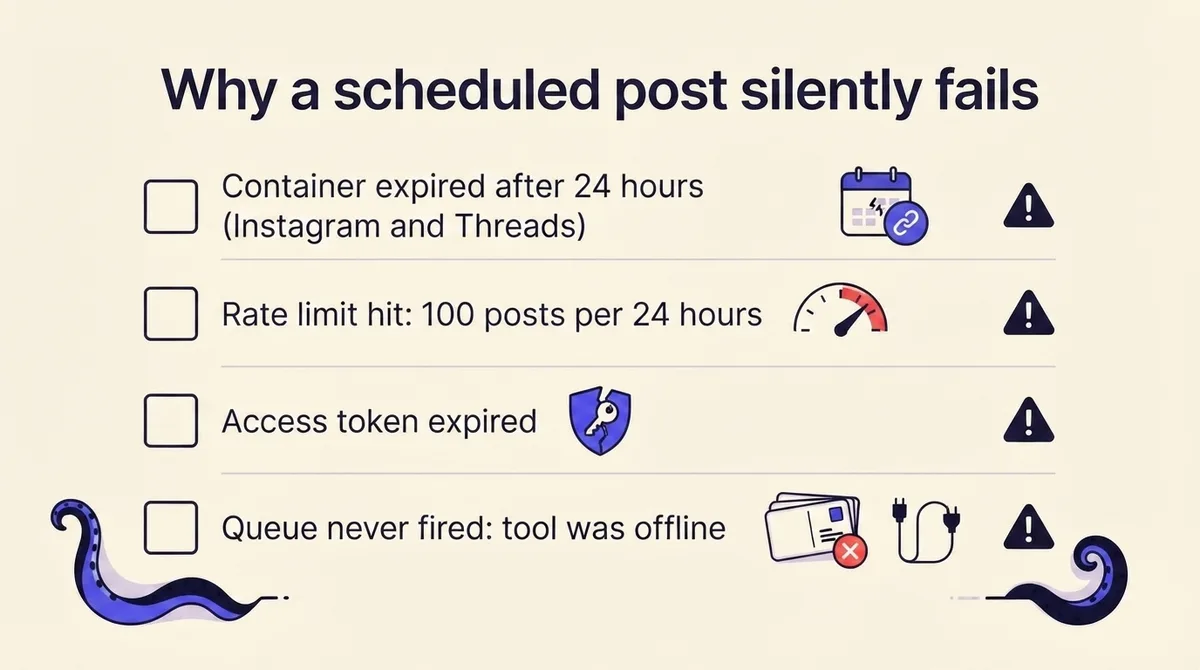
The operational takeaway: a post that goes out 40 minutes late, or not at all, will genuinely see less reach, and it has nothing to do with the algorithm. Build a delivery report you actually read. If your tool cannot show you a per-post confirmation with a platform post ID, you do not have delivery confirmation, you have hope.
How to schedule the same post across every platform at once
Here is the sequence that survives the constraints above.
- Sort your platforms into the two tiers. Facebook and YouTube are fire-and-forget. Instagram, Threads, TikTok and LinkedIn need a monitored queue. X organic needs either native scheduling or a monitored queue.
- Set your planning horizon to the tightest platform in the set. If TikTok is in the mix, native batch loading tops out at 10 days. Plan in 10 day blocks or accept that a queue holds the rest.
- Adapt per platform before you queue, not after. One caption pasted seven ways is the fastest way to lose the deferred-push posts you cannot easily fix mid-flight. Our cross-platform distribution guide covers the adaptation pass.
- Queue, then verify. After the publish minute, confirm a real post ID on every deferred-push platform. Treat a missing ID as an incident, not a curiosity.
- Keep the exceptions manual. Instagram Stories and X polls are reminder workflows. Put them on the calendar with an owner and a notification.
This is where OctoSpark's architecture is genuinely relevant rather than a bolt-on pitch. The same schedule can be created three ways: from the dashboard, from the terminal, or by an AI agent over MCP. One schedule object, one queue, one delivery record, whichever surface created it. That matters precisely because four of seven platforms need a monitored queue instead of fire-and-forget, and a monitored queue is only trustworthy if every entry point writes to the same place. You can see how the multi-platform side works on the multi-platform feature page, or start from the social media scheduler if you want the dashboard view first.
If you are building the calendar that feeds the queue, a consistent voice across seven surfaces helps more than tooling does; our social media brand guidelines framework is the input to that.
Frequently asked questions about scheduling social media posts
How far in advance can I schedule a post?
It depends entirely on the platform. Facebook's API caps at 30 days. TikTok's native scheduler caps at 10 days. LinkedIn allows 3 months natively on both profiles and Pages. YouTube documents no maximum. Instagram and Threads native horizons could not be confirmed first-party, so verify them in-product.
What is the minimum lead time for a scheduled post?
Facebook API requires at least 10 minutes. TikTok requires 15 minutes. LinkedIn requires 10 minutes on a profile but a full hour on a Page. Below the floor, the platform rejects the timestamp.
Can I schedule Instagram Stories?
Not natively and not via API. Any product offering this is running a reminder or a manual push. Plan Stories as a staffed action.
Do scheduled posts get less views?
No platform documents a penalty for scheduling. The observed underperformance almost always traces to silent delivery failure in the deferred-push tier: expired containers, rate limits, expired tokens, or a queue that never fired.
Which platforms can schedule through their public API?
Only Facebook Pages and YouTube, and both do it truly server-side. Instagram, Threads, TikTok and LinkedIn have no scheduling parameter. X organic has none either; its only documented path is the Ads API scheduled posts endpoint.
Why do these numbers change?
Because platforms revise them without announcements. That is the whole reason this page carries a verification date and a changelog. If you are reading it more than a quarter after the stamp above, re-check the two Meta help center numbers marked unconfirmed before you plan around them.
If you want the scheduling side handled without maintaining seven separate mental models, see how OctoSpark handles it.