
Hootsuite Alternatives Worth Evaluating


Almost every "Hootsuite alternatives" page you will find was written by a Hootsuite alternative. Search the term and most of page one is vendor-owned: tools ranking their own comparison page, each one placing itself at number one. The two neutral results are an aggregator and a three-year-old Reddit thread. That is why the advice feels interchangeable, and why none of it survives contact with the part of switching that actually hurts.
This page is organized differently. Instead of ranking fifteen tools, it starts from the reason you are leaving, because the right answer is completely different for a five-person in-house team paying per seat, a solo operator running twenty client channels, and an enterprise buyer who needs listening data in a warehouse. Then it does the thing every list stops short of: it explains why your scheduled queue cannot be transferred, and gives you a runbook for moving it anyway.
All prices here were checked on the vendor's own pricing page on 25 August 2026. Three of the highest-ranking pages on this query currently quote Hootsuite figures that do not match Hootsuite's published plans, so treat any price you read anywhere, including here, as something to re-verify at the checkout page before you commit budget.
Myth: Hootsuite is one product you already understand
Reality: as of mid-2026 it is four products with new names, and that alone triggers a re-evaluation for a lot of teams.
On 24 June 2026, Hootsuite announced Social OS and split the portfolio into four named products: Perch for publishing and planning, Nest for customer care, Parliament for employee advocacy, and Lumen by Talkwalker for social intelligence. Perch replaces the previous publishing experience, Nest replaces Inbox, and Parliament replaces Amplify. The same announcement introduced Wisdom, an AI agent built on the company's proprietary social data, and Model Context Protocol connectors across Perch, Nest and Lumen so external AI agents can pull Hootsuite insights (Hootsuite newsroom).
That matters for two practical reasons. First, retraining: a team that bought one dashboard now navigates a suite, and internal documentation, onboarding decks and "click here to approve" screenshots all go stale at once. Second, packaging: when a suite is split into named products, the capability you actually used can end up positioned under a different product than the one your plan centers on. Before you shop for a replacement, open your invoice and your plan page and write down which of the four you genuinely touch each week. Plenty of teams discover they use publishing and nothing else, which reframes the search entirely: they are not replacing a social suite, they are replacing a scheduler.
The MCP piece is worth noting even if you leave. It confirms that agent access to social tooling is becoming table stakes rather than a novelty, so "can a script or an AI agent drive this?" belongs on your evaluation checklist, not in a nice-to-have column.
Myth: you already know what Hootsuite costs
Reality: the published number is per seat, and per-seat math compounds in a direction most teams do not model.
Hootsuite's plans page currently lists Standard at $99 per user per month with 10 social accounts, Professional at $199 per user per month with unlimited social accounts, and Advanced at $399 per user per month with unlimited social accounts, on annual billing. Enterprise carries no published price at all. The page also states the model plainly: plans are sold per user, or "seat," and you add as many users as your organization needs (Hootsuite plans).
Hold that against a per-channel model. Buffer's Team plan is $10 per channel per month with unlimited team members, and the per-channel rate drops once you go past ten channels. These two curves run in opposite directions, and which one punishes you depends entirely on your shape.
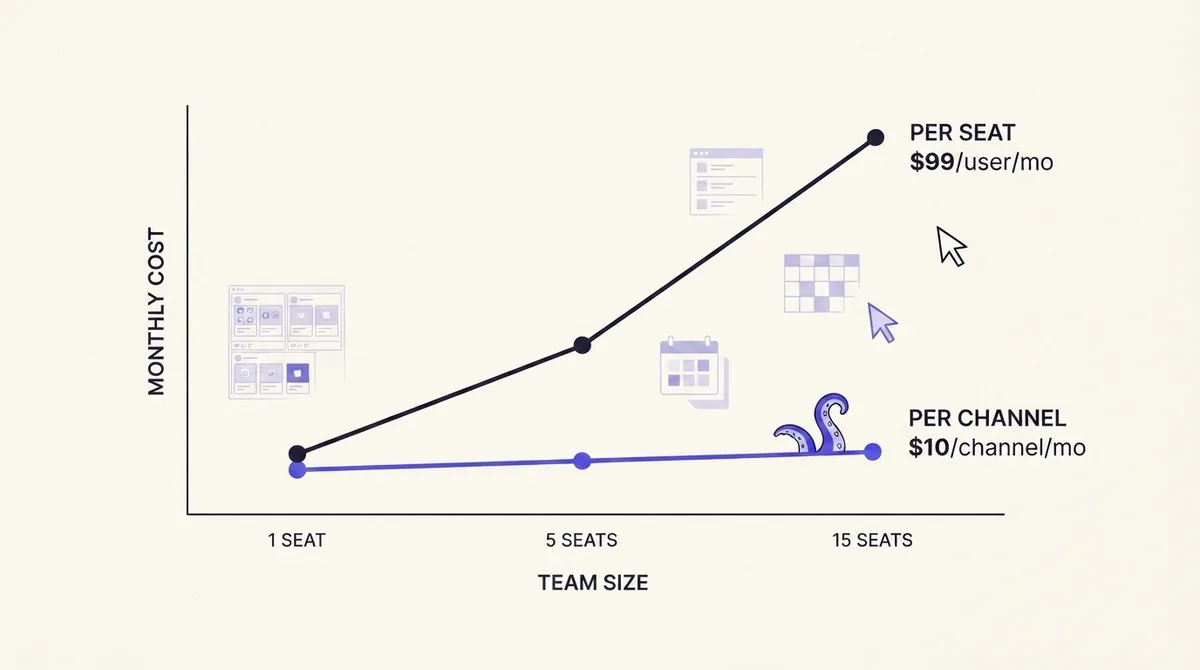
Worked examples, using Standard at $99 per seat and a $10 per-channel comparison:
- 1 person, 3 channels. Per seat: $99 a month. Per channel: $30 a month. The solo operator is fine either way, but pays roughly three times more for the seat model.
- 5 people, 3 channels. Per seat: $495 a month, because four of those five people mostly review and comment. Per channel: still $30 a month with unlimited members. This is the classic in-house trap: cost tracks headcount, not workload, so adding a designer who posts twice a month costs the same as adding your busiest publisher.
- 1 person, 15 channels. Per seat on Standard: you exceed the 10-account limit, so you move up a tier for unlimited accounts, and one seat on Professional costs $199 a month. Per channel: $150 a month at the flat rate, less once volume discounts apply. Here the per-channel model starts to lose its advantage, which is why solo agency operators with large account counts often prefer flat-rate tiers.
The rule of thumb: per-seat pricing penalizes collaboration, per-channel pricing penalizes breadth. If your bottleneck is that reviewers, clients and executives need visibility, hunt for unlimited-seat pricing. If your bottleneck is account count, hunt for flat tiers with generous channel allowances.
Then there is Enterprise, which is not a price but a process. No published number means a demo booking, a discovery call, a scoping exercise and a quote, typically with annual commitment and an order form your legal team reads. Budget weeks, not an afternoon, and ask for the per-seat rate at your current headcount plus one year of expected growth in the same email. If a vendor will not put a floor price in writing early, that is data about how the rest of the relationship will run.
How we evaluated these tools (and why OctoSpark is not on the list)
We build OctoSpark, so we are excluded from our own shortlist. That is not modesty, it is the reason this page can be useful: no vendor page on this search result can honestly rank itself last. OctoSpark appears once, at the end of the migration section, because it is genuinely the relevant tool for one specific problem, and we say so there rather than pretending otherwise.
Every tool below was assessed on five things: pricing model (per seat, per channel, or flat), collaboration (approvals, roles, client access), inbox and engagement, listening and analytics depth, and programmatic access (public API, CLI, MCP, or none). We deliberately did not score "ease of use," because it is unfalsifiable in a comparison page.
Two framings worth setting up front, since they drive most of the related searches on this query:
On free. Hootsuite retired its free plan in 2023 and the plans page today lists no free tier. Genuinely free options do exist elsewhere, but they buy you a small number of channels and a monthly post cap, and they almost never include approvals or a shared inbox. Free works if you are one person on three channels. It stops working the moment a second human needs to approve something.
On small business. The question that decides your tool is not features, it is whether the people who review your posts need logins. If they do, per-seat pricing at $99 a head is the wrong shape, no matter how good the product is. Our broader breakdown of how to choose a social media management platform walks through the evaluation criteria in more depth.
If per-seat cost is the reason you are leaving
Buffer
The cleanest inverse of Hootsuite's model: $10 per channel per month on Team with unlimited team members, and lower per-channel rates above ten channels. If your problem is five people sharing three channels, this single change is the whole fix. Trade-off: listening is effectively absent, and the inbox is lighter than Agorapulse or Sprout.
Metricool
Strong on analytics and competitor benchmarking for the price, with a free tier for a single brand. Buyers pick it when reporting is the job and the shared inbox is not. Check its per-brand limits against your client count before committing, since "brands" is the unit that gates the plan.
Zoho Social
Usually the cheapest credible option if you already live in the Zoho ecosystem, with a genuinely useful CRM tie-in for social leads. Interface density is the trade-off, and multi-brand access sits in higher tiers.
Postiz
The only significant open-source, self-hostable option in this category. If you have infrastructure and want to remove per-seat cost entirely, self-hosting turns a subscription into an ops cost. The bill you avoid becomes maintenance you own, including keeping network API integrations working when platforms change.
If approvals or multi-client work is the reason
Agorapulse
Generally the strongest social inbox in this bracket, with saved replies, assignment and inbox-zero workflows. It is priced per user, so verify the math against the examples above before assuming it solves your cost problem.
Planable
Built around approval as the core object rather than a bolt-on: comment threads on individual posts, multi-step approval, and a client view that does not require the client to learn a dashboard. Weakest on listening.
SocialPilot and SocialBee
Both aim at agencies and small teams with per-account limits rather than expensive per-seat charges. SocialPilot leans toward client management and white-label reporting; SocialBee leans toward evergreen content categories and recycling.
Sendible and Statusbrew
Sendible is the long-standing agency workhorse with client dashboards and white labeling. Statusbrew is stronger on rule-based moderation and permission granularity, which matters when you have contractors who should publish to some accounts and not others.
If approvals are your actual blocker, design the workflow before you shop, because tools implement approval very differently. Our guide to building a social media approval workflow covers the stages worth enforcing, and client approvals shows one implementation of them.
If listening or analytics depth is the reason
Sprout Social
The usual enterprise-adjacent step-up: strong reporting, solid inbox, mature integrations. Priced per seat, and listening typically sits in a higher tier or as an add-on, so ask for the all-in number rather than the entry price.
Brandwatch, Sprinklr and Emplifi
These are not schedulers with listening attached; they are intelligence and customer-experience platforms where publishing is one module. Expect a quote wall, annual contracts and an implementation period. Choose them when the deliverable is a research or care function, not a content calendar. If you only need listening, buying a full suite to get it is the most common overspend in this category.
Worth naming honestly: if Lumen by Talkwalker was the reason you were on Hootsuite in the first place, most of the cheaper alternatives on this page will not replace it, and you should shop listening separately from publishing.
Side-by-side, in one honest pass
Most pages ranking for this query never put their shortlist on a common set of criteria. Here it is, in the order pricing model, seats, approvals, inbox, listening, programmatic access:
- Buffer - per channel; unlimited seats; light approvals; basic inbox; no listening; public API.
- Metricool - per brand; limited seats by tier; light approvals; limited inbox; competitor tracking only; API on higher tiers.
- Zoho Social - per brand and tier; seat limits by tier; approvals included; inbox included; limited listening; API available.
- Postiz - self-host or hosted; seats you control when self-hosted; basic approvals; basic inbox; no listening; open codebase.
- Agorapulse - per user; paid seats; strong approvals; strongest inbox; add-on listening; API on higher tiers.
- Planable - per user; paid seats; strongest approvals; no real inbox; no listening; API limited.
- SocialPilot / SocialBee - per account and tier; some seats included; approvals included; basic inbox; minimal listening; API available.
- Sendible / Statusbrew - per user and account mix; paid seats; strong approvals and permissions; good inbox; limited listening; API available.
- Sprout Social - per user; paid seats; strong approvals; strong inbox; listening as a paid tier; API on higher plans.
- Brandwatch / Sprinklr / Emplifi - custom quote; negotiated seats; enterprise approvals; enterprise care; deepest listening; enterprise APIs.
Read that list against your own bottleneck rather than top to bottom. There is no winner column, because the winner changes with the reason you opened this page.
Migrating off Hootsuite: why your queue cannot be transferred
This is where every other page stops. One competitor gives it a single FAQ sentence; most give it nothing. None explain the underlying reason, which is the part that makes the rest of the plan obvious.
Here is the fact that explains everything: LinkedIn's Posts API accepts only PUBLISHED as the lifecycleState at creation time. Draft and publish-requested states can appear in responses but are not accepted on create (LinkedIn Posts API). A scheduled LinkedIn post therefore does not exist on LinkedIn until the second it fires. Until then it is a row in your vendor's database with a timestamp on it. The shape is the same across most networks.
So there is nothing on the network to re-point at a new tool. Your queue is vendor-held state. Published posts stay on your profiles and your accounts remain yours, but the calendar is the vendor's data structure, and it does not travel.
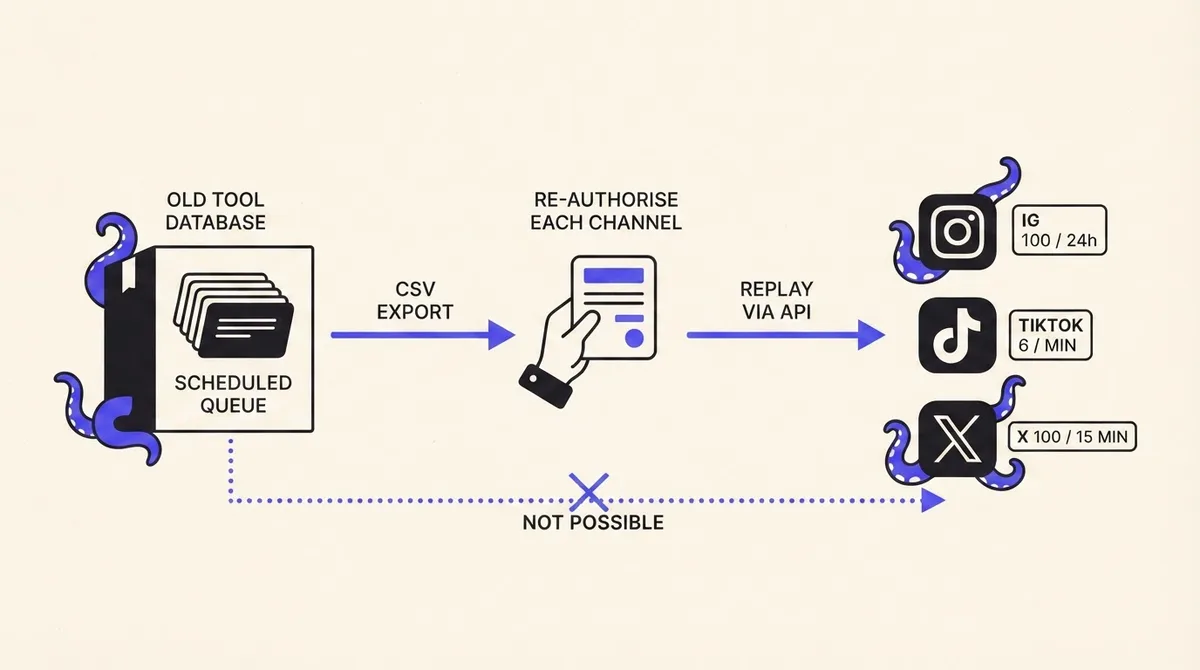
Step 1: export the queue before you cancel
Hootsuite documents an export of scheduled and past scheduled messages. Use it. Do not screenshot the calendar, and do not rely on a teammate transcribing it, because you will lose the exact timestamps, the per-network variants and the link parameters. Run the export while the account is still active and paid, and keep the raw file, not just a cleaned-up version. Downgrade or cancellation is the wrong moment to discover an export limit.
Step 2: re-authorise every channel, and check who can
Re-authorisation is real work, not a checkbox. Two things bite here.
Meta long-lived user access tokens last around 60 days and refresh only when the user makes requests. If no requests are made, the token expires and the person has to complete the login flow again, and an expired token cannot be exchanged for a fresh one (Meta access token docs covers the publishing side of the same platform). Practically: whoever connected the accounts originally needs to be available on migration day.
On LinkedIn, posting to a company page needs the w_organization_social permission, which is restricted to members holding an ADMINISTRATOR, CONTENT_ADMIN or DIRECT_SPONSORED_CONTENT_POSTER role on that page. If your only page administrator left the company, that is a multi-day detour, so check page roles in week one of your evaluation, not on cutover day.
Step 3: replay without hitting publishing limits
Backfilling a queue means hitting publishing endpoints in bursts, and every network caps that:
- Instagram: 100 API-published posts in a rolling 24 hours, with a carousel counting as one post. Meta recommends apps enforce the limit locally and exposes a content publishing limit endpoint to check usage.
- TikTok: Direct Post allows 6 requests per minute per user access token, upload URLs expire an hour after issuance, and captions cap at 2,200 characters. A spam risk error means you hit an additional daily cap.
- X: 100 posts per 15 minutes per user, with an app-level ceiling of 10,000 per 24 hours.
Sequence the backfill against those numbers. A 400-post Instagram queue is a four-day replay minimum, so start with the next 14 days of posts, confirm they fire correctly, then backfill the tail.
Step 4: move a large queue programmatically
Under a few dozen posts, retype them. Above that, hand entry is where migrations die, and Hootsuite's own bulk tool will not rescue you on the way out: Bulk Composer caps at 350 posts and posts already scheduled for those accounts count toward the same 350, with rows required to be at least 20 minutes in the future, times ending in a 5 or a 0, one post per slot, and duplicates rejected.
The path that scales is: read the export, map each row to the new tool's post schema, and replay it through an API or CLI with a rate limiter matched to the per-network numbers above. That is exactly the shape OctoSpark is built for, since the same publishing surface is reachable from the dashboard, the terminal, or an AI agent over API and MCP, which means the migration script and your day-two workflow use one interface. If you are evaluating any tool on this basis, our guide to choosing a social media posting API is the checklist to apply, and our pricing is published rather than quoted.
Step 5: the traps
- TikTok audit status. A tool can have TikTok support and still be unable to post publicly: content from unaudited API clients is restricted to private viewing mode (TikTok Content Posting API). Ask a vendor directly whether their client is audited for
video.publish. - LinkedIn organic carousels. The Posts API documents carousels as sponsored only, not organic, so a tool cannot fully automate what you may be doing manually today.
- The 350-post cap. It includes what is already scheduled, so the more of a queue you have, the less bulk headroom you get.
Frequently asked questions
Is Hootsuite no longer free? Correct. The free plan was retired in 2023, and the current plans page lists only Standard, Professional, Advanced and Enterprise, with no free tier. There is a trial on the paid plans; check the current length on the plans page rather than trusting a comparison article, including this one.
Do people still use Hootsuite? Yes, heavily, particularly in large organizations where the value is compliance, roles and consolidated reporting rather than the calendar itself. The leaving trigger is usually one of three things: per-seat cost at team scale, paying for modules you do not use, or the 2026 restructure changing a workflow someone relied on.
What is the best free social media scheduler? For one person on a handful of channels, the free tiers from Buffer or Metricool cover it, and self-hosting Postiz removes subscription cost entirely if you can run it. Free tiers reliably break at the point where a second person needs to approve something.
What are the top five social media schedulers? Any honest answer is conditional. Cheapest per collaborator: Buffer. Best inbox: Agorapulse. Best approval flow: Planable. Best analytics for the money: Metricool. Best enterprise depth: Sprout Social. Agencies running many clients should read our agency operating model guide before locking in a per-seat contract.
Can I export my Hootsuite data? You can export scheduled and past scheduled messages, and your published posts and connected accounts remain yours on the networks. What does not export in a re-importable way is the queue as a live schedule, for the LinkedIn lifecycleState reason above. Export first, cancel second.