
How to Automate Social Media Posting End to End

Almost every guide to automating social media posts gives you the same three steps: pick a tool, batch your content, connect your accounts. That last step is treated as a solved, one-click problem. It is not. "Connect your accounts" is where Instagram's 100-posts-per-24-hours publishing cap lives, where TikTok's audit requirement forces every post from an unaudited client into private viewing, and where LinkedIn returns an error if you forget a version header.
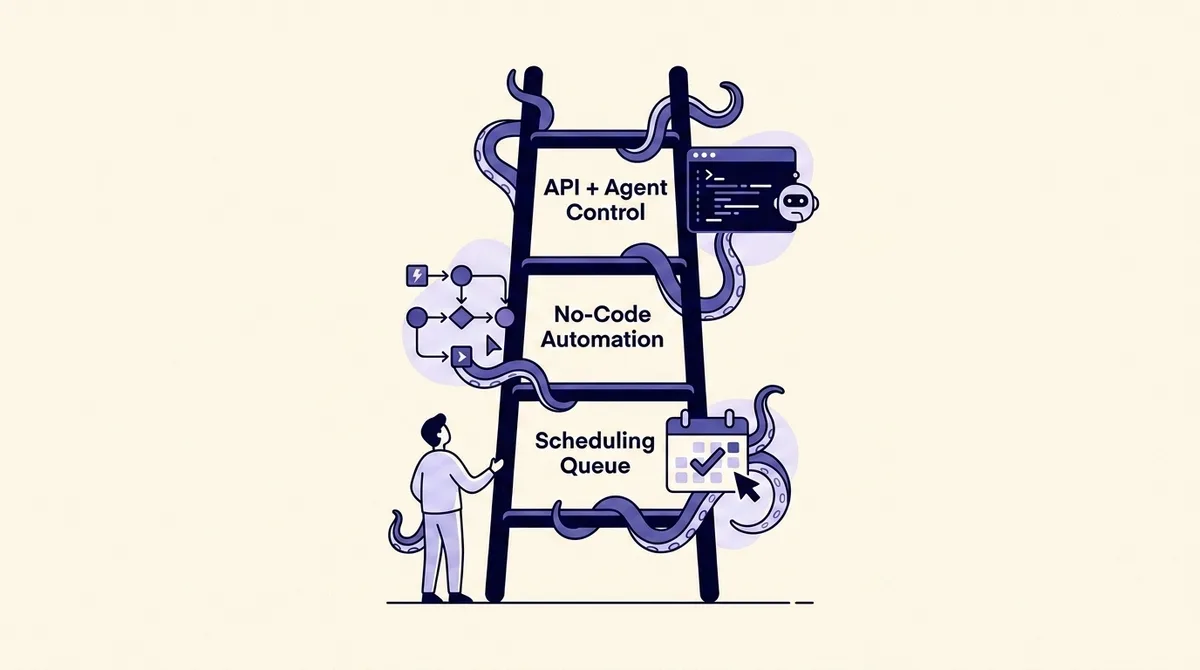
The useful question is not "which tool should I use." It is how far up the automation ladder should you actually go, and what breaks at each rung. Most people are correctly served by the cheapest rung. Some are not, and they find out at 2am when a multi-platform post half-publishes.
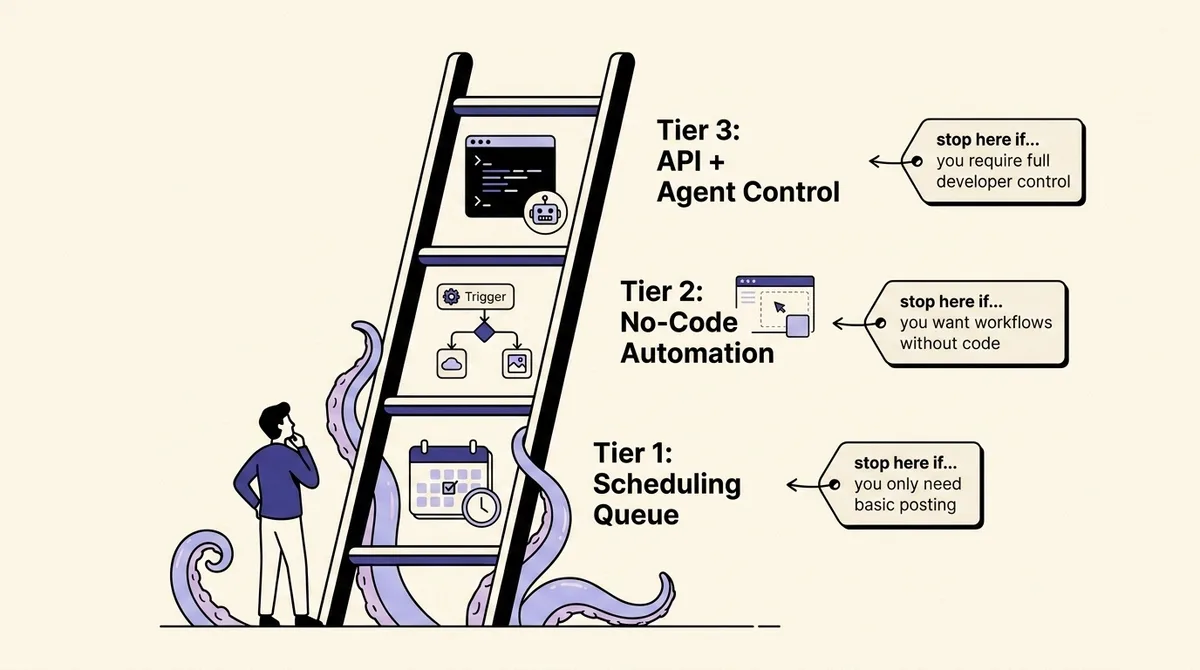
This guide is organized as three escalating tiers, each ending with an explicit "stop here if" gate so you can self-select out rather than be upsold in.
The three tiers, and which question you are actually asking
Automating social media posting means removing humans from one or more of five steps: deciding what to post, drafting it, adapting it per platform, publishing at a chosen time, and reporting on it. Tools differ mainly in how many of those five they absorb.
- Tier 1, the scheduling queue. A human writes and approves everything; the software holds posts and fires them at a time. Buffer, Later, and OctoSpark's queue live here. The automation is timing.
- Tier 2, the no-code automation platform. A trigger (an RSS item, a new sheet row, a webhook, a schedule) produces a draft, optionally through an AI step, and pushes it to a queue. Make, n8n, Zapier, and AI-first posting tools live here. The automation is the pipeline from source to draft.
- Tier 3, API and agent control. Your own code, or an AI agent with tool access, calls the platform APIs directly. The automation is the entire loop, including retries, token refresh, and per-platform adaptation.
A useful test: if you can describe your posting rule in one sentence starting with "every time X happens," you need at least tier 2. If the rule requires reading something, deciding, and changing the draft based on the answer, you are looking at tier 3. If your rule is "post the things we already wrote, on Tuesday," tier 1 is the whole answer.
Before you automate: the four inputs automation cannot invent
Automation multiplies whatever you feed it. Four inputs need to exist first, or every tier fails the same way.
- A cadence you can sustain. Buffer's analysis of over 2 million LinkedIn posts from more than 94,000 accounts found that versus posting once a week, posting 2-5 times a week produced +1,182 impressions per post and +0.23 percentage points of engagement rate; 6-10 times produced +5,001 impressions and +0.76pp; and 11 or more produced +16,946 impressions per post and +1.40pp (Buffer). Read it honestly: a correlation, on LinkedIn, in that dataset. It does not transfer to TikTok.
- Account types that support publishing. Instagram's Content Publishing API is available only to professional accounts (Meta). On LinkedIn, posting for an organization requires the
w_organization_socialpermission and an ADMINISTRATOR, DIRECT_SPONSORED_CONTENT_POSTER, or CONTENT_ADMIN page role. Fix roles before tooling. - A content bank with per-platform variants. One idea with a 500-character Threads version, a threaded X version, a vertical video, and a LinkedIn text post, not one asset with one caption.
- An approval rule written down. Who publishes without review, what always needs review, and what happens when the reviewer is asleep. Tier 1 survives without this. Tiers 2 and 3 cannot.
If you are still assembling a calendar, our guide to building a social media content calendar is the prerequisite step.
Tier 1: the scheduling queue
Setup is an afternoon. Connect each account through the tool's OAuth flow, define time slots per network, load 10 to 20 posts, and let the queue drain. For the exact connection steps on each network, see how to schedule social media posts on every major platform.
The part worth engineering here is slot structure, not content. A worked example for a two-person B2B team: three LinkedIn slots (Tue/Wed/Thu 08:30 local), one long-form and two short; five X slots, three repurposed from the LinkedIn long-form as separate threads rather than copies; one Instagram carousel on Friday built from the week's best text post; and one evergreen slot drawn from a recycling list of 30 posts, each rewritten before it re-enters the queue. That is ten posts a week from roughly three original ideas, with zero API knowledge.
Stop here if: your content originates from humans, your volume is under about 50 posts a month per network, you manage fewer than five accounts, and no external system needs to trigger a post. That is most teams.
Tier 2: no-code automation platforms
Tier 2 answers "every time X happens, post Y." Four patterns earn their setup cost:
- Source to draft. A blog post, changelog entry, or YouTube upload triggers a drafting step producing per-platform variants into a review queue.
- Bank to queue. A sheet of approved evergreen posts refills empty slots so the queue never runs dry.
- Signal to alert. A comment containing purchase intent, or a post beating its 30-day median, routes to a human rather than a publisher.
- Post to record. After publishing, write permalink, platform, variant, and campaign UTM back into your analytics store.
The trap is chaining an AI drafting step straight into a publish step with no gate: the source of nearly every "automation ruined our brand voice" story. Put generated drafts into an approval state by default, promote them manually for the first month, then loosen the rule for content types that never needed an edit. Client-facing teams should wire this through a formal review lane; OctoSpark's client approvals flow exists so a generated draft cannot reach a client's audience without a named approver.
Stop here if: your triggers are stable and few (under about ten workflows), you do not need to read platform data back to make decisions, and a five-minute delay between trigger and post is acceptable.
Tier 3: API and agent control
Tier 3 means you or your agent hold the tokens. You need it when one of four things is true: you publish on behalf of many accounts programmatically; your content comes from a system of record no connector reaches; you need an agent to read performance, decide, and act in one loop; or you need publishing embedded in your own product.
The counterargument is maintenance, and LinkedIn is the clearest example. Its Marketing APIs ship a new version monthly, each supported a minimum of one year, and every call must send a Linkedin-Version: YYYYMM header or it errors, because the latest version is never applied by default. Version 202508 sunsets on August 17, 2026 (Microsoft Learn). That is a recurring calendar obligation forever. And the Posts API does not support organic carousels at all: carousels are sponsored-only, and organic multi-image posts need the separate MultiImage API.
There is a quieter reason the tier framing matters. Incumbents pick a tier and stay there, so a team graduating from a queue to triggers has to migrate tools and rebuild its connections. OctoSpark's multi-platform publishing spans all three. If you are weighing build versus buy, our comparison of social media posting APIs breaks down what each vendor abstracts, and letting an AI agent post safely covers the permission model an agent needs.
Stop here if none of the four conditions above applied to you. Tier 3 is a product decision, not a productivity upgrade.
What each platform's API actually allows
These are the ceilings that decide whether your plan is feasible.
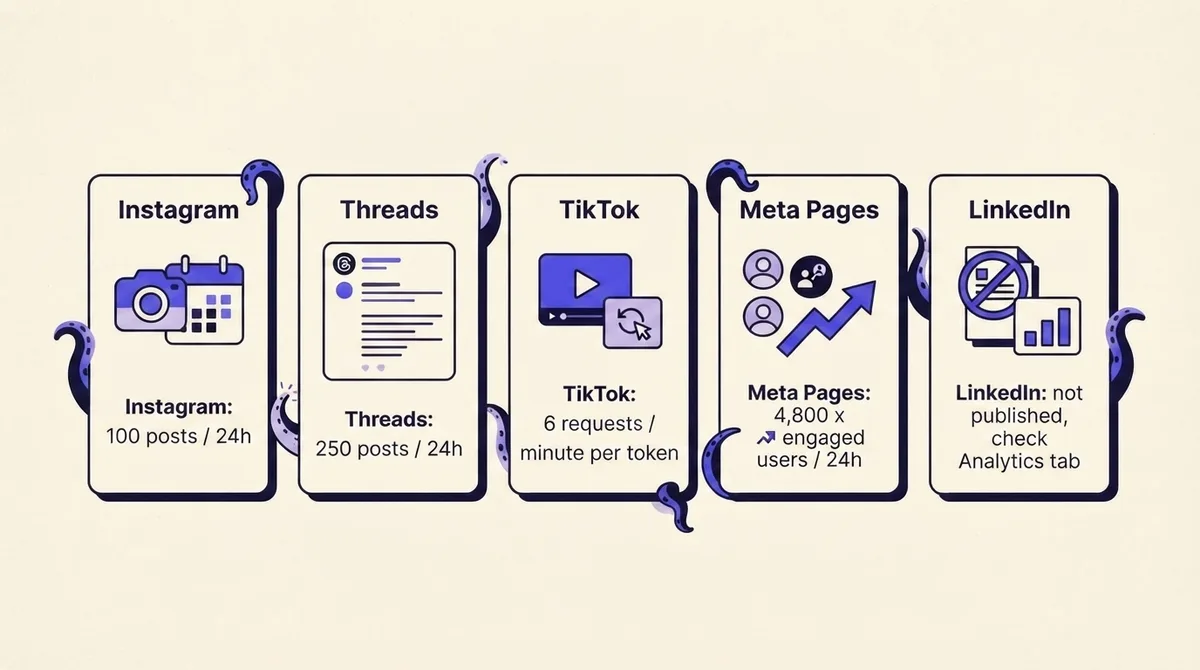
- Instagram. 100 API-published posts per rolling 24 hours. A carousel counts as one post and holds up to 10 items. Professional accounts only. Shopping tags and filters are unavailable through the API, and only JPEG images are supported (Meta).
- Threads. 250 published posts per 24 hours per profile. Text caps at 500 characters. Carousels hold 2 to 20 items and count as one post. Videos max at 1GB and 300 seconds, images at 8MB (Meta).
- TikTok. The direct post endpoint limits each user access token to 6 requests per minute, and
privacy_levelmust be set explicitly to a value returned by the creator info query API, with no default permitted. Thevideo.publishscope is required, and until your client passes TikTok's audit all content it posts is restricted to private viewing, with unaudited clients capped at 5 users per 24 hours (TikTok). - Meta Pages and Facebook. A formula, not a number: the app-level limit is calls within one hour = 200 x unique daily active users, and the Pages business-use-case limit is calls within 24 hours = 4,800 x engaged users. When
total_cputimeortotal_timereaches 100 you are throttled, and the response carriesestimated_time_to_regain_accessin minutes (Meta). - LinkedIn. No standard rate limits are published. Limits are per-application and per-member, reset at midnight UTC, and you discover them by making a test call and reading the Developer Portal Analytics tab. Exceeding one returns a 429; developer admins get an email at 75% of quota, delayed one to two hours, for application-level breaches only.
The planning consequence: a 40-client agency publishing four Instagram posts per client per day is at 160 posts daily, which is fine only because the cap is per Instagram account, not per app. A single high-volume account still cannot exceed 100. Model volume per account, per 24 hours, before promising a client anything.
Cross-posting: why "post everywhere at once" backfires
TikTok's content sharing guidelines list copying content from other platforms to TikTok as a cause of audit failure, alongside adding watermarks or logos to creator content. The same guidelines require that clients only send content after express user consent and that users manually select the privacy status from a dropdown with no default (TikTok). If your integration's main feature is mirroring Reels into TikTok, you have built the thing the audit catches.
Instagram, separately, states that it aims to make certain reels less visible, including low-resolution or watermarked reels, reels that are muted or bordered, reels that are majority text, and reels already posted on Instagram (Instagram).
The workable pattern is adapt-per-platform, and it is cheap once automated. Keep one canonical idea record, then generate variants: a native vertical export with no watermark for TikTok, a separate Reels export, a 500-character version for Threads, a threaded version for X, and a text-first version for LinkedIn. Approve the variants, not the idea. That is exactly the job an AI social media manager should do: same input, different outputs, per network.
Where automated posting breaks
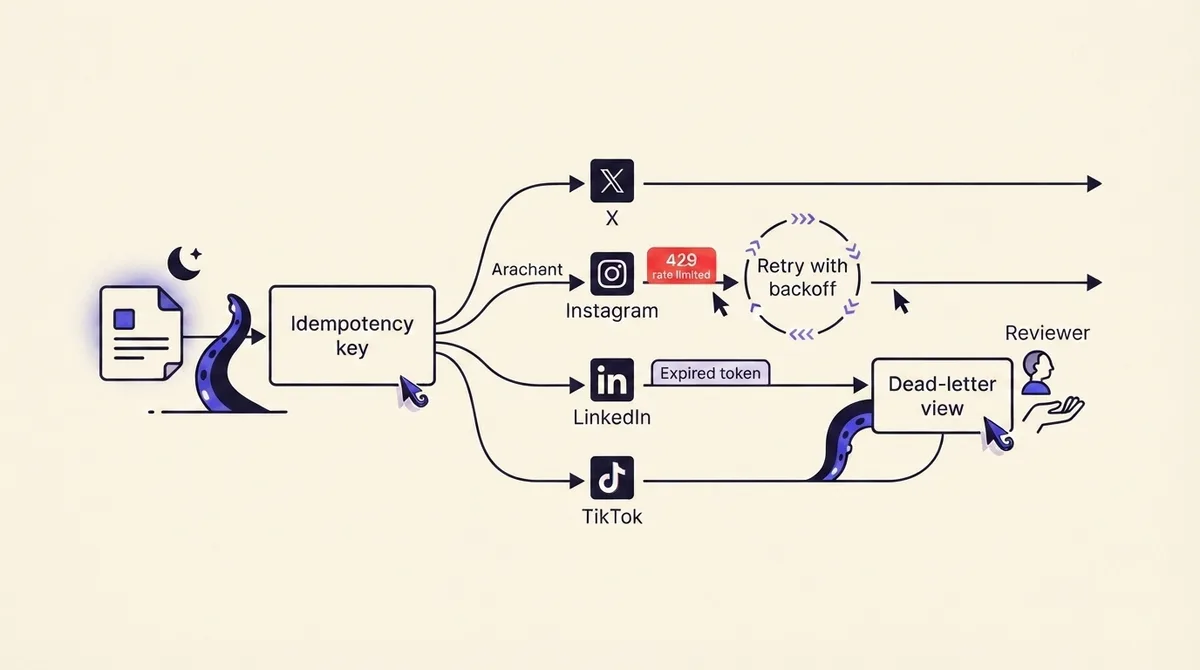
- Partial multi-platform failure. A post scheduled to five networks succeeds on three. Re-running the whole post double-publishes on those three. Fix: per-leg state plus an idempotency key on every publish attempt.
- Rate limiting. Meta hands you
estimated_time_to_regain_access, so reschedule that leg past the window. LinkedIn returns a bare 429, so back off exponentially with jitter and cap attempts. TikTok's 6-per-minute-per-token ceiling means bulk posting for one creator must be paced, not fired in parallel. - Expired or revoked tokens. A password change or lost page role fails publishing silently at 2am unless a daily health check pings each connection and surfaces breakage before the post is due.
- Media transcode failures. A video over Threads' 1GB or 300-second limits, or a PNG sent where Instagram wants JPEG, fails at upload. Validate against each target's constraints at creation time so errors land during working hours.
- Bad content shipped confidently. The answer is an approval gate plus a kill switch that pauses a whole queue in one click.
Operationally: idempotency so retries are safe, a dead-letter view where failed posts wait for a human with the error attached, and an approval gate on by default for anything a model wrote.
What each tier costs, and how to tell it is working
Tier 1 costs seats: typically $6 to $30 per channel or user per month, flat regardless of volume. Tier 2 adds an automation platform (task or run based) plus model costs. Tier 3 is the only tier where cost scales with volume rather than headcount, and X makes that concrete: the X API now uses pay-per-usage pricing with no subscriptions, at $0.015 per Post created, $0.200 for a Post containing a URL, $0.015 for direct messages, and $0.010 for deletions, capped at 3 million Post reads per billing cycle before Enterprise is required (X).
Work it through. 300 X posts a month, 40% with a link: 180 x $0.015 = $2.70 plus 120 x $0.200 = $24.00, so $26.70. Cheap. An agency posting 8,000 a month at the same ratio: $72 plus $640, so $712 a month, plus engineering time. Compare that against tier-1 seats for the same output and the crossover becomes a number rather than a vibe. Pricing for a managed multi-tier setup is on our pricing page.
The metrics that prove automation works are operational: queue fill rate, publish success rate per platform, median time from draft to approval, edit rate on AI drafts, and dead-letter count per week. If edit rate is above about half, your prompt or source material is the problem. If dead-letter count climbs, a token or media rule broke and nobody noticed.
Your 30-day rollout
- Days 1-7. Fix account types and page roles. Build a canonical idea bank of 20 items with per-platform variants. Define slots. Publish manually to confirm variants land right.
- Days 8-14. Turn on the tier-1 queue only. Load two weeks of posts. Watch for failed publishes, media rejections, and truncation.
- Days 15-21. Add exactly one tier-2 trigger, your highest-volume source. Route every generated draft to approval. Record edit rate.
- Days 22-30. Loosen approval only for the lowest-edit-rate content type. Add a daily connection health check. Write your kill-switch procedure down. Re-evaluate tier 3 against the four conditions.
The mistakes that get accounts restricted are consistent: identical assets posted across networks at the same minute, unofficial API clients, engagement bots running alongside legitimate publishing, watermarked video from another platform, and defaulting a privacy setting the platform requires the user to choose. Publishing automation through official APIs is expected; interaction automation is where suspensions come from. Our deeper look at where social media automation backfires covers the tool-selection side of the same risk.
FAQ
What is the 5-5-5 rule for social media? An informal routine: five minutes a day commenting on five posts in your niche and connecting with five new accounts. It is a habit heuristic, not a platform rule, and automating it is exactly the interaction automation that gets accounts restricted.
What is the 5:3:2 rule for social media posts? A content mix: out of every ten posts, five curated, three original, two personal. Useful when building tier-1 slot structures because it forces three distinct sources.
Can ChatGPT automate social media posts? It can draft and adapt them, but a chat interface holds no platform tokens. To publish, the model needs a tool it can call: a publishing API, an MCP server, or a no-code connector. That is the boundary between tier 2 and tier 3.
Can I use AI to automatically post to social media? Yes, within each platform's rules, using official APIs. The constraints are real: professional account types, Instagram's 100 posts per 24 hours, TikTok's audit, and LinkedIn's monthly version header. Add an approval gate for anything a model wrote.
Do I need my own developer account? Only at tier 3. At tiers 1 and 2 the vendor holds the app registration and audit status, which is much of what you are paying for.
If you want to start at tier 1 today and keep the door to tiers 2 and 3 open without migrating tools later, create an account and connect one network first.